The BOLTMARK
®
II‑series PrinTers
Basic OPeraTing insTrucTiOns
9 2018/02/27#2.0EN
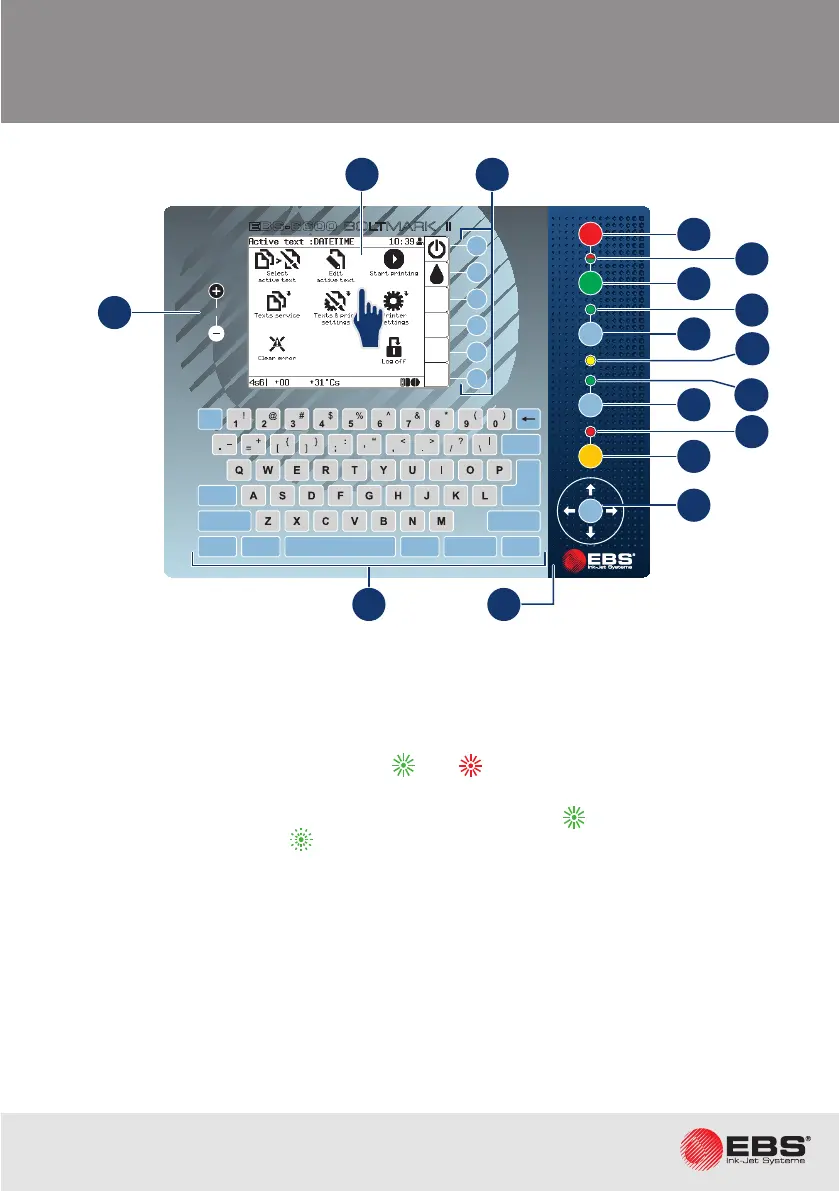
oPerator Panel
1. LCD touch screen.
2. Funcon buons.
3. Main panel.
A. Printer shutdown buon.
B. LED indicator of printer state: on ( ), o ( ).
C. Printer startup buon.
D. LED indicator of ink ow in the printhead: ow started ( ), ow in the process of be-
ing started/stopped ( ).
E. Buon for starng/stopping ink ow in the printhead.
F. LED indicator of readiness of the printer for prinng.
G. LED indicator of prinng state.
H. Buon for starng/pausing prinng.
I. LED indicator of alarm state.
J. Buon for clearing an alarm.
K. Navigaon buons.
4. Alphanumerical keyboard.
5. LCD color change buons.
COLOUR
EBS-6600
OFF
ON
INK
ON / OFF
READY
CLEAR
ALARM
ERROR
PRINT
ON / OFF
Enter
Delete Par
Shift
Space
Alt Alt
Shift
Caps
Esc
Insert
Ctrl
Enter
F5
F4
F3
F2
F6
F1
BOLTMARK
®
II
5
A
C
E
H
J
K
G
B
D
I
1 2
F
4 3



 To Next Page