The BOLTMARK
®
II‑series PrinTers
Basic OPeraTing insTrucTiOns
29 2018/02/27#2.0EN
maintaining the Printhead
1
2
3
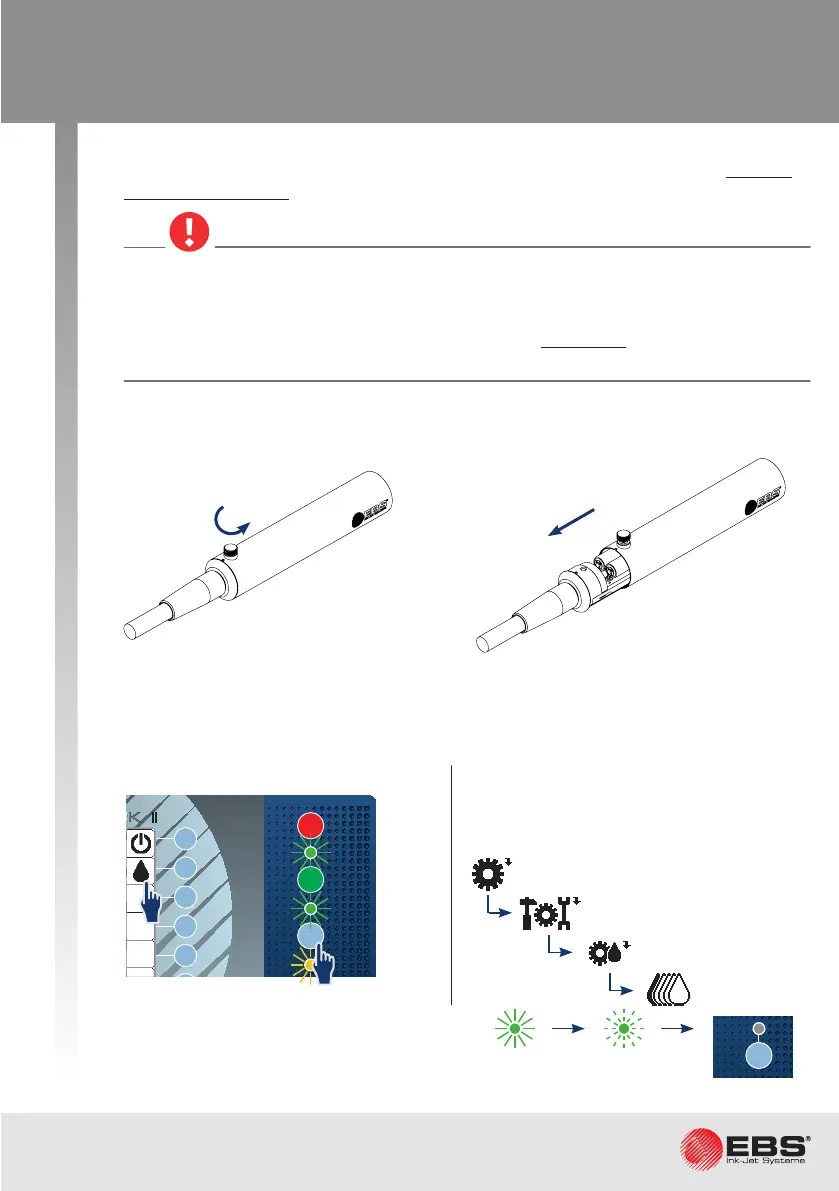
Remove the printhead cover:
Check the printhead interior for cleanliness.
If no dirt needs removing from the printhead, then insert the printhead into the cover,
screw home the fastening screw and resume normal operaon.
Stop ink ow in the printhead.
While maintaining the printhead, check the printhead interior for cleanliness approxi-
mately once a month and remove dirt, if need be.
If the printhead needs to be cleaned quick-
ly, follow the brief procedure for stopping
ink ow.
Stopping in regular mode.
Ink ow is stopped when the ink ow LED
does not illuminate.
Pull the printhead out of the cover.Loosen the screw that fastens
the printhead cover.
Fast ink OFF
Printer sengs
Service
Print head service
OFF
ON
INK
ON / OFF
READY
CLEAR
ALARM
ERROR
PRINT
ON / OFF
Enter
Delete Par
Shift
Space
Alt Alt
Shift
Caps
Esc
Insert
Ctrl
Enter
F5
F4
F3
F2
F1
®
II
1
1
INK
ON / OFF
READY
CLEAR
ALARM
ERROR
PRINT
ON / OFF
Enter
Delete Par
Shift
Space
Alt Alt
Shift
Caps
Esc
Insert
Ctrl
Enter
F5
F4
F3
F2
F6
F1
BOLTMARK
®
II
Any operaons that involve the removal of printhead cover during printer operaon
must be performed exclusively by the manufacturer’s authorized service sta or a user
trained by the manufacturer’s authorized representaves in performing such opera-
ons. An untrained user can remove printhead cover exclusively when the printer is
disconnected from the electric mains.



 To Next Page