The BOLTMARK
®
II‑series PrinTers
Basic OPeraTing insTrucTiOns
13 2018/02/27#2.0EN
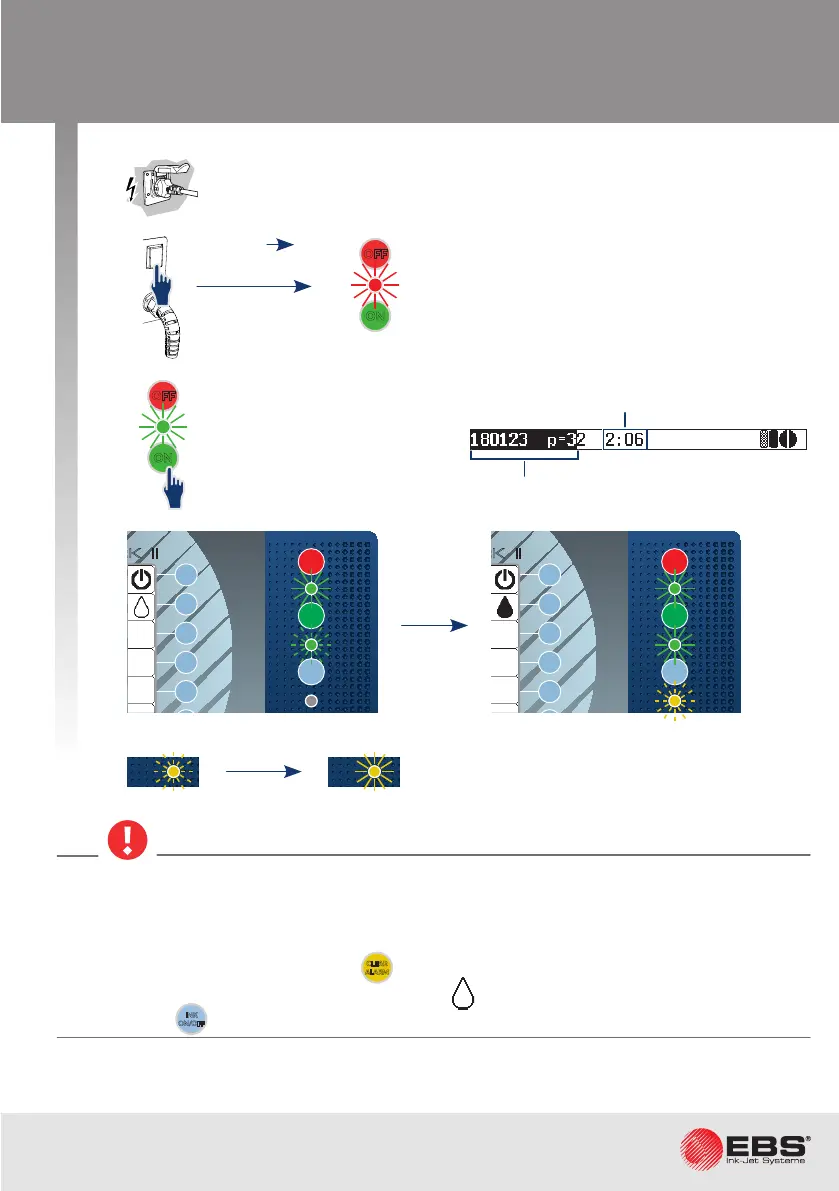
Starting the Printer uP
The procedure for starng
the printer up follows.
The printer enters standby mode.
Printer ready for prinng.
1
3
When the startup procedure is followed, the iModule
®
transport protecon must be open.
An aempt to start up the printer when the transport protecon is closed, results in the follow-
ing message
VACUUM DOESN’T INCREASE, Check iModule transport protecon and turn ink on
In such a case clear the alarm with the
CLEAR
ALARM
buon, open the iModule
®
transport protecon
and start ink ow in the printhead by pressing the icon in the funcon idencaon icon
window or the
INK
ON/OFF
buon on the main panel.
OFF
ON
OFF
ON
INK
ON / OFF
READY
CLEAR
ALARM
ERROR
PRINT
ON / OFF
Enter
Delete Par
Shift
Space
Alt Alt
Shift
Caps
Esc
Insert
Ctrl
Enter
F5
F4
F3
F2
F1
®
II
OFF
ON
INK
ON / OFF
READY
CLEAR
ALARM
ERROR
PRINT
ON / OFF
Enter
Delete Par
Shift
Space
Alt Alt
Shift
Caps
Esc
Insert
Ctrl
Enter
F5
F4
F3
F2
F1
®
II
COLOUR
EBS-6600
OFF
ON
INK
ON / OFF
READY
CLEAR
ALARM
ERROR
PRINT
ON / OFF
Enter
Delete Par
Shift
Space
Alt Alt
Shift
Caps
Esc
Insert
Ctrl
Enter
F5
F4
F3
F2
F6
F1
BOLTMARK
®
II
COLOUR
EBS-6600
OFF
ON
INK
ON / OFF
READY
CLEAR
ALARM
ERROR
PRINT
ON / OFF
Enter
Delete Par
Shift
Space
Alt Alt
Shift
Caps
Esc
Insert
Ctrl
Enter
F5
F4
F3
F2
F6
F1
BOLTMARK
®
II
POWER „|”
2
OFF
ON
Time required to com-
plete the procedure.
Progress bar.



 To Next Page