The BOLTMARK
®
II‑series PrinTers
Basic OPeraTing insTrucTiOns
282018/02/27#2.0EN
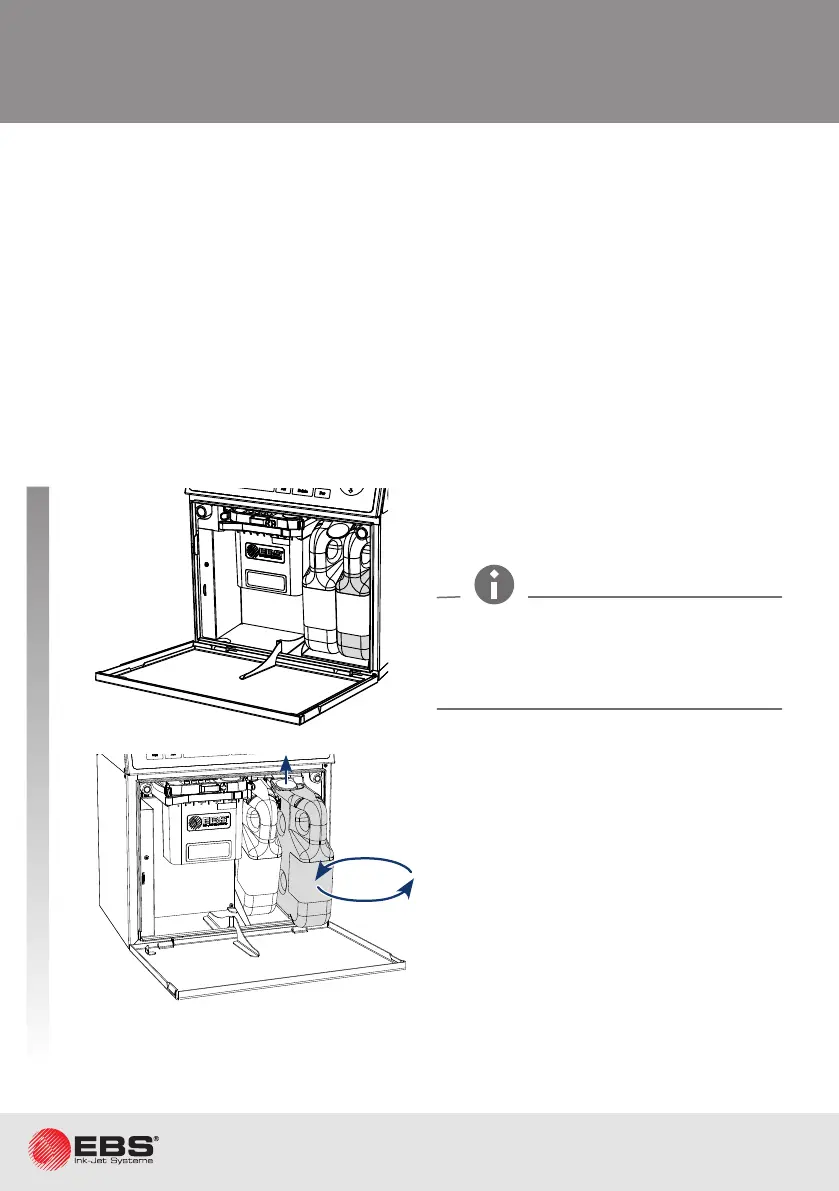
rePlacing a Bottle
The bole should be replaced immediately aer the above signaling has occurred. The opera-
on can be performed also during prinng. Otherwise, if the correct ink parameters cannot be
maintained or if the ink level in iModule
®
reduces too much, prinng is paused, and the printer
is shut down.
1
2
3
4
5
Open the consumables compartment
door.
Close the consumables compartment
door.
Li the latch.
Take the empty bole out; signaling:
INK: NO BOTTLE
or
SOLVENT: NO BOTTLE
Insert a new bole; signaling:
CODE VERIFYING: WAIT 10 SECONDS
PLEASE
and then
BOTTLE ACCEPTED
Emptying of a bole is signaled with an audible alarm signal, the ERROR LED on the operator
panel illuminang blinking red, the display background ickering red and an error message:
SOLVENT LACK
or
SOLVENT: EMPTY BOTTLE
INK LACK
or
INK: EMPTY BOTTLE
While replacing boles, be careful not to
get wounded with the needles that are part
of the boles connecons in the consuma-
bles compartment.



 To Next Page