12
USING THE KEYPAD CONTROLLER TO PROGRAM & OPERATE AXIOS™
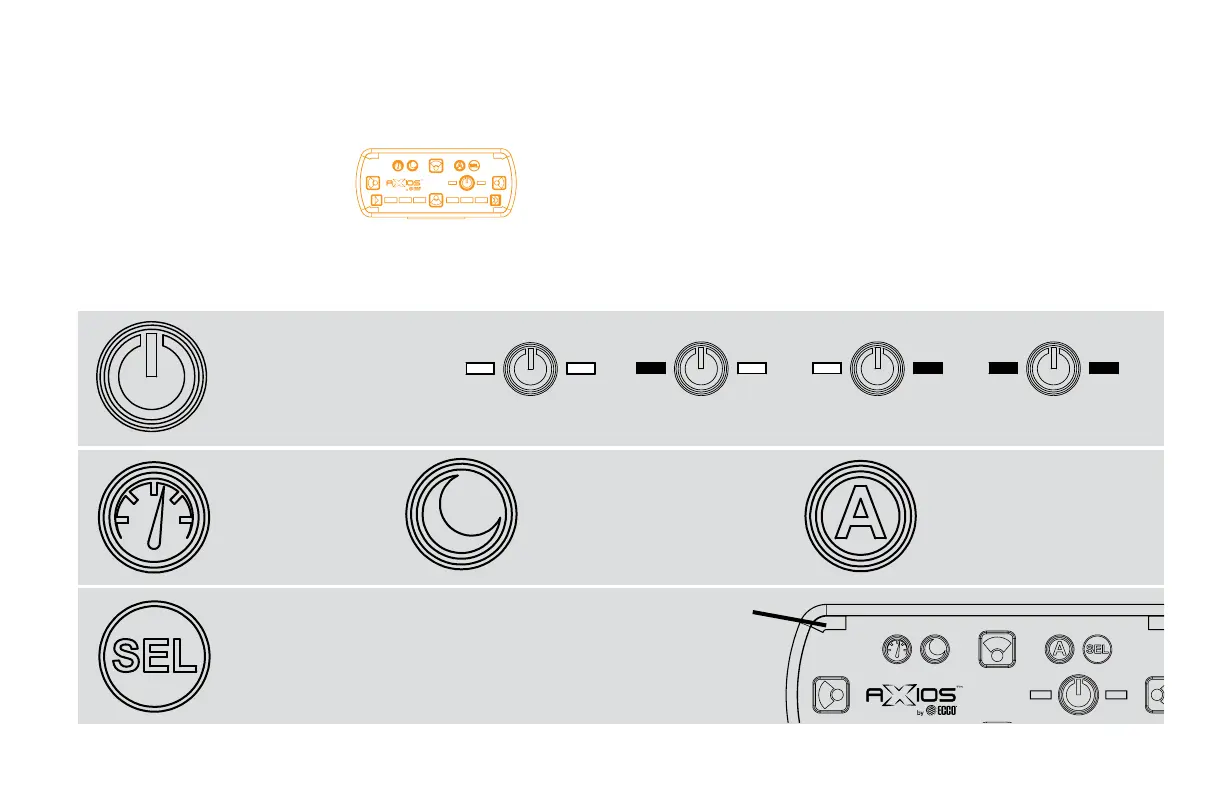
Keypad Controller
EZ1405
The controller provides convenient control of the Lightbar’s flash patterns and auxiliary functions and features soft touch
buttons and LED function indicator lights. See page 14 for mounting instructions.
Power Button
Press to cycle through three
programmable ash pattern
presets. Hold button down to
shut down all functions. Press
again to resume as before.
Preset 1 Preset 2 Preset 3
Off
Cruise Button
Press to illuminate all
beacon/directional
modules (steady burn).
Day/Night Mode Button
For use if parking lights are not
connected to junction box. When
active, provides backlight to keypad
and lowers intensity of the beacon/
directional modules in the lightbar.
Auxiliary Output Button
For use with the auxiliary output
from the junction box to a relay
(customer supplied), to control
any auxiliary device via the
junction box controlled relay.
Flash Pattern Select Button
Press to cycle through beacon/directional ash patterns. The
keypad will remember the pattern used and store it to the
active preset. Double tap the button to begin cycling. The 4
corner leds will mimic the bar, to give pattern feedback.
Corner LED
Primary Warning & General Function


 To Next Page