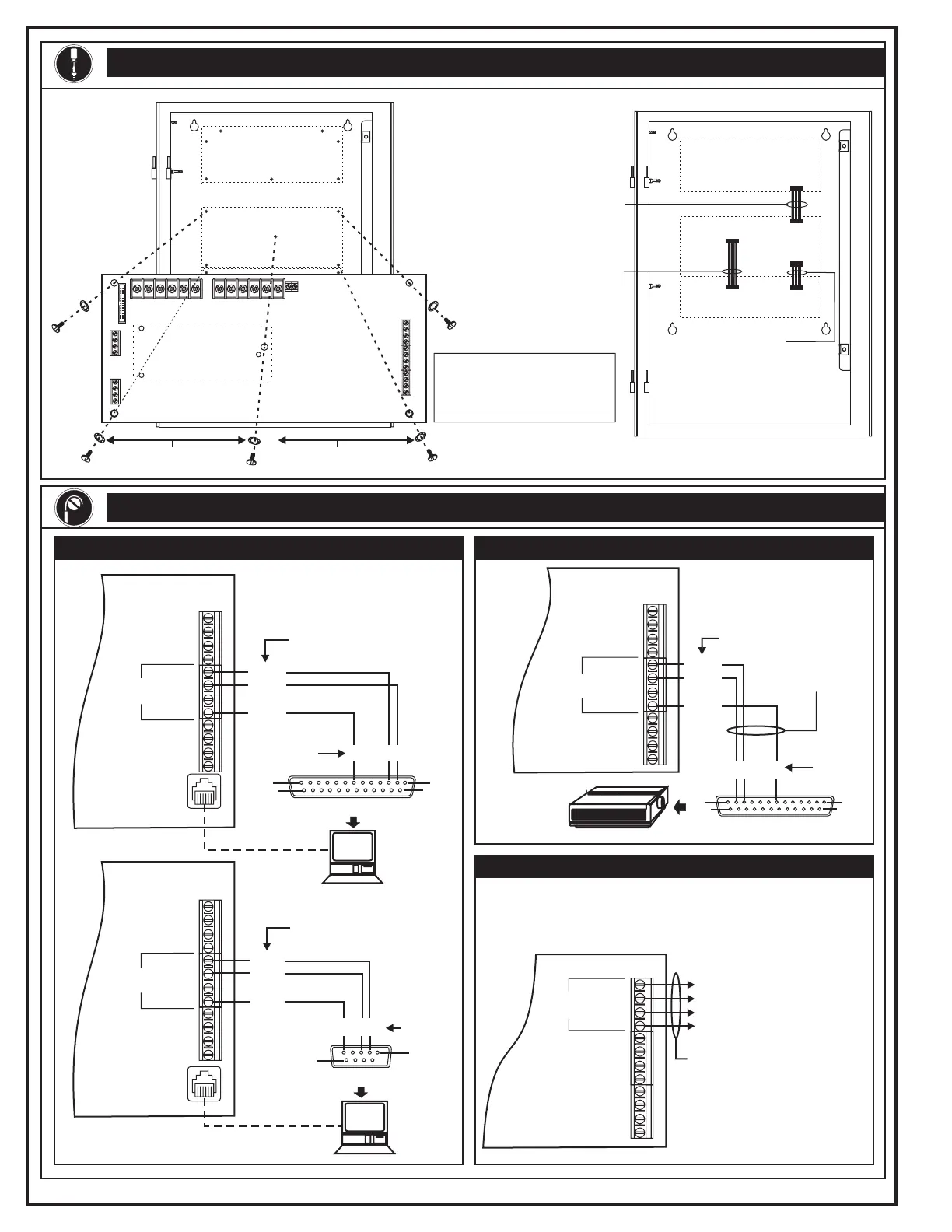
INSTALLATION
INTERNAL WIRING
Printer Wiring
RS-485 Port Wiring
270210.CDR REV 3.0 Page 2 of 4
Download Wiring Printer Wiring
To primary port of RS-485
remote annunciator or 2-AAC
To secondary port of RS-485
remote annunciator
See the Installation and Service
for detailed RS-485 wiring
information.
Manual
Caution: Any wiring that exits one building and enters another
requires a Ditek surge protector module. See the Installation and
Service Manual.
Main
Controller
Module
Ch 0
RS-485
Ch 1
+
+
_
_
TB6
Supervised and power-limited
Primary Power Supply
Main Controller Module
2
Connect the
ribbon cables
to the Main
Controller
Module.
1
Mount the
Main
Controller
Module
with the
screws and
washers
provided.
6/32 x 3/8 Pan
Head Screws
#6 Interlocking
Washers
Note: If you install a DL2,
mount it before you mount the
Main Controller Module. See
the DL2 installation sheet.
Primary Power Supply
Main
Controller
Module
Expander Loop Module
J1
J1
J3
J5
J3
J1
Ribbon Cable
(P/N 250213)
Ribbon Cable
(P/N 250213)
Ribbon Cable
(P/N 250214)
Mount the DL2 here.
Main
Controller
Module
1
14
13
25
1
9
DB25 Female (Front View)
DB9 Female (Front View)
Pin Function
To Pin
237
To Pin
235
IBM
Compatible
Computer
IBM
Compatible
Computer
TXD
RXD
RTS
COM
RS-232
Main
Controller
Module
J4
J4
Note: Disconnect the printer
while downloading.
Pin Function
COM
RXD
TXD
COM
RXD
TXD
TXD
RXD
RTS
COM
RS-232
TB6
TB6
Main
Controller
Module
TB6
Form printer
1
14
13
25
DB25 Male (Front View)
Pin Function
23 7
To Pin
TXD
RXD
RTS
COM
RS-232
COM
TXD
RXD
Non-supervised
and power-limited
Main
Controller
Module
Technical Manuals Online! - http://www.tech-man.com



 To Next Page