Home
EFT
Drones
Z50
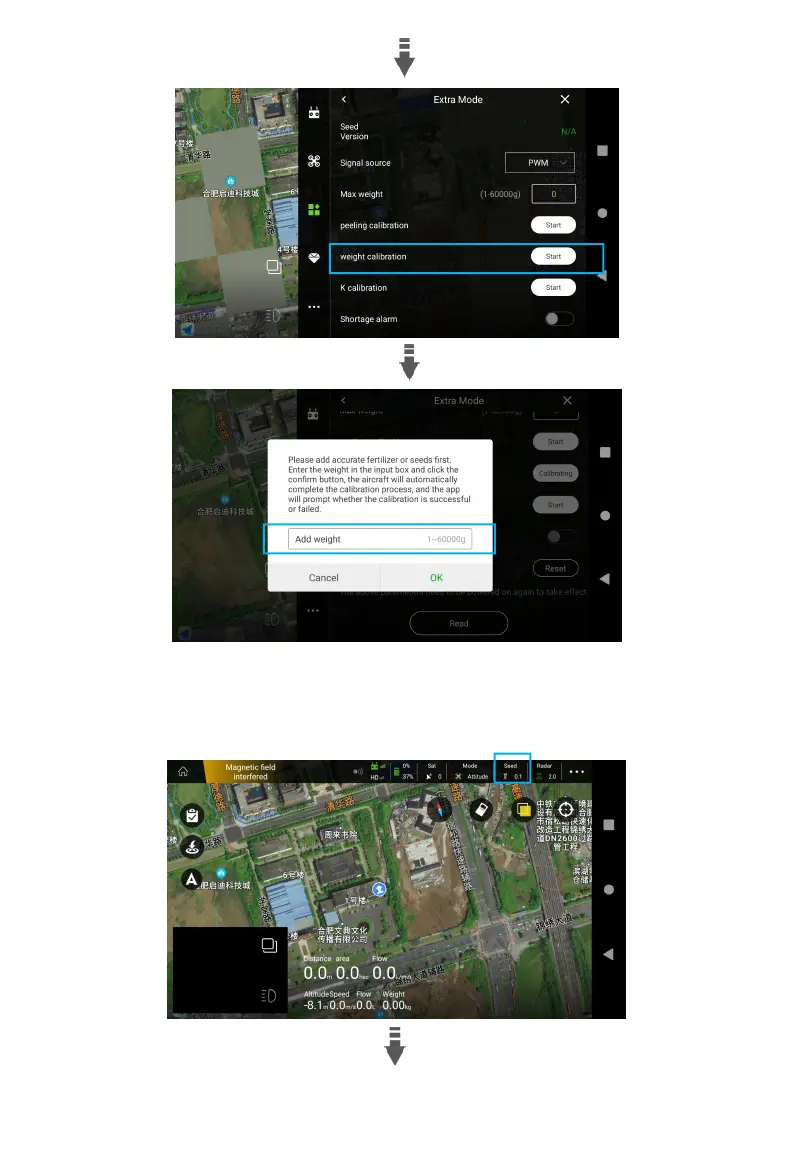
Page 44 (Weight Calibration)
EFT Z50 - Weight Calibration
55 pages
Manual
Save Page as PDF
To Next Page
To Next Page
To Previous Page
To Previous Page
Loading...
41
3.
Click
“Spread”
in
t
he
top
bar,
set
Sowing
mode
t
o
“Precision
sowing”,
T
emplate
Selection
to
“Create”,
enter
the
object
name,
set
the
parameters
,
such
as
the
Hec
Dosage,
D
isc
spee
d,
Flying
speed,
etc.,
then
“Save”.
43
45
Table of Contents
Main Page
Table of Contents
2
Disclaimer
5
Safety Guidelines
6
List of Items
8
Introduction
10
Pre-Flight Preparation
11
Inspection
11
Smart Battery
11
Remote Control Introduction
13
Overview
13
Function Introduction
14
Description of Status Indicator
14
Touchscreen Introduction
15
Charging the Remote
15
Power On/Off Remote
16
Signal Range
16
Operating the Aircraft
16
Connection and Settings
17
Link to Aircraft
17
Remote Control Setup
19
Agri Assistant App
21
Home Screen
21
Account Registration and Activation
22
Operation View
25
Debugging before Takeoff
26
RC Calibration
26
Gate Set
28
Sensor Calibration
28
Parameter Settings
30
Advanced Setting
33
Map Type
33
Pre-Flight Test
33
Unlock/Landing
33
Motors Test
34
Nozzle Test
34
Spraying Operation Modes
34
Operation Mode Switch
34
Manual Operation Mode
35
Auto Operation Mode
36
A-B Route Operation
36
Fully Auto Operation
38
Switch Spreading System
42
Spreading System Debugging
42
Spreading Operation
46
Maintenance
47
Cleaning after Operation
47
Regular Maintenance
47
Transportation
49
Supplements
50
Automatic Return to Home (RTH)
50
Log Drownload
51
Alarm
52
Appendix
53
Specifications
53
Other manuals for EFT Z50
Assembly & Instruction Manual
15 pages
Related product manuals
EFT Z30
55 pages
EFT Z Series
55 pages
EFT E416P
24 pages
EFT E410P
24 pages
EFT G06
11 pages



 To Next Page