20
USER MANUAL MAGIC 500 PLUS ULTRASOUND UNIT
T +49 7461 96 580 0 | F + 49 7461 96 580 90 | export@eickemeyer.com | www.eickemeyer.com
5. Press direction keys to choose “numbers” or “characters” and press key to confi rm.
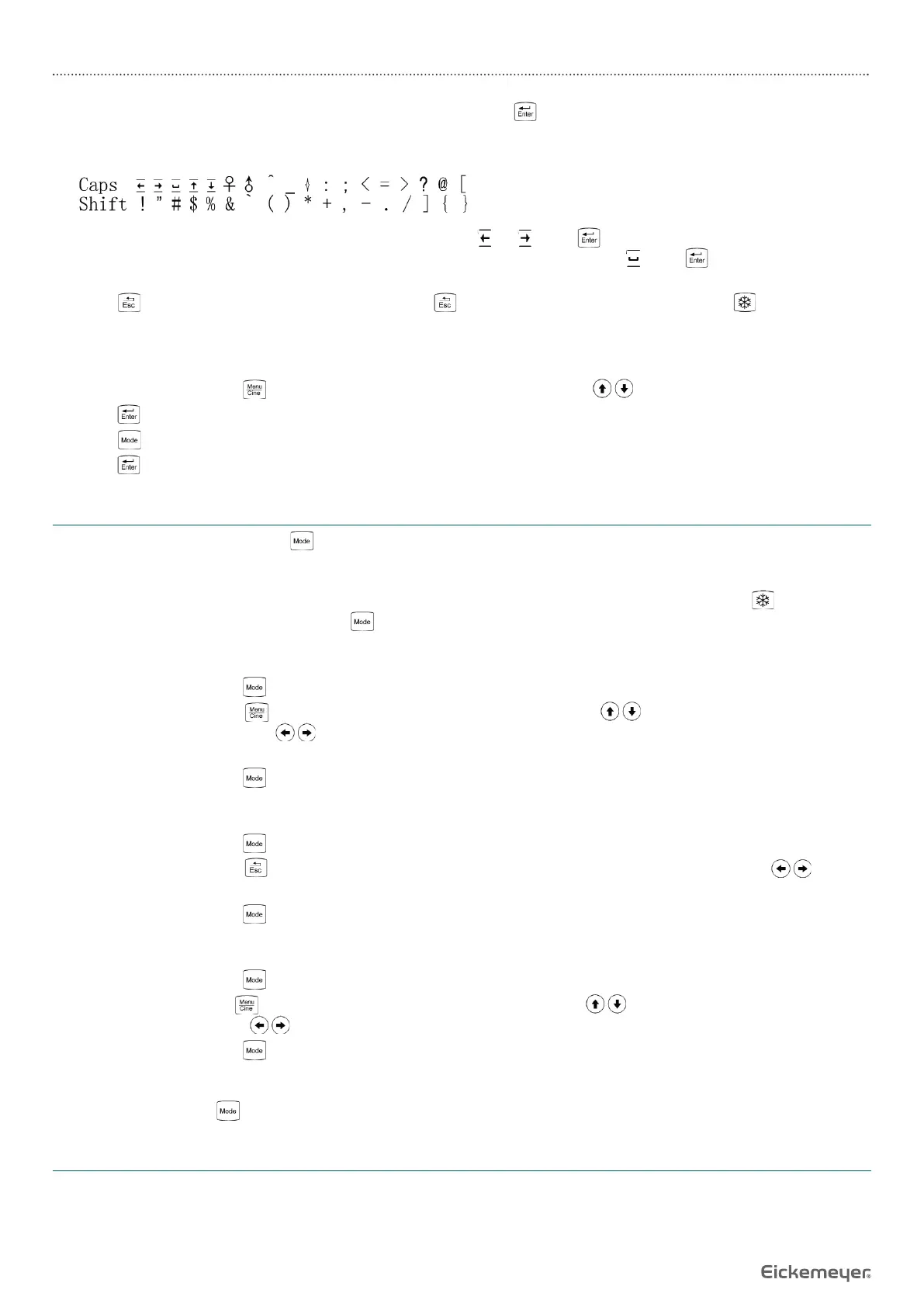
6. If you need to modify the content, in the characters input status press Shift key, the special characters input menu is then
shown at the bottom of the screen displays:
Press direction keys to move the cursor to point to character “
Press direction keys to move the cursor to point to character “
” or “
”, press key, move the cursor to the position need
to deleted character, and then press directions keys to move the cursor to character “
to deleted character, and then press directions keys to move the cursor to character “
”, press key, delete input content
and retype.
7. Press key to quit the character input menu, press key again to quit the cursor status, press key to return the
frozen status.
6.2.11 English-German Language Setting
1. In real-time mode, press key to enter the main menu, press direction keys to select “Preset”.
2. Press key to enter setting interface.
3. Press key to switch between English and German.
4. Press key to confi rm this setting and quit setting interface.
6.3 Mode Selection
In real-time mode, repeatedly press key to achieve mode switching of B, B / B, B / M, M and A.
6.3.1 B Mode
B mode is the basic operation mode after startup and a single-framed B mode image is displayed. Press key to freeze /
unfreeze the image. In real-time mode, press key to exit B mode.
6.3.2 B / B Mode
1. In real-time mode, press key to enter B / B mode.
2. B / B image switch. Press key to enter the main menu, press direction keys to move the cursor to “B / B Mode”
and then press direction keys to switch left / right image display. The selected image is activated and the other one
is frozen.
3. In real-time mode, press key to exit B / B mode.
6.3.3 B / M Mode
1. In real-time mode, press key to enter B / M mode.
2. Move sample line. Press key to quit the current using status of direction keys. Press direction keys to move
sample line.
3. In real-time mode, press key to exit B / M mode.
6.3.4 M Mode
1. In real-time mode, press key to enter M mode.
2. Change M speed: Press key to enter the main menu, press direction keys to move the cursor to “M Speed” and
then press direction keys to select the eight kinds of scan speed.
3. In real-time mode, press key to exit M mode.
6.3.5 A Mode
In real-time mode, press key to enter or exit A mode.
6.4 Image Adjustment and Control in B, B / B, B / M and M
In real-time mode, you can adjust the total gain, near fi eld gain, far fi eld gain, dynamic range, depth range, frequency, frame
correlation, image post-process, edge enhancement, focus quantity, local zoom, left / right reverse, up / down reverse, color,
backlight, brightness and contrast, etc.


 To Next Page