40
Chapter 6
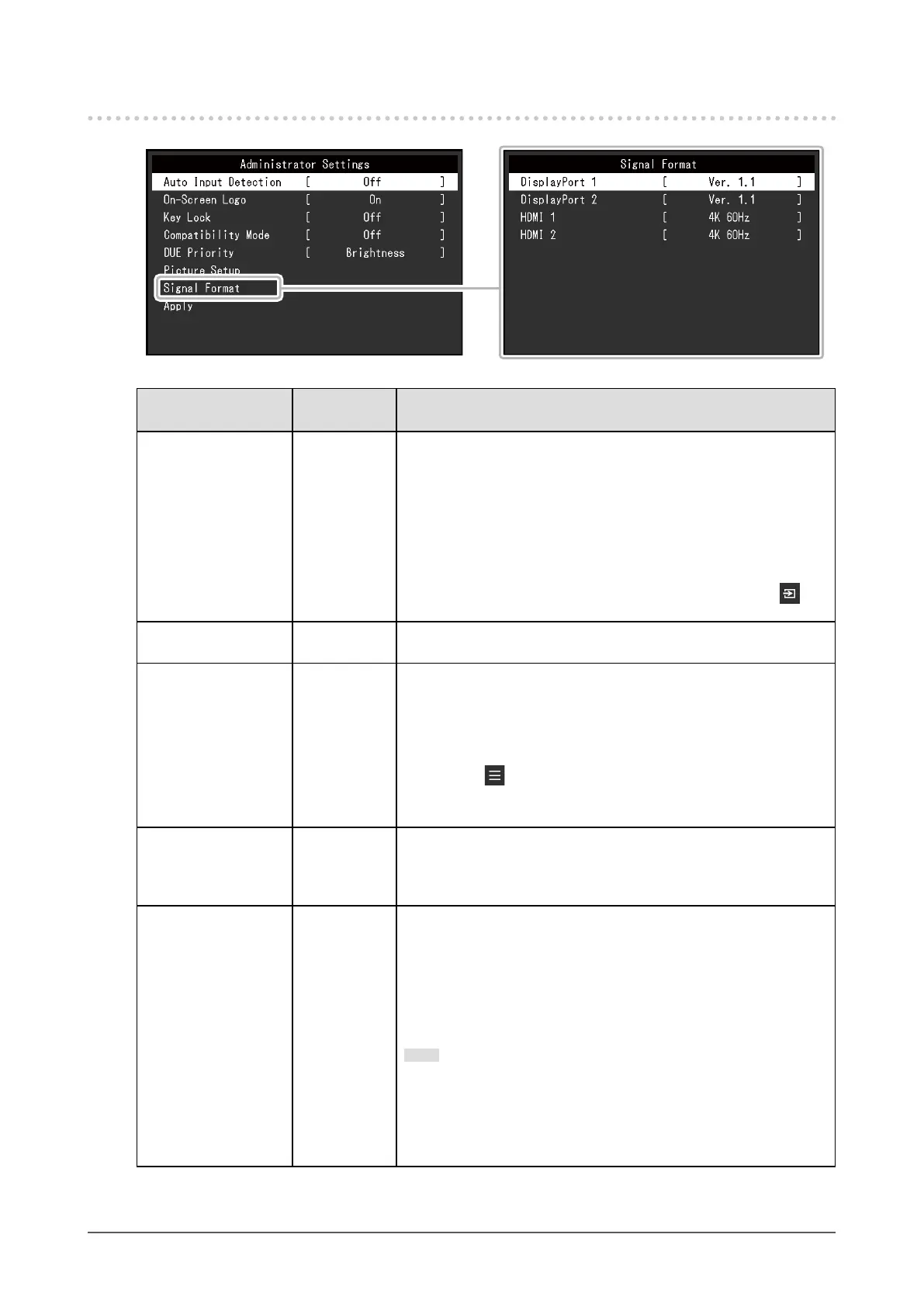
Administrator Settings
6-2. "Administrator Settings" Menu Functions
Function
Adjustable
Range
Description
Auto Input Detection Off
On
When this function is set to "On", the monitor automatically
recognizes the connector through which signals are input, so that
the screen can be displayed. If the input signal for the selected
connector is lost, the monitor automatically switches to a different
signal.
When set to "Off",
the monitor displays the signal from the selected
connector regardless of
whether a signal is input or not. In this case,
select the input signal to display using the operation switch ( ) on
the front of the monitor.
On-Screen Logo Off
On
When this function is set to "Off", the EIZO logo that is displayed
when the monitor is turned on does not appear.
Key Lock Off
Menu
All
In order to prevent changes to settings, the operation switches on
the front of the monitor can be locked.
• "Off" (Default setting)
Enable all switches.
• "Menu"
Lock the
switch.
• "All"
Lock all switches except the power switch.
Compatibility Mode Off
On
To avoid the following effects, set this function to "On".
• When you switch the monitor's power back on or return from
power saving mode, windows or icons may have shifted position.
• The PC's power save function does not operate correctly.
DUE Priority Uniformity
Brightness
This product is equipped with a Digital Uniformity Equalizer (DUE)
function that reduces display unevenness. This DUE setting can be
changed.
• "Uniformity"
Prioritizes reduction of display unevenness.
• "Brightness"
Prioritizes high brightness and high contrast.
Note
• When changing the DUE setting, the monitor whose display
is adjusted must be re-calibrated. Perform the calibration
and, if necessary, correlation again using ColorNavigator 6
or ColorNavigator NX.
• For details, refer to the ColorNavigator 6 User's Manual.







 To Next Page