- 16 -
STEP 6
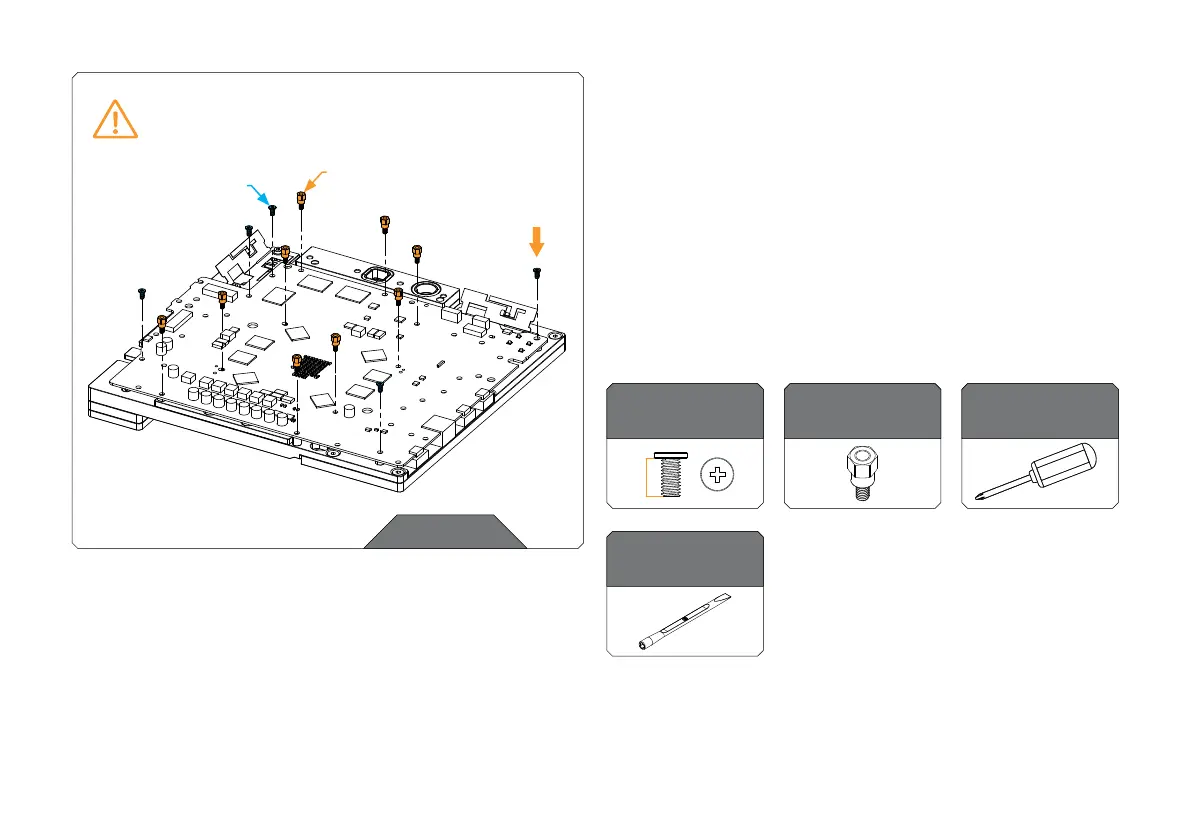
ATTACHING THE PS5 PCB
After placing the PS5 PCB, the provided mounting screws and
standoffs need to be used.
Use five (5) M2.5 x 5 AX1 screws to tighten the PS5 PCB. Tighten
the screws evenly using the Phillips-head screwdriver. After
securing the screws, secure the additional nine (9) M2.5-M3 x 6.6
standoffs using the EK- Plug Out Spludger Tool.
EK also recommends using the EK-Loop Torque Screwdriver -
0.6Nm for tightening the screws:
https://www.ekwb.com/shop/ek-loop-torque-screwdriver-0-6nm
STEP 6
For this step, you will need:
EK-Plug-Out
Spludger Tool
Standoff M2.5-M3
x 6.6 mm (9 pcs)
M2.5 x 5 AX1
(5 pcs)
Phillips Head
Screwdriver
M2.5-M3 x 6.6 STANDOFF
M2.5 x 5 AX1
SCREW
MAX TORQUE:
0.6 Nm



 To Next Page