16
2.8 “Advanced” mode function (allows 10 cooking steps)
The following parameters can be set by touching the “Advanced” mode icon on the display:
Cooking steps (from 1 to 10)
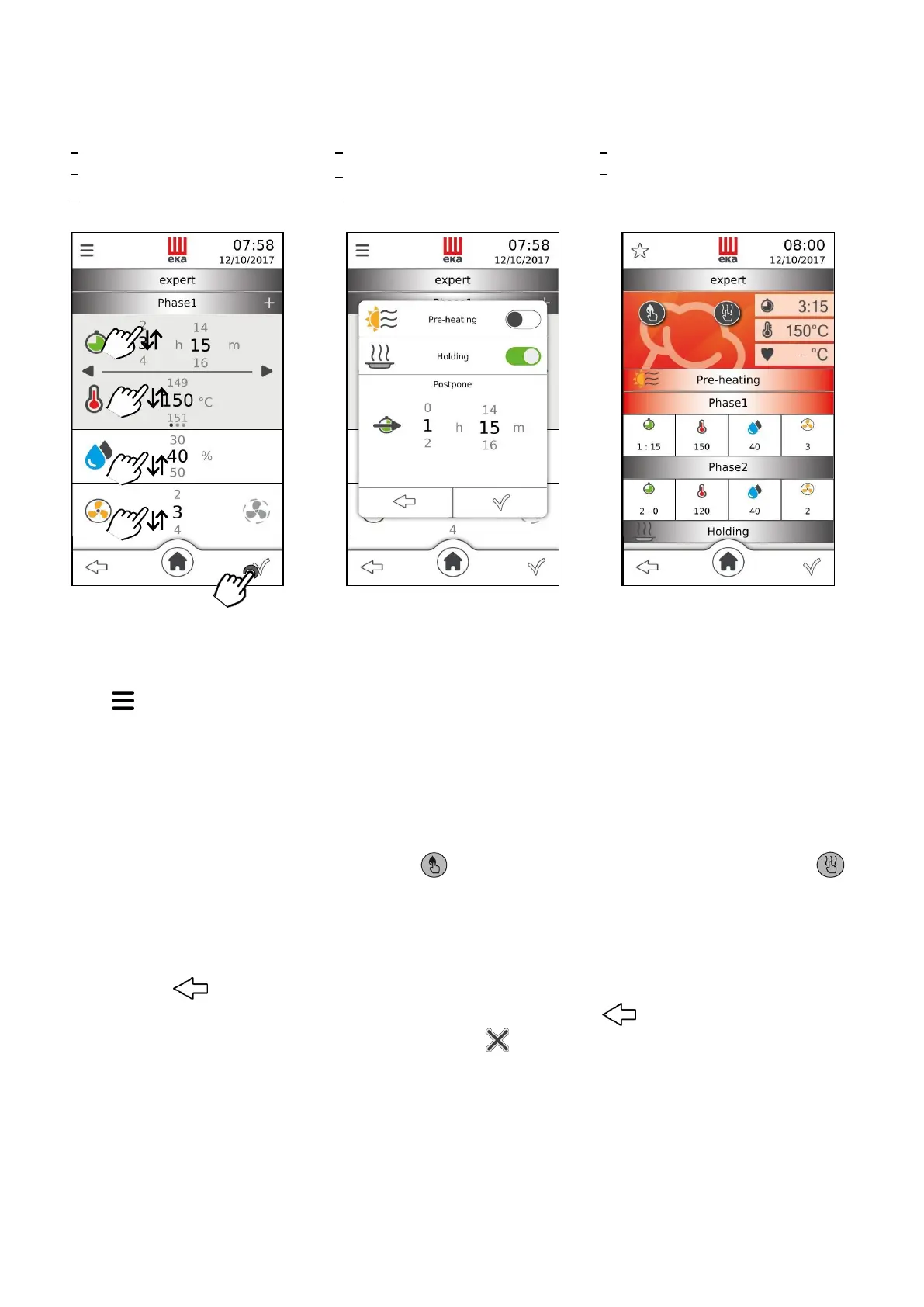
Fig.11 Fig.12 Fig.13
The parameter value is set by sliding, up or down, your finger on the “number” next to the parameter (Fig.
11) to the desired value; or by turning the knob clockwise or anti-clockwise to the desired value. This value
is confirmed by pressing the knob; turning it again goes directly to the next parameter.
The “ ” symbol is present at top-left of the display; touching it, displays a window (Fig. 12) which allows
enabling the following functions:
Touching “” displays the “summary” screen (Fig. 13); touching it again, enables the cooking cycle. The
following are displayed at the top-right of the screen: the remaining cooking time, the actual temperature
in the cooking chamber and the actual temperature of the core probe, if enabled (in this case, the
“Cooking time” parameter is disabled). The “ ” symbol is on the left of the screen and the “ ”
symbol is in the centre. The “summary” screen contains all parameters and functions that can be set for
each cooking step. By selecting each individual parameter, you can edit the set value at any time; simply
touch the symbol of the desired parameter: a window appears indicating the parameter and its set value.
The new value can be set by sliding the finger or turning the knob; touching the “” symbol in the
window automatically confirms the value and the window goes back to “summary” screen mode; vice-
versa, if the “ ” symbol is touched the new parameter value is not confirmed and the previous value
remains active. Bottom-left of the “summary” screen has the symbol “ ” which allows to go back to
the previous screen, while bottom-right has the symbol “ ” which allows stopping the cooking cycle.



 To Next Page