29
2.22 Settings
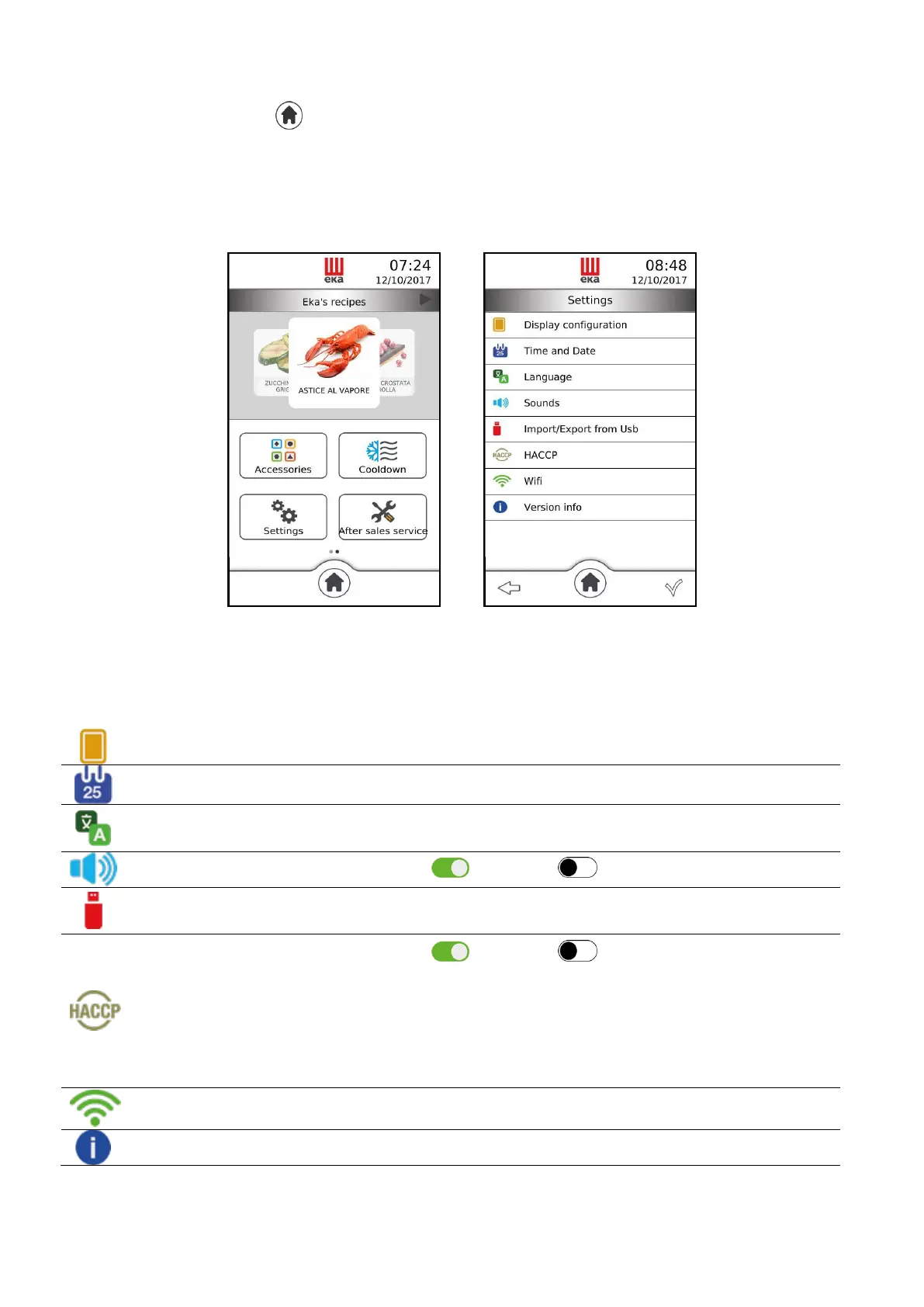
From the “Home” screen ( ) slide your finger to the left on the “Available functions” window: the
“Settings” icon appears (Fig.39); touching it displays the “summary” screen which shows the settings
available (Fig.40):
Fig. 39 Fig.40
Touching the icon of the desired setting displays a window in which you can modify the state of the
setting. By touching the icon again after changing the state of the setting, the window disappears and the
“summary” screen of the settings appears again.
You can adjust the brightness of the display
You can set the desired time and date
You can select the desired language
You can enable ( ) or disable ( ) the buzzer volume (beep)
Import/export from
Flash drive
You can import (“upload”) and export (“download”) the cooking
programs (recipes) via “USB pen drive”
You can enable ( ) or disable ( ) the “HACCP” function.
The “HACCP” function has the purpose of recording the operative
data of cooking cycles performed, constantly monitoring their progress.
The “HACCP” data can be recorded into a “USB pen drive” which
must be connected into the suitable “USB port” of the oven. All the
data concerning the cooking done on the same day are contained in
the same “HACCP” file.
You can connect to a Wifi network
You can display the operational “firmware” version
Import/export from Flash drive



 To Next Page