24
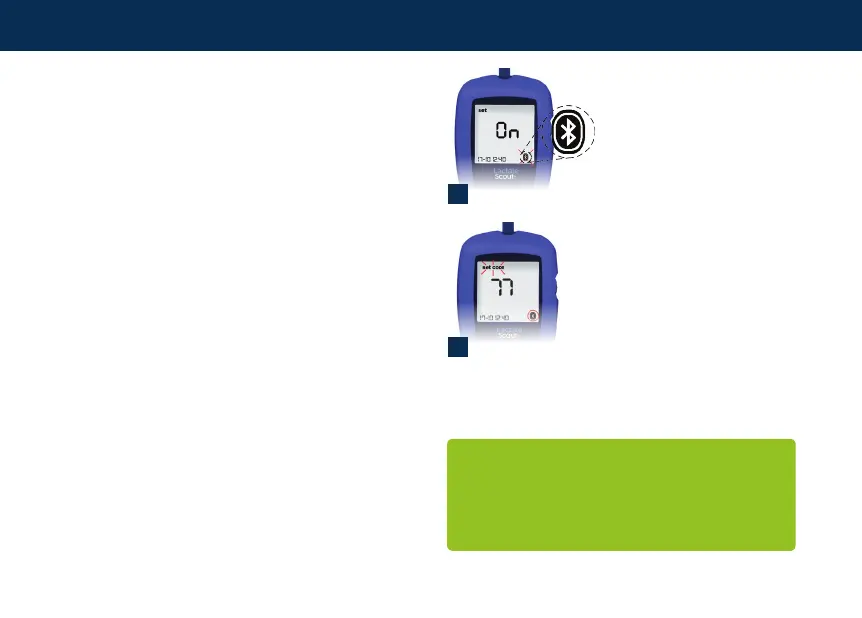
By turning the scroll wheel by one position,
the Bluetooth
TM
moduleisconnected,“On”
appears on the main display and the Bluetooth
TM
symbol is surrounded by a black line (3). After
conrmation (briey press the scroll wheel), the
Bluetooth
TM
module in the device is activated.
The Lactate Scout+ bluetooth function, can be
used with Windows XP, Windows Vista,
Windows 7 and Windows 8.
For data transfer to a PC additional software must
be installed on the PC. A generic data export
tool Lactate Scout Data link is availabe as free
download from the website www.lactatescout.
com". Advanced software solutions like the
Lactate Scout Assistant software including
data management and chart functions for
performance analysis are available for purchase
fromEKFDiagnostics.
The activated Bluetooth
TM
module is permanently
displayed in the setting and storage mode as an
outlined Bluetooth
TM
symbol (4).
Data storage
3
Attention: A detailled description for the
initial setup of the Bluetooth TM connection
is available on the website www.lactatescout.
com. Please use the Bluetooth™ dongle
recommended by us.
Bluetooth
™
is active
4
Display of Bluetooth
™
symbol after activation
Data storage


 To Next Page