8. HOW TO USE THE INSTRUMENT ELBO CONTROLLI srl
Preset E236+
32
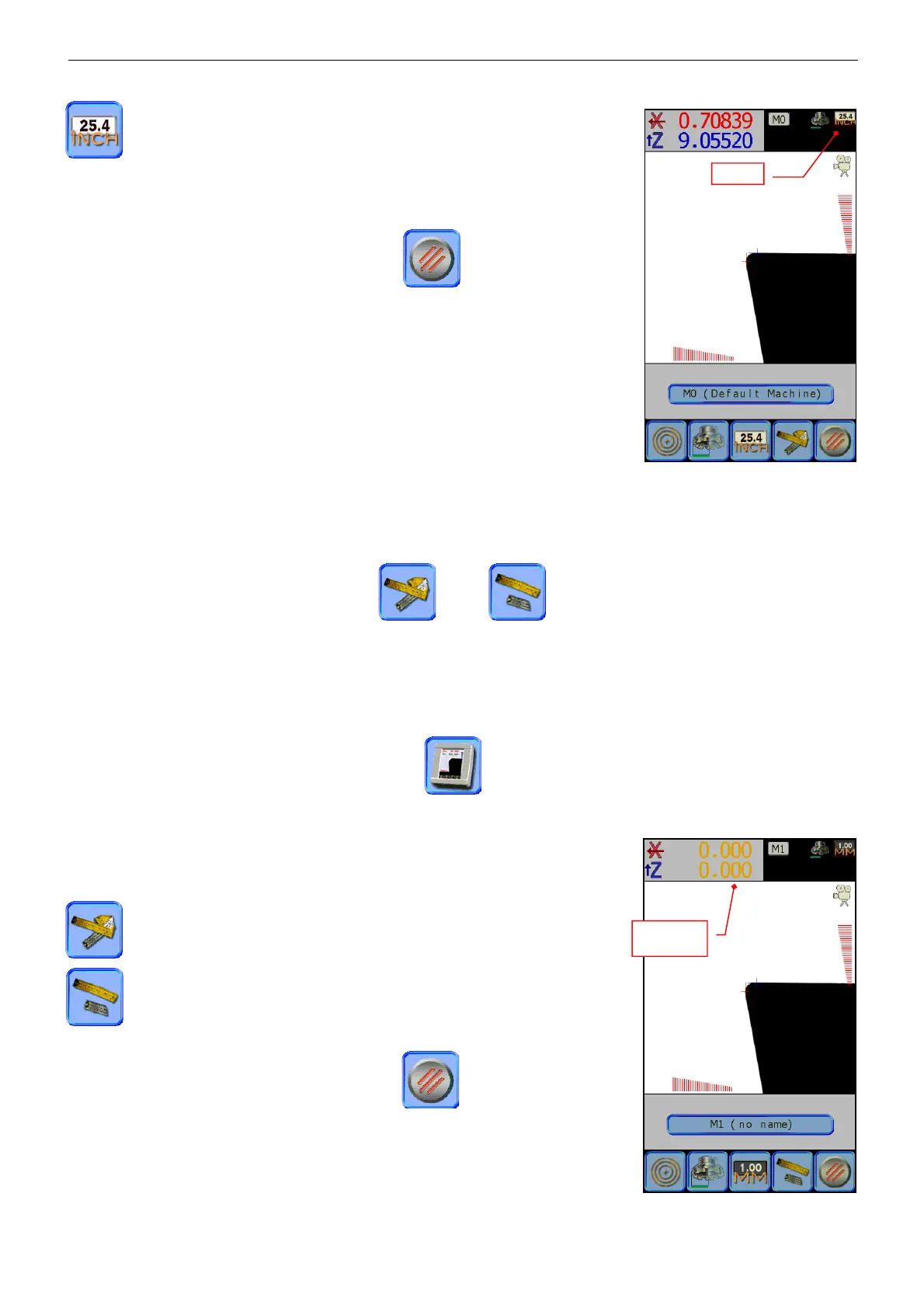
The value shown is in inches; five decimal places are displayed
At the top right of the screen, is indicated the unit of measure active.
To exit the “display settings” menu press the
icon.
þ The setting of the function “Millimetre” or “inch” is automatically saved
and reactivated at the next switch on of the instrument.
8.4 HOW TO SELECT ABSOLUTE / INCREMENTAL
While using the instrument it may be useful to clear the axes measurement to carry out partial measurements
or to check quickly the differences in the alignment between the different inserts of a tool with multiple
cutting edges. In this case, it isn’t necessary to clear the reference of the axes absolute origin but you can
simply use the “incremental” mode, for major ease joined to the automatic measurement mode (auto-
collimation).
Select the menu “display settings”, press the icon, then press alternatively the selection icon
Absolute/Incremental to see the dimension changing in both ways, or to set the value to zero.
The counter of the incremental mode is always reset to zero every time.
The value is the actual dimension of the tool
The axes are set to zero and the measuring mode is incremental
The value is shown in the colour yellow to signal that the actual
measurement of the tool isn’t indicated
To exit the menu “display setting,” press the icon.


 To Next Page