9. MACHINE ORIGINS ELBO CONTROLLI srl
Preset E236+
48
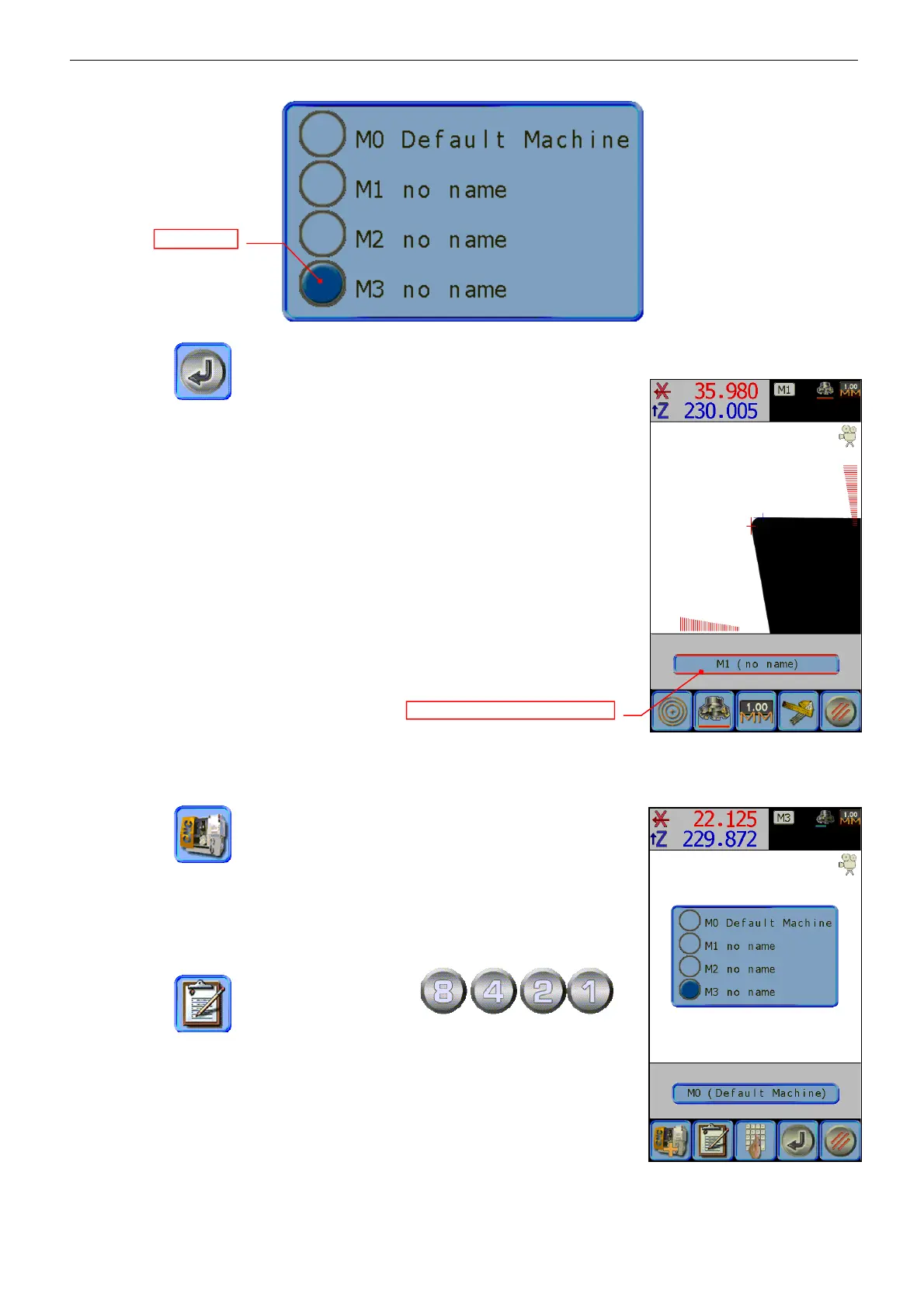
Press the icon to confirm the selected origin.
The screen will return to the main page; the dimensions displayed will be
updated and referred to the requested machine that is shown in the top right
of the screen. From now on all the measurements taken will be valid only for
this machine.
If it is needed to switch from radius to diameter (par. 8.2) with one active
machine origin different from the one set on the machine origin, this would
be highlighted by two red bars in the label above the main menu.
It isn’t possible to switch from mm/inch or vice versa: the measuring unit
must be set when the machine origin is created.
9.5 EDIT OR DELETE A NC MACHINE ORIGIN
Press the icon to open the machine origins menu.
Select from the list the machine origin to edit or delete.
Press the icon , end insert the password
.
The menu already seen in the previous para. 9.3, will reappear and allow you
to measure the origin again and to switch from radius/diameter and
MM/Inch.
M1 default radius – switch to diameter


 To Next Page