11. TD236+ SOFTWARE ELBO CONTROLLI srl
Preset E236+
63
11.5 UPDATING BIOS
Incorporated in the characteristics of the TD236+ software, is the function of updating Bios of the preset,
allowing the installation of the latest available version freely from Elbo Controlli in the “Download” area
of their website: www.elbocontrolli.it.
Registering the TD236+ software, will automatically notify you of the availability of a new update for their
Preset and supply a link to download it. Otherwise, it will be necessary to identify the adapted file in
function to the model and serial number of the presetter, navigating the Download area of the Elbo Controlli
site.
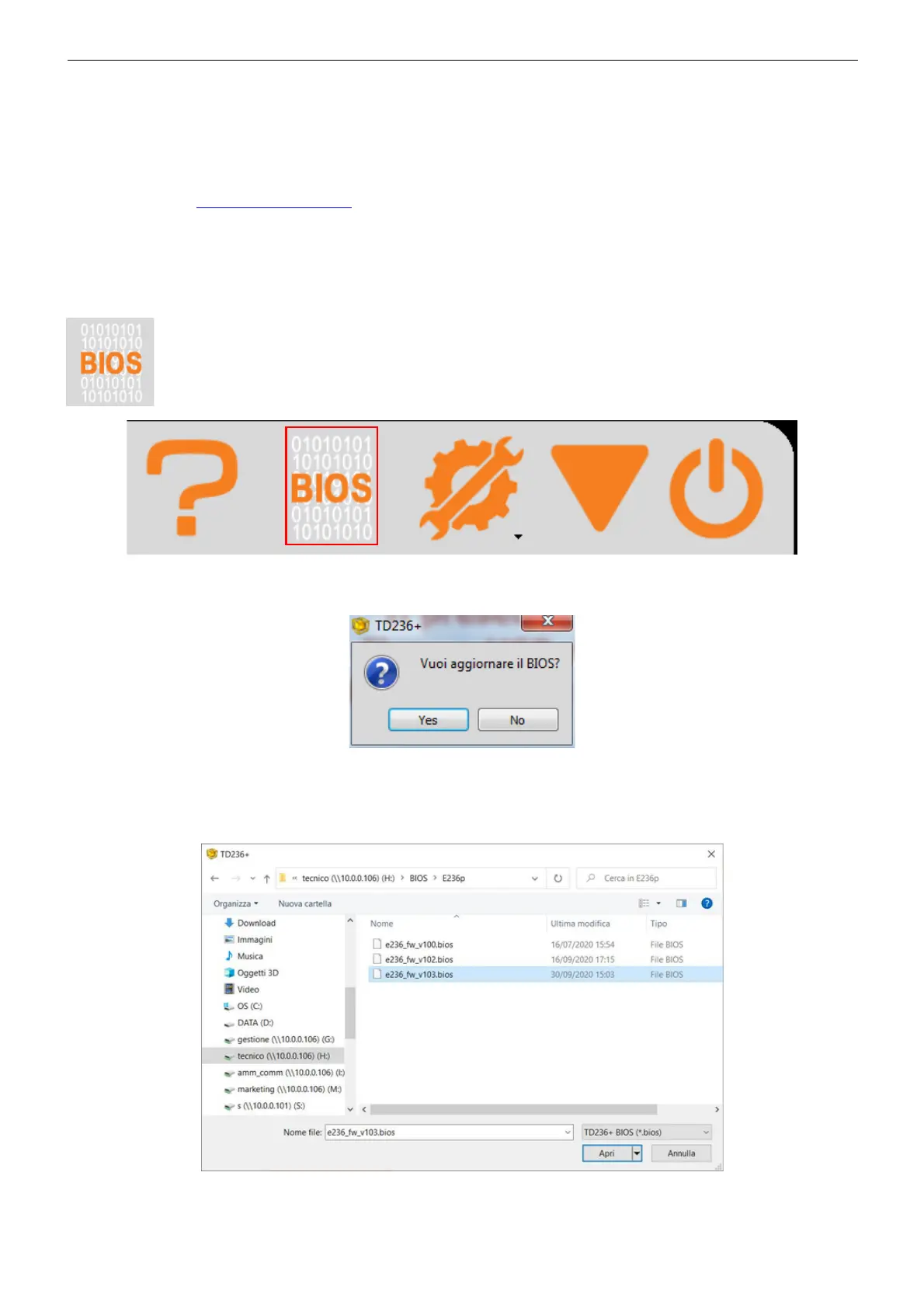
Once in possession of the file “E236+_fw_v***.bios” to install, start the procedure of
updating by selecting the icon “BIOS".
The program will ask you to confirm before starting to update:
Press "Yes" to continue.
Select the way and double click on the file to transfer to the E236+ presetter.


 To Next Page