Need help?
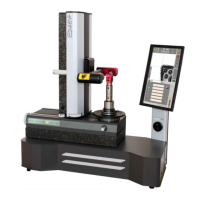
Do you have a question about the ELBO CONTROLLI E236+ and is the answer not in the manual?
Declares E236+ conforms to safety standards like Machinery, EMC, LVD, RoHS, WEEE directives.
Manual is integral part of apparatus, keep for reference; provides necessary info for correct use.
To acquaint operator with operating directions, maintenance, and procedures from introduction to disposal.
Explains how chapters and paragraphs are identified and how notes are formatted.
Details mechanical specifications like measuring range, base material, spindle type, dimensions, and weight.
Describes vision system, transducers, sensor, magnification, display, and touch screen.
Lists software functions like machine origin management, tool tables, tool corrector storage, and measurement capabilities.
Lists optional items like additional spindles, mini-label printer, and support table.
Lists components included in the presetter packaging for checking before installation.
Describes the instrument's purpose for tool presetting and measuring dimensions, emphasizing proper use.
Provides guidelines for handling the instrument during packaging, transport, and storage to prevent damage.
Continues unboxing instructions, including rotating the unit and removing lifting plates. Mentions QR code for video.
Identifies key components on the rear of the presetter, including ports (USB, RS232), power entry, and earthing terminal.
Specifies environmental conditions for optimal performance, such as temperature, lighting, and humidity.
Details the 24V DC power supply, interchangeable adapters, and the electric connection panel layout.
Describes the RS-232 serial port, its connector configuration, and communication parameters.
Details how to connect the s'Print-S label printer via the serial port and its label compatibility.
Explains printer setup parameters and how to resolve issues like no labels or incomprehensible printing.
Describes the LCD touch-screen interface, its main functions (Machine Origins, Tool Set, etc.), and displayed information.
Details how to use the quick movement handle for fast axis positioning, with a warning to avoid limit stops.
Describes how to use the fine movement knobs for precise axis positioning for measurement.
Provides detailed procedures for safely removing and installing rotating spindles and adaptors.
Explains the function of the spindle brake for locking rotation and its operation, with a torque warning.
Details the procedure for powering on the presetter, including software loading and initial axis reference.
Describes how to change the display language using the touch screen interface.
Explains collimation as detecting measurement points using a vision system, describing the process and advantages.
Details how to frame the tool and use control bars to achieve the best image focus for accurate measurements.
Introduces two collimation modes: fixed central reticule and automatic. Mentions manual measurement possibility.
Explains how to use the fixed grid for measurements, emphasizing tangency and movement direction for accuracy.
Explains using a fixed circular reticle to match tool profiles with circumference arcs and setting measurement units.
Discusses how the presetter automatically recognizes tool orientation and prioritizes measurements.
Guides on setting a starting reference (origin) for measurements, including default M0 and creating new origins.
Details how to switch between millimeter and inch units for displaying measurement values.
Covers tool cleaning, acquiring points for analysis, and how the system recognizes lines or circumferences.
Explains how to calibrate the vision system to adapt the image to axes, necessary after replacement or memory deletion.
Guides on calibrating the touchscreen to correlate touch points with LCD coordinates, especially after settings restoration.
Explains how to verify touch screen calibration and save new settings for future use.
Details how to correct measurements due to temperature variations by modifying compensation parameters for X and Z axes.
Describes how to input actual dimensions to calculate compensation factors and how to activate/disconnect linear compensation.
Explains how to restore default settings, including deleting data and performing vision system calibration.
Discusses establishing reference points for Z-axis measurements and transferring dimensions to the presetter.
Guides on creating new machine origins (M1-M9) by inserting a resetting gauge and accessing the menu.
Details entering password, selecting units (mm/inch), and inputting radius/diameter for a new machine origin.
Covers inputting tool length, saving modified data, and confirming the new active origin.
Explains how to configure axes counting direction and assignment (X/Z) for different machine types.
Details axis configuration, reversal counting, and the 'attention' symbol for non-default settings.
Guides on selecting and activating a previously registered machine origin from the list.
Explains how to open the origins menu, select an origin, and use password to edit or delete it.
Details the confirmation steps for deleting a machine origin, including handling associated toolsets.
Explains toolsets as lists for managing up to 99 tools associated with a machine origin.
Guides on creating new toolsets, associating them with machine origins, and handling the 'no toolset' warning.
Details defining tool corrector numbers and storing X, Z dimensions and radius after collimation.
Explains analyzing tool profiles, geometric calculations, and measuring radius using fixed reticule.
Guides on accessing, editing, searching for, or deleting tools within a toolset.
Explains how to delete entire toolsets to free up memory and the confirmation process.
Details how to print labels with tool data and image using the s'Print-S printer.
Explains connecting the E236+ to a PC via USB and the requirements for software detection.
Guides on registering the TD236+ software online to receive updates and access full functionality.
Describes the software's startup process, data import, and directory structure.
Explains how to import/export data and configure machine settings like post-processor templates and tool numbers.
Details how the tool chart is displayed in a grid form and how to print it.
Explains how to move tool charts to another machine and confirms the operation with potential differences.
Covers editing software interface language and restoring data (origins, tool charts) from backup copies.
Details accessing the 'Restore data' menu to select and confirm backup copies, warning about overwriting current data.
Explains how to update the presetter's BIOS using files from the manufacturer's website.
Describes the process of transferring the BIOS file and programming EPCS after reception.
Details erasing, writing, and verifying EPCS, followed by hardware programming and rebooting the presetter.
Outlines simple, regular maintenance tasks to keep the presetter efficient and precise.
Provides guidance on cleaning and lubricating gauges, adaptors, and spindles using specific products.
Instructs on cleaning the display panel and optical system using appropriate cloths and detergents.
Advises on periodically cleaning the granite base with alcohol or degreaser for proper operation.
Introduces the chapter as a guide to solve common presetter problems with checks and corrective actions.
Lists initial problems like 'presetter does not turn on' or 'difficulty displacing Z-axis', with causes and solutions.
Addresses problems related to incorrect counts, non-repetitive measurements, and vision system alignment.
Covers troubleshooting for the S'Print-S label printer not working or labels being incorrectly spaced.
Provides information on proper disposal of waste materials according to EU directives, emphasizing separate collection.
 General
| Brand | ELBO CONTROLLI |
|---|---|
| Model | E236+ |
| Category | Industrial Equipment |
| Language | English |

 To Next Page