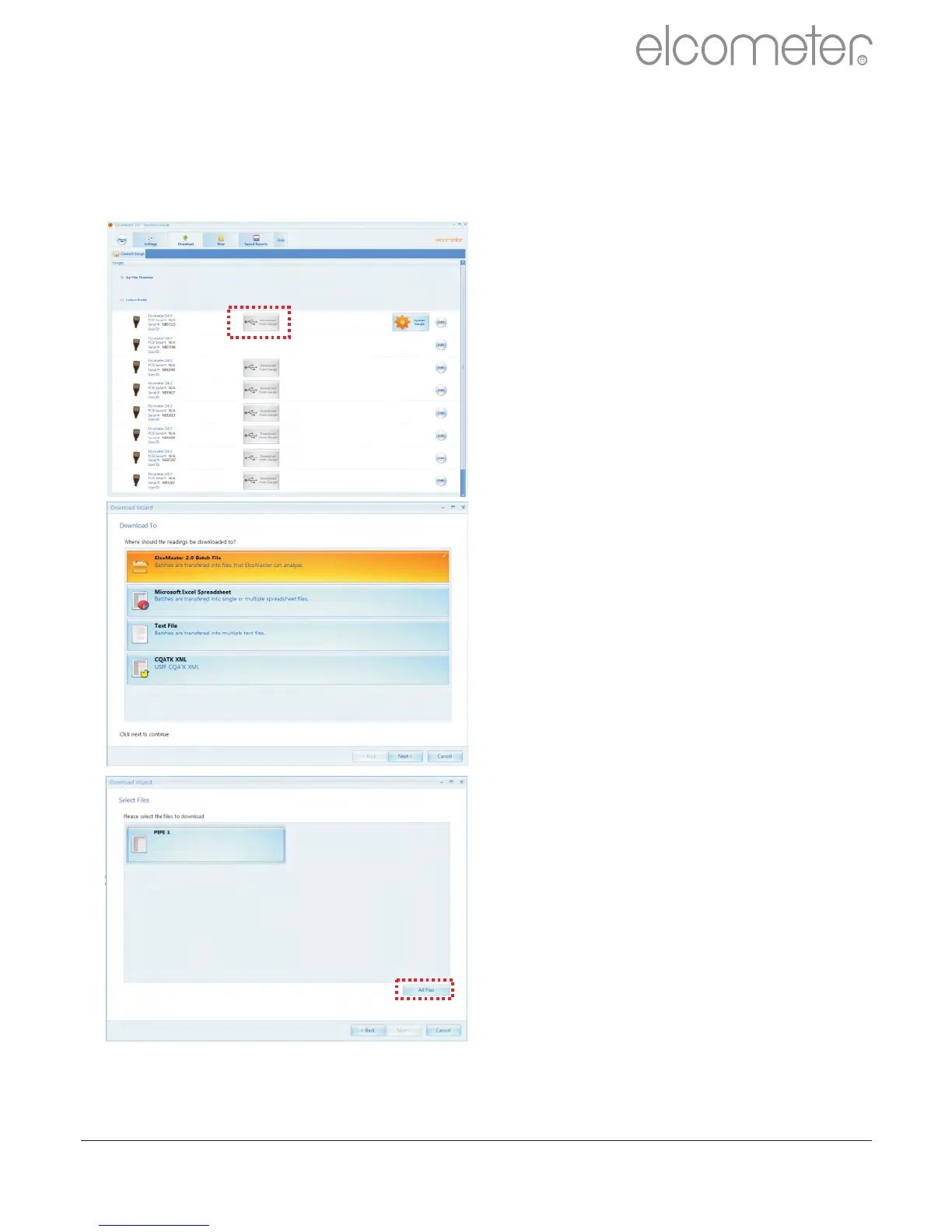
The Download Wizard will now
guide the user through the simple
download readings process.
ElcoMaster™ 2.0 allows users to
download their gauge readings:
?Directly into ElcoMaster™ 2.0
?Directly into an Excel
Spreadsheet, bypassing
ElcoMaster 2.0
?into a text file for use in other
software programs, or
?into a CQATK XML file
?Select the appropriate option
?Select or create a new project
folder as required (ElcoMaster
Batch File users)
Users wishing to export directly
into Excel will also be asked to
select a single or multiple
spreadsheet option. Single; all
batches selected will be
downloaded into a single
spreadsheet. Multiple; each
batch will be downloaded into a
separate spreadsheet tab.
?Select one or more individual
batches or click on ‘All Files’
and press ‘Next >’
Downloading Data from the Elcometer 224 (T)
Once the gauge has been connected to ElcoMaster™ 2.0 (see pages
33 - 35), switch on your gauge and click the ‘Download from Gauge’
button for the relevant gauge and connection method.
When downloading data into ElcoMaster™ 2.0 (as opposed to directly into
a spreadsheet or a text file), downloaded data is stored in Projects -
allowing users to clearly identify inspections.
www.elcometer.com 36
en
R



 To Next Page