R
24
Bluetooth [T]: Toggles Bluetooth communication on/off and displays Bluetooth information.
The Bluetooth setup menu is displayed. The Gauge ID and Bluetooth Authentication number are displayed.
To toggle Bluetooth communication on/off, scroll to Enable and press Sel (when Bluetooth is enabled, a
Bluetooth symbol is displayed on the right side of the display).
When finished, press Back.
About: Displays miscellaneous information about your gauge.
To view the information, scroll to the parameter of choice and press Sel.
Gauge Information - Elcometer model #, gauge identity, language, language version, software versions
Contact - details of Elcometer offices worldwide and, if applicable, the contact details for the supplier or local
distributor.
Help - explains symbols used on the display.
9 GAUGE SETUP
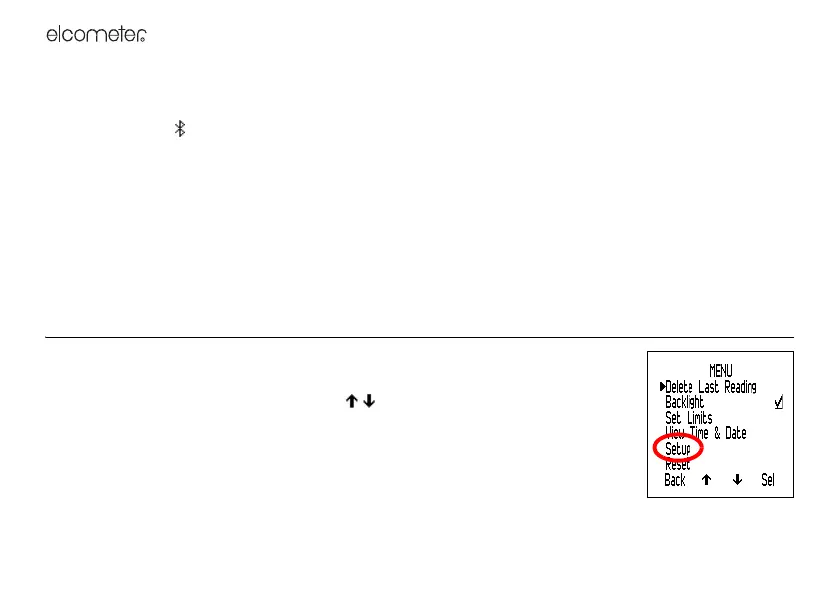
This section describes the functions and gauge settings available by pressing
Menu>Setup from the reading screen.
To access a function or gauge setting, scroll to the required function and press Sel.
To return immediately to the reading screen at any stage, press and hold Back/Esc.
Units: Choose °C, g/kg or °F, gr/lb.
To select the units, scroll to the required unit and press Sel.
When finished, press Back.
Languages: Choose your menu language.



 To Next Page