Man. NVIP3 – Rel 1.3 EN (UK)
- 21 -
4.2.3.3 - Reset of Minimum & Maximum Values
To reset the minimum and maximum instant values, place the cursor on RESET MIN MAX and select YES.
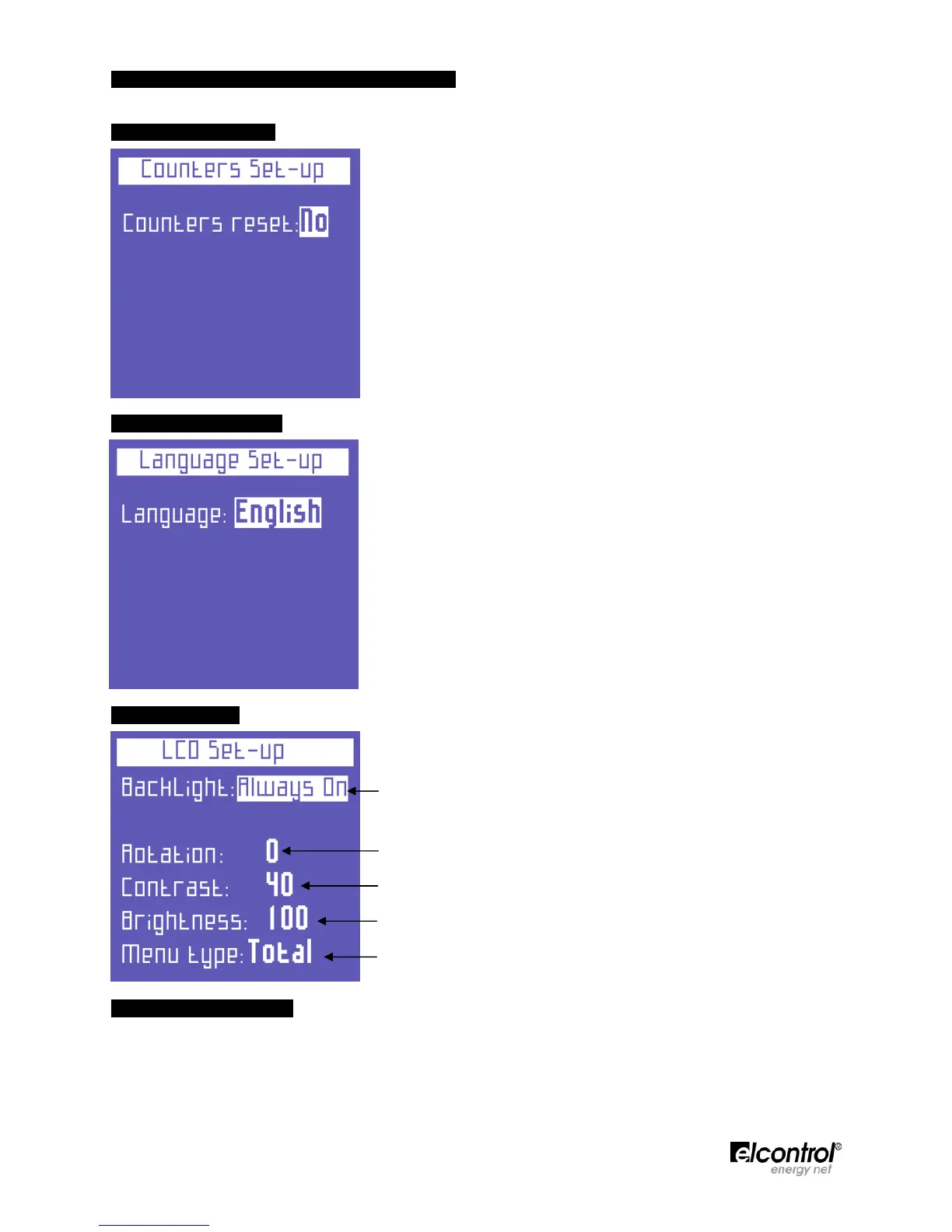
4.2.4 - Counters Reset
To reset the counters of both absorbed and generated power, place the
cursor on COUNTERS RESET and select YES.
N.B. To reset the tariff counters, see Sect. 4.2.9.1
4.2.5 - Language Setup
Select one of the following languages:
● ENGLISH
● ITALIANO
● ESPAÑOL
● FRANÇAIS
● DEUTSCH
4.2.6 - LCD Setup
The LCD SETUP page allows the user to set:
● The backlight of the display (Sect. 4.2.6.1).
● LCD orientation (Sect. 4.2.6.2).
● LCD contrast level (Sect. 4.2.6.3).
● The display brightness (Sect. 4.2.6.3).
● The menu type (Sect. 4.2.6.4).
4.2.6.1 - Backlight Setup
The LCD SETUP page allows the user to set backlight of the display. Place the cursor on BACKLIGHT and
select:
● ALWAYS ON.
● DELAY OFF 15 SEC (the backlight dims 15 seconds after the last key was pressed).
● DELAY OFF 1 MIN (the backlight dims 1 minute after the last key was pressed).


 To Next Page