Man. NVIP3 – Rel 1.3 EN (UK)
- 32 -
5.2 - Three-phase or Two-phase Connection Menu
When switching on the instrument or exiting the Setup Menu, NanoVIP
3
displays the first page of the Voltages
Menu. As shown in the flowcharts, the menus have a loop-type structure, i.e. when the end of the last page is
reached, the menu automatically returns to the first page. You can scroll through the menus in either direction.
The information displayed will then vary, depending on the type of connection that has been set in the Setup
Menu.
5.2.1 - Voltages Menu
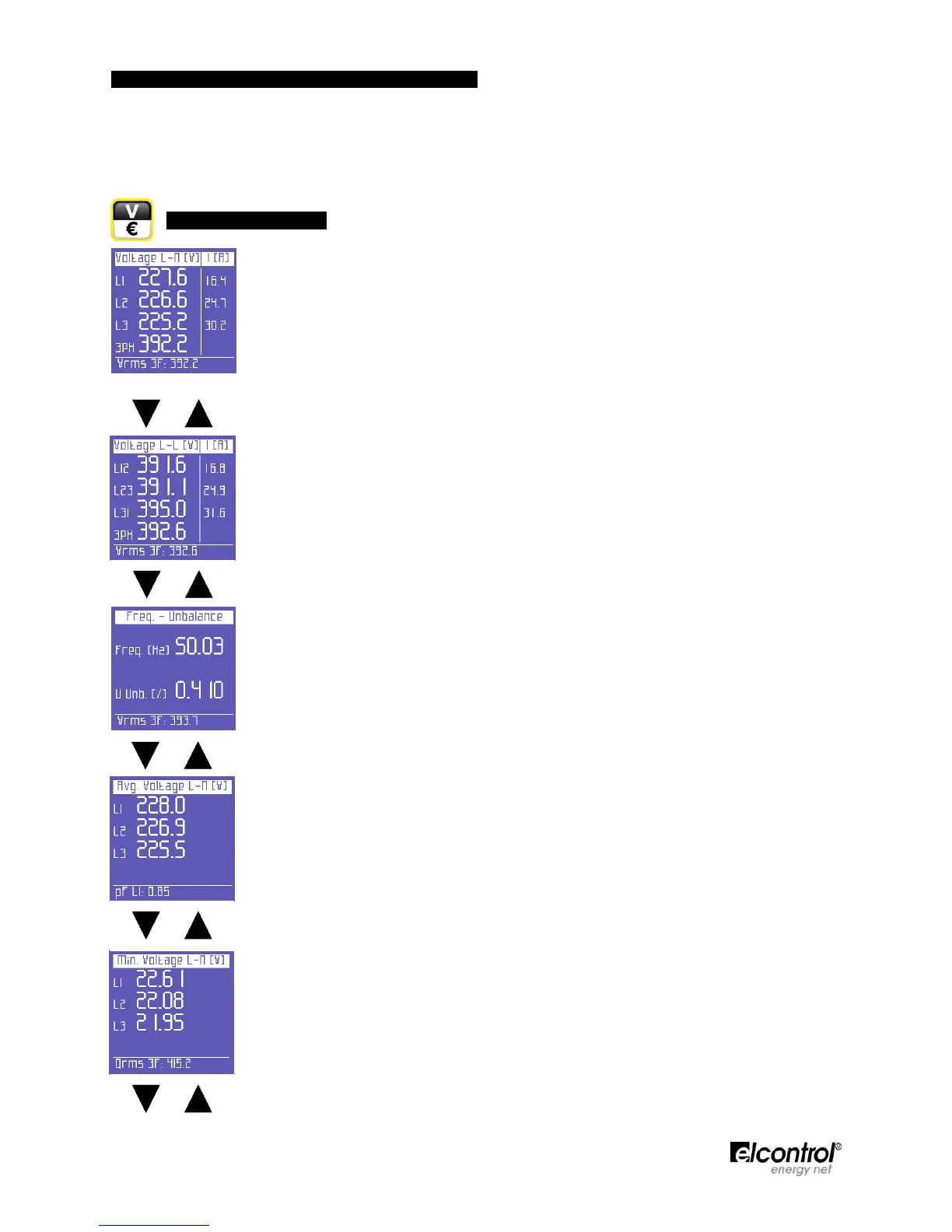
If the 3PH+N, 3PH+N-BL or 2PH connection is set (unbalanced/balanced three-phase with
neutral connection or two-phase connection - See Sect. 4.2.1.1), the first page will display
the phase-neutral voltages, the relevant phase currents, and the three-phase (or two-
phase) voltage.
NOTE: if another type of electrical connections without neutral is set, this page will not be
displayed.
When scrolling through the pages of this menu, as described in Sect. 5.1, the following
pages will be displayed.
Line voltages and relevant phase currents.
Frequency (measured on L1) and unbalance.
NOTE: in a three-phase system, the unbalance value is a parameter indicating a condition
in which the effective values of phase voltages or the phase angles between consecutive
phases differ. This parameter is one of the values which serve as an indication of power
quality. The lower the percentage value, the better the power quality.
Average voltage levels (calculated on the basis of the integration time which has been set.
Values can be reset as described in Sect. 4.2.3).
Minimum instant voltage values (Values can be reset as described in Sect. 4.2.3.3)


 To Next Page