Man. NVIP3 – Rel 1.3 EN (UK)
- 41 -
5.2.6 - Waveforms Menu
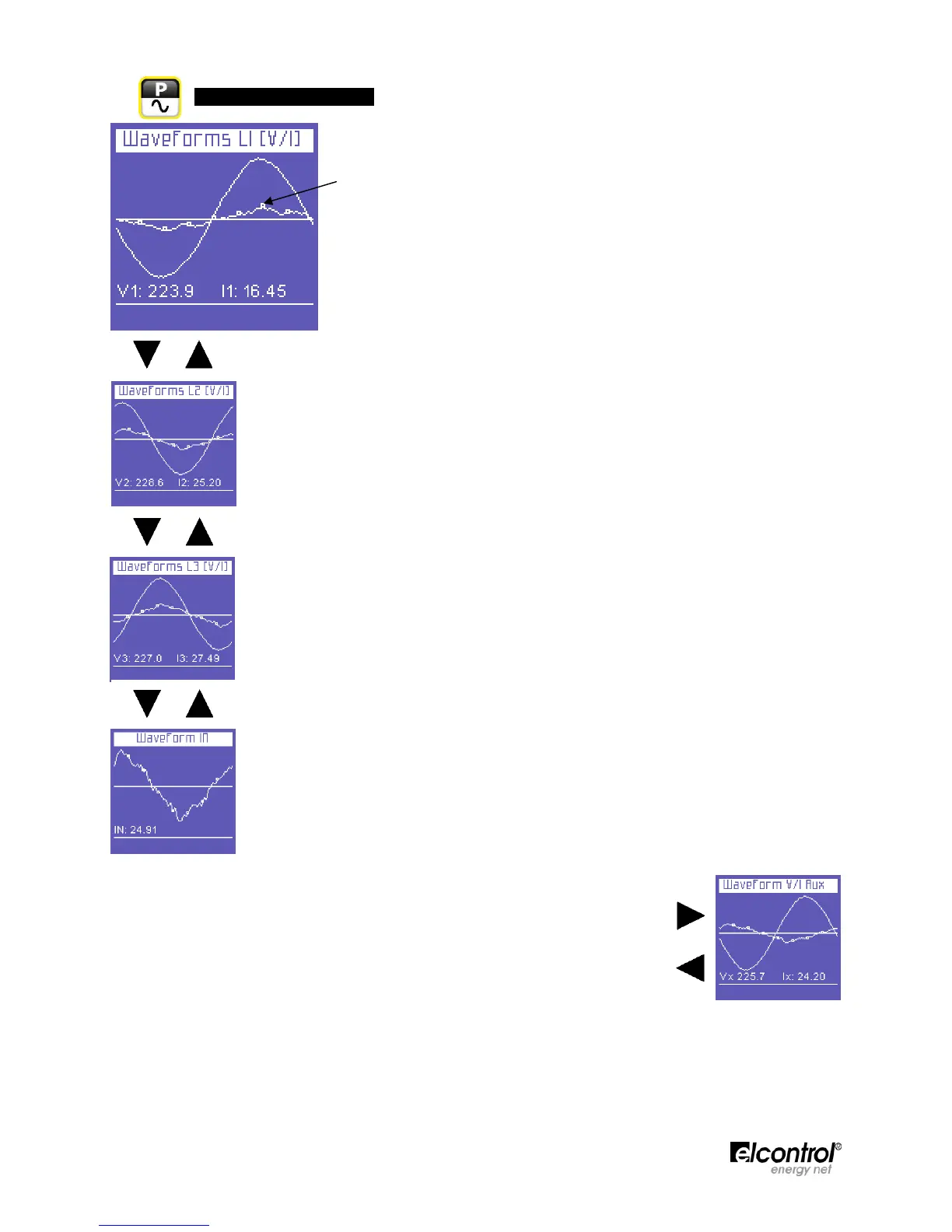
This menu shows the real-time waveforms and the relevant system voltage
and current values.
● NOTE: current tracing can be distinguished from voltage tracing by little
square markers. Waveform amplitude is purely indicative and is
automatically adjusted to screen size.
The first page of the menu displays the L1 voltage and current waveforms and
relevant RMS values.
L2 voltage and current waveforms and relevant RMS values.
L3 voltage and current waveforms and relevant RMS values.
Neutral current waveform and relevant RMS value.
On any of the Waveforms Menu pages, press to access the auxiliary channel
tracing page. In the AUX Menu, the user can also access the other Auxiliary
Channel Menus (Voltages, Currents, Power, Counters, Harmonics) by selecting
them with the relevant function keys.
Press ⊳ to exit the Auxiliary Menu and return to the first page of the relevant
menu.


 To Next Page