Man. NVIP3 – Rel 1.3 EN (UK)
- 46 -
5.2.10.2.5 - Manual Start
If manual start is selected, the instrument will detect any current (without the threshold set acting as a trigger)
occurring during the time period selected. At the end of the selected time period, the waveform detected will be
displayed (Sect. 5.2.10.3).
5.2.10.3 - Inrush Current Display
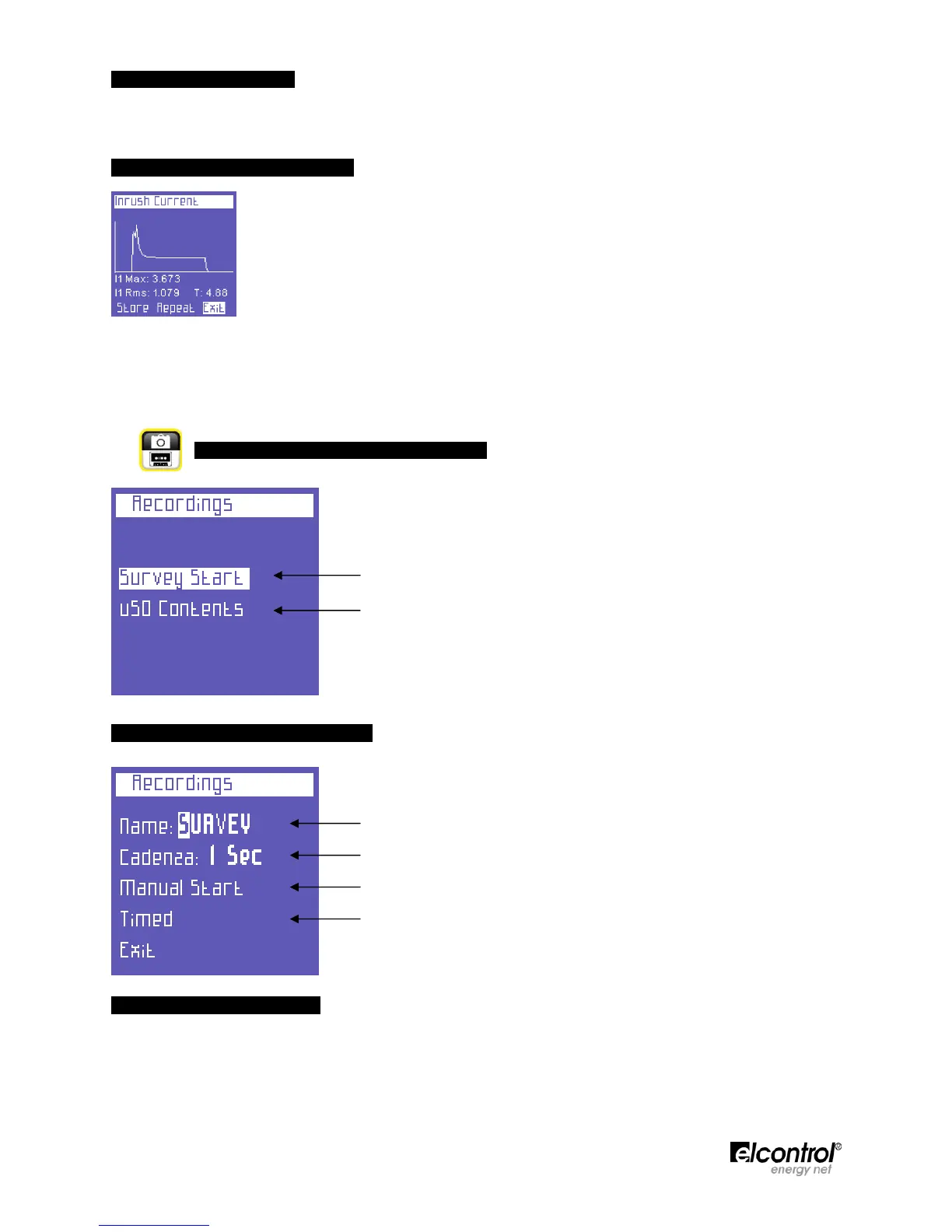
When an inrush current is detected, the following information will be displayed:
- Waveform;
- Maximum value;
- RMS value;
- Duration.
This screen will be displayed until the user:
- Exits (Exit = Return to the Setup page, Sect. 5.2.9.2).
- Repeats the measurement using the same settings (Repeat).
- Stores the measurement on the uSD card (Store, Sect. 5.2.10).
5.2.11 - Measurement Campaigns Menu
This menu allows the user to:
• Set a Measurement Campaign (Sect. 5.2.11.1).
• View the data stored on the uSD card (Sect. 5.2.11.2).
5.2.11.1 - Measurement Campaigns
Select "Start Campaign" to view the Measurement Campaign configuration page.
The following parameters can be set:
• Campaign Name (Sect. 5.2.11.1.1).
• Storing Rate (Sect. 5.2.11.1.2).
• Manual Start (Sect. 5.2.11.1.3).
• Scheduled Start (Sect. 5.2.11.1.4).
5.2.11.1.1 - Campaign Name
To assign a name to the campaign, place the cursor on the first character, press
and change the character
using the and keys.
The selection of the other characters has been made easier: move the flashing cursor using the and ⊳ keys,
and change the character as described above. The campaign name must have 6 alphanumeric characters (if the
same name is assigned to more than one campaign, progressive numbers will automatically be added to
subsequent campaign names, e.g. Survey01).


 To Next Page