Man. NVIP3 – Rel 1.3 EN (UK)
- 34 -
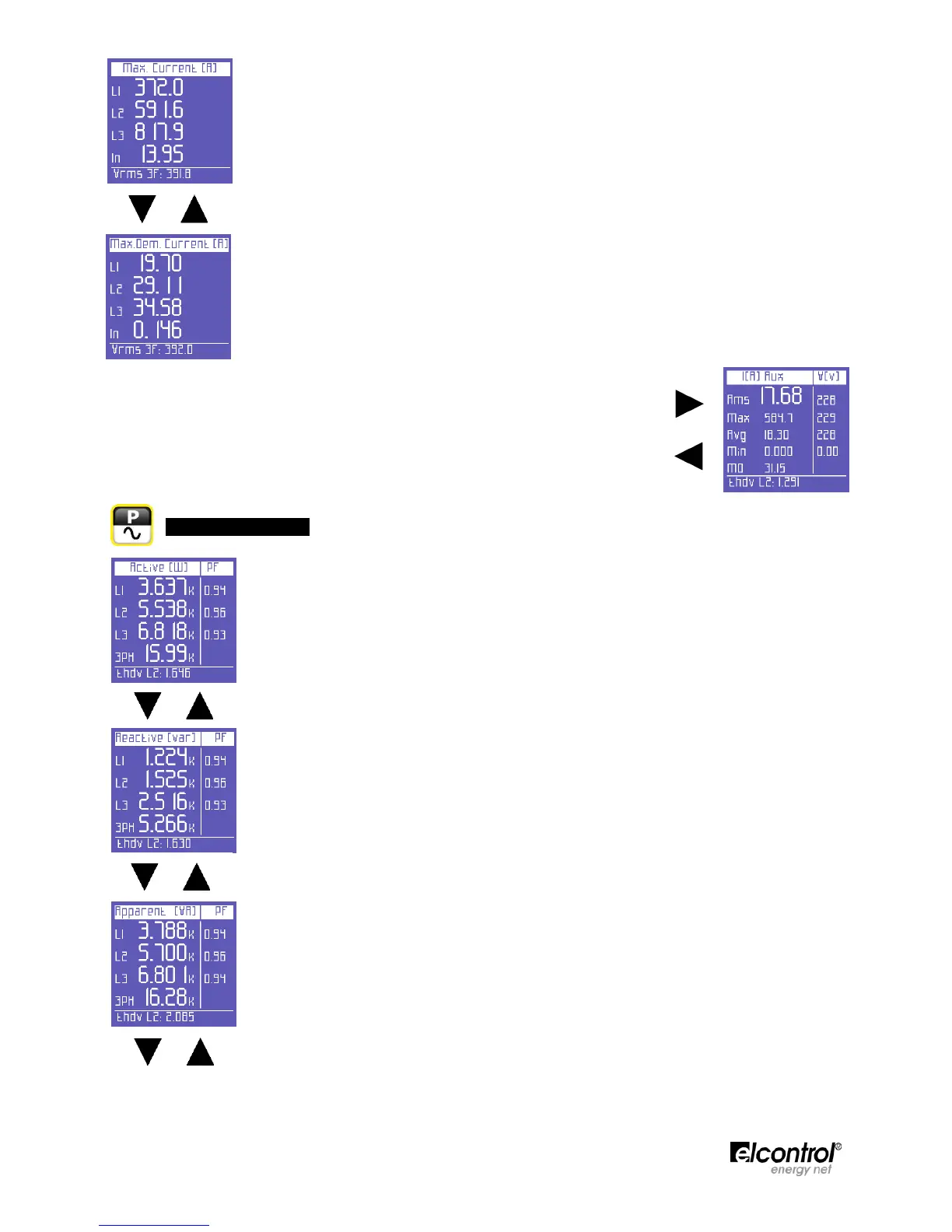
Maximum instant current values in each phase (values can be reset as described in Sect.
4.2.3.3)
Load peaks, i.e. the highest average current (calculated on the basis of the integration time
set. Values can be reset as described in Sect. 4.2.3.2)
On any of the Currents Menu pages, press to access the page containing all the
information regarding the auxiliary channel current. In the AUX Menu, the user can
also access the other Auxiliary Channel Menus (Voltages, Power, Counters,
Harmonics, Waveforms) by selecting them with the relevant function keys.
Press ⊳ to exit the Auxiliary Menu and return to the first page of the relevant
menu.
5.2.3 - Power Menu
The first page of this menu displays the active power (W) in each phase and in the three-
phase (or two-phase) connection and the corresponding PF values.
NOTE: as a norm, active power is shown as a negative when generated and a positive
when absorbed.
When scrolling through the pages of this menu, as described in Sect. 5.1, the following
pages will be displayed.
Reactive power (Var) in each phase and in the three-phase (or two-phase) connection and
the corresponding PF values.
NOTE: as a norm, reactive power is shown as a negative when capacitive and a positive
when inductive.
Apparent power (VA) in each phase and in the three-phase (or two-phase) connection and
the corresponding PF values.


 To Next Page