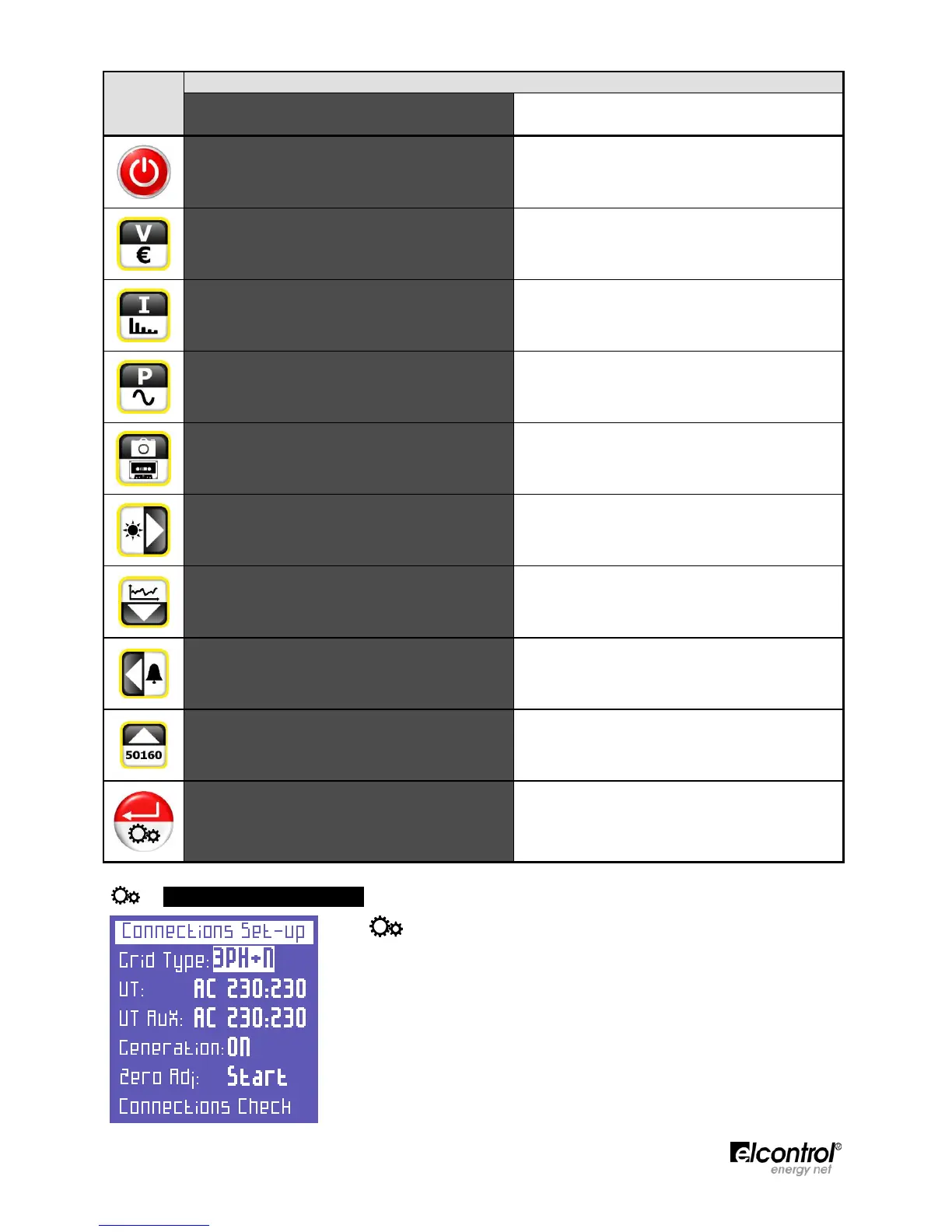
Press Once Press and Hold for 3 seconds
Switch the instrument
ON and OFF
Access to VOLTAGES Menu Access to COUNTERS Menu
Access to CURRENTS Menu
Access to HARMONICS - THD - C
os
ϕ
ϕϕ
ϕ
Menu
Access to POWER Menu Access to WAVEFORMS Menu
Snapshot Function: Takes a snapshot of the
parameters and displays them for the desired period
of time.
Access to MEASUREMENT CAMPAIGN Menu
• Access to AUX channel.
• After pressing
, scrolls through the
harmonics, trends, dips, interruptions, and
alarms menus.
Access to PHOTOVOLTAIC (if enabled)
• Scrolls down the pages of a measurement menu.
• Moves cursor down in the setup pages.
• Decreases the selected value in the setup pages.
Access to TRANSIENTS Menu
• Exits AUX channel.
• After pressing
, scrolls through the
harmonics, trends, dips, interruptions, and
alarms menus.
Access to ALARMS Menu
• Scrolls up the pages of a measurement menu.
• Moves cursor up in the setup pages.
• Increases the selected value in the setup pages.
Access to EN 50160 Menu
• Selects a parameter to be modified in the setup
pages.
• Access to a measurement subpage or submenu.
In this case, ENTER will be displayed in the lower
right corner of the display.
Access to SETUP Menu
4.2 - Programming & Setup
Press for approximately 3 seconds to access the configuration menus.
Use
and
keys to select the parameter to be configured.
Press
and the cursor will start to flash. Use
and
keys to modify the
selected value.
Press
again to confirm the value. The cursor will stop flashing.
Press
and ⊳
⊳⊳
⊳ to scroll through the setup pages, as illustrated in the
flowchart below.
As shown in the flowchart, the menus have a loop-type structure, i.e. when
the end of the last page is reached, the menu automatically returns to the first
page. You can scroll through the menus in either direction.


 To Next Page