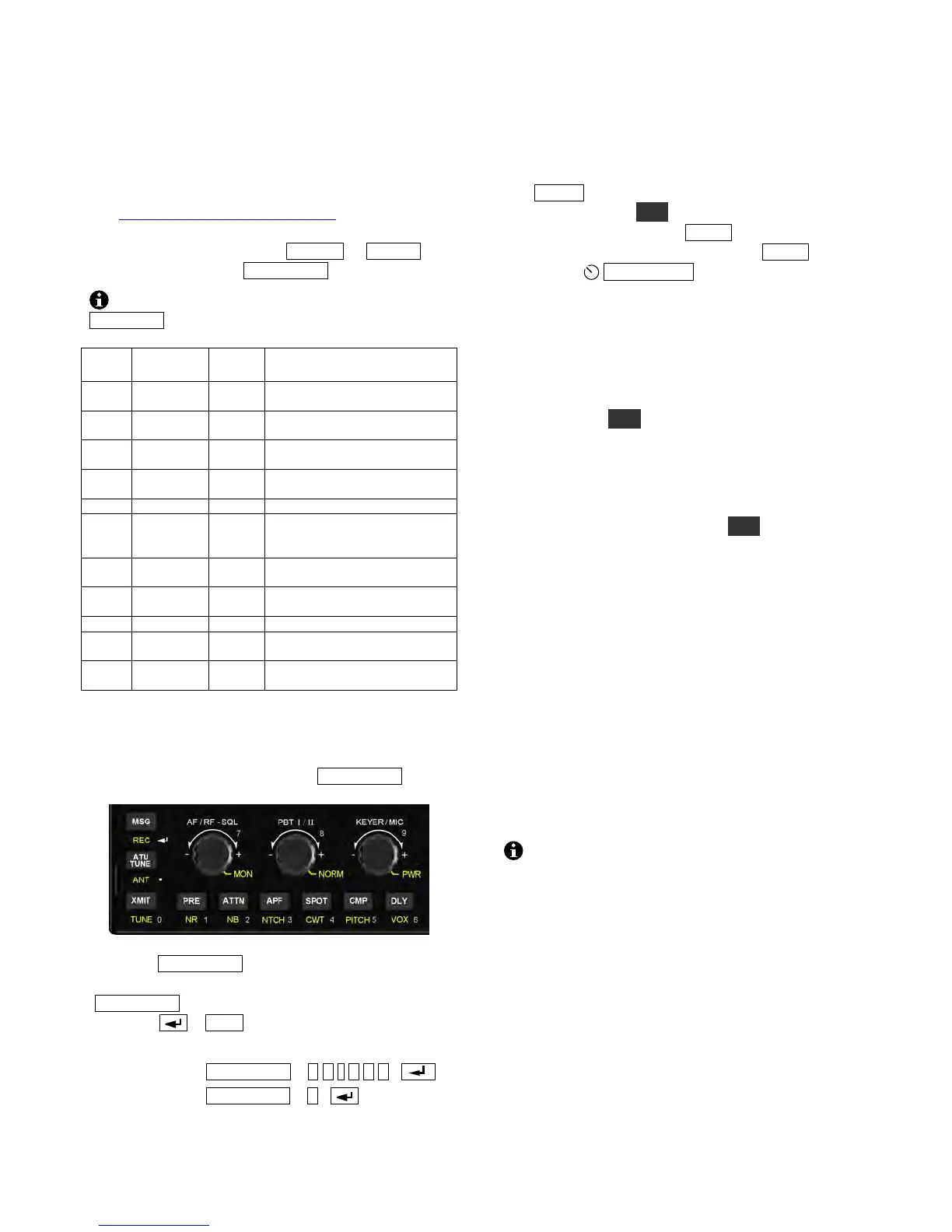
Direct Frequency Entry
The controls below function as a numeric keypad
(see 0 - 9 labels) when used with F RE Q E NT .
First, tap F RE Q EN T . Then enter up to three
MHz digits, optionally followed by a decimal point
(A T U TU N E switch) and up to three kHz digits.
Next tap . (MS G switch) to accept, or any
other switch to cancel. Examples:
14.255 MHz: FR E Q E NT 1 4 . 2 5 5 . . .
7.000 MHz: FR E Q E NT 7 .
Mode Selection
Each mode is described briefly below. Later
sections cover each mode in detail.
Tap M OD E one or more times to select SSB, CW,
AM, or FM mode. A LT selects alternate modes,
such as CW reverse. Tap D AT A to select data
mode. To select a data sub-mode, tap D AT A again,
then rotate
OF S / V FO B .
SSB (single sideband, pg. 15) is a narrow-banded
voice mode that conserves space in crowded band
segments. It’s the most popular operating mode
overall. LSB (lower sideband) is usually used on
160, 80, and 40 meters, while all other bands use
USB (upper sideband). You can override the default
sideband using AL T .
CW mode (pg. 16) uses on-off keying of the
carrier. CW requires very little bandwidth,
providing a high signal-to-noise ratio that’s ideal
for low-power (QRP) use. It’s also a popular mode
for DXing and contests. Holding A L T switches to
CW REV (CW reverse), reversing the received
sideband in CW mode from LSB to USB. This may
reduce the level of interference (QRM).
AM mode (amplitude modulation, pg. 15) is
characterized by its good fidelity . It is much less
power-efficient than SSB. AM amateur operation is
often found on 160, 80, 40, and 10 meters.
FM mode (frequency modulation, pg. 15) is most
often used for local communications, and can be
found on 10 m and up (see ARRL band plan). The
KX3 supports simplex and repeater operation,
including tone encoding. Many repeaters can be
found on the 2-meter band (144-148 MHz), which
is covered by the KX3-2M option module (pg. 25).
If you don’t plan to operate in AM or FM
modes, you can turn them off individually using the
AM MODE and FM MODE menu entries (pg. 35).
DATA modes (Advanced Operating Features, pg.
18) typically use a PC or keyboard connected to the
transceiver. However, the KX3 has two built-in data
modes that don’t require a computer: FSK D
(narrow-shift RTTY) and PSK D (PSK31). These
modes use the KX3’s built-in display for receive,
and a keyer paddle for transmit, converting the CW
you send into data.



 To Next Page