4
Installation
CAUTION
Avoid operating in wet conditions (rain, snow,
ocean spray, etc.). The KX3 is not waterproof.
Avoid operating in very high temperatures. If
the internal temperature is too high, the KX3
may reduce output power or turn itself off.
The KX3 can be damaged by electrostatic
discharge (ESD). Prior to opening the case,
touch a grounded, unpainted metal surface.
Operating Position
All controls are located on the top of the KX3’s
enclosure. This provides ample space for controls
and display, despite the transceiver’s small size.
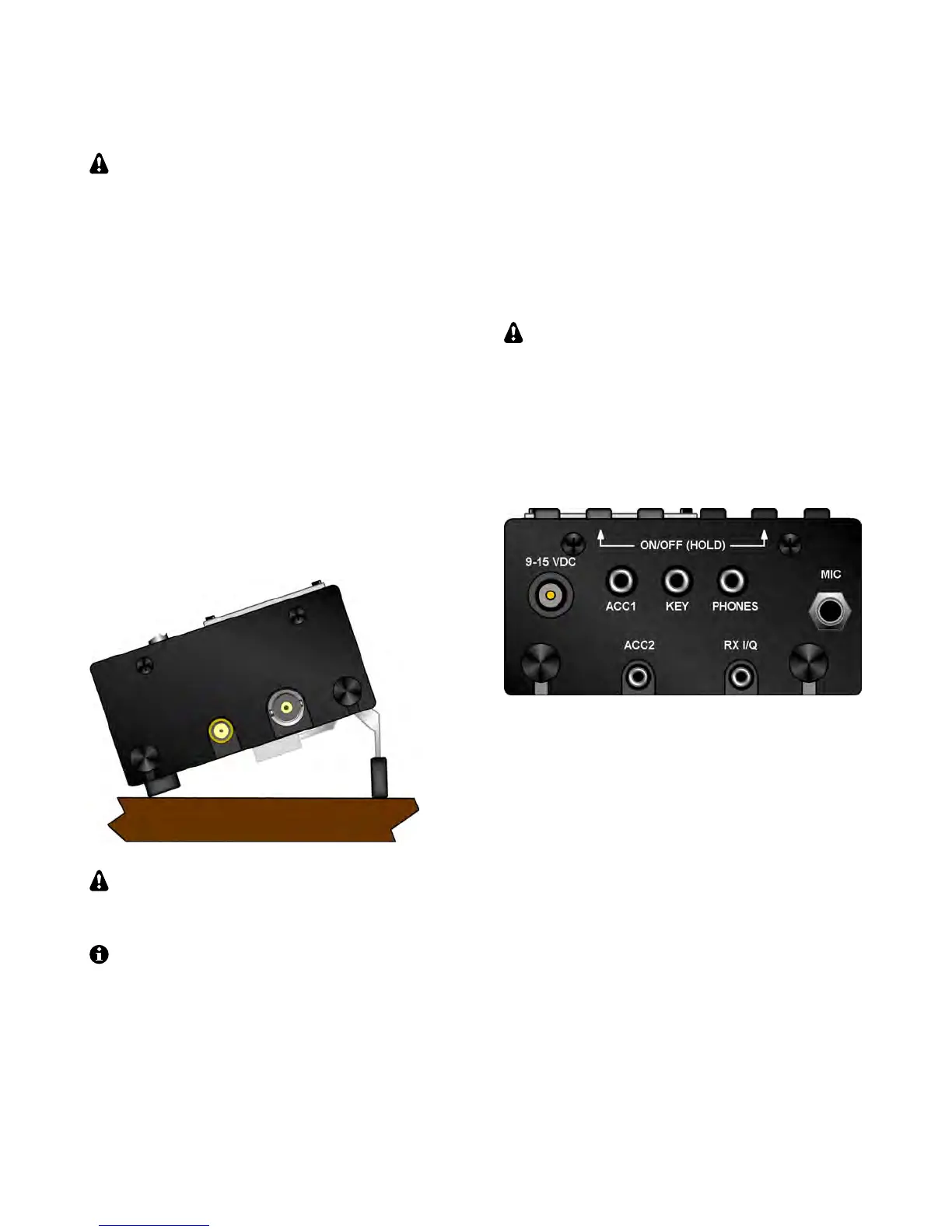
Tilt legs are provided in the back to position the
controls and display for ease of use, as shown
below. Loosen the two rear thumbscrews before
adjusting the legs. Tighten them afterwards.
To open the enclosure, follow the
instructions on pg. 23 (Internal Batteries). Use
only the method shown.
The KX3 can be conveniently operated with
one hand, in a manner similar to writing in a
notebook. If you’re right-handed, rotate the radio
slightly counter-clockwise (see cover illustration).
If you’re left-handed, rotate the KX3 clockwise.
Power Supply
For fixed-station use, a low-noise 12-14 VDC
power supply or battery is recommended. (See
linear and switching power supplies in the
Glossary, pg. 49.) For lightweight portable
operation, the KX3’s internal 8-AA-cell battery
pack can be used. See Internal Batteries, pg. 23.
Maximum power output varies with supply
voltage and other parameters. For full power
(10+ watts on most bands), 12-14 V is required.
A power cable with a 2.1-mm plug is supplied. The
wire with the white stripe is positive. Trim the cable
to the desired length. Plug the cable into the 9-15
VDC jack, shown at left in the illustration below.
CW Key/Keyer Paddle
The KX3 has two CW keying inputs:
KEY Jack: This stereo 3.5 mm jack on the left side
can be used with any hand key, keyer paddle, or
other keying device, as selected by the CW KEY1
menu entry. (See Using the Menu, pg. 9.)
KXPD3 Keyer Paddle: The KXPD3 is an optional
high-quality keyer paddle that attaches at the front
of the KX3 via two thumb screws. The dot and dash
paddles can be electrically reversed or configured
as a hand key using the CW KEY2 menu entry.
Allen wrenches are supplied for contact adjustment.



 To Next Page