Page 33
UPPER OVEN COMPONENTS
Bake Element
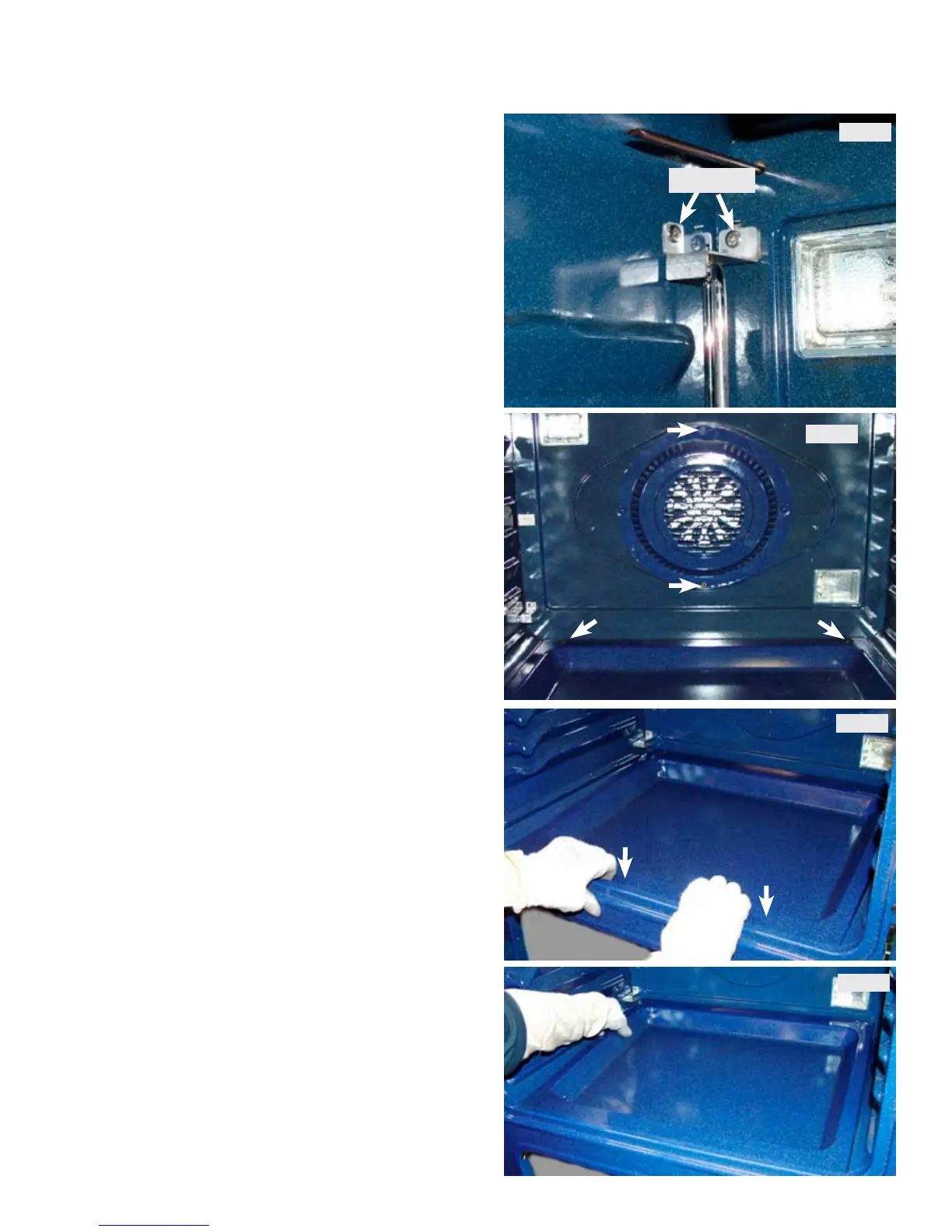
To remove and replace the bake element remove the
oven door and all interior oven racks. Remove the
rack sensor assembly by taking out the two screws in
the top mounting bracket and lifting the bracket and
sensor assembly rod out of the lower bracket. (Photo
A)
Mtg. screws
Photo A
Photo B
Photo C
Photo D
Remove the two screws that secure the convection
fan cover to the rear of the oven wall and remove the
cover. Remove the two screws at the rear corners of
the oven bottom panel. (Photo B)
Using your nger tips press down on the front edge
of the oven bottom to cause it to lift upward in the
rear of the oven cavity. (Photo C).
Lift the rear of the oven bottom upward and slide
it toward the rear oven wall to disengage the front
edge from the chassis. Remove the oven bottom.
(Photo D)



 To Next Page