28
DIAGNOSTICS SYSTEM
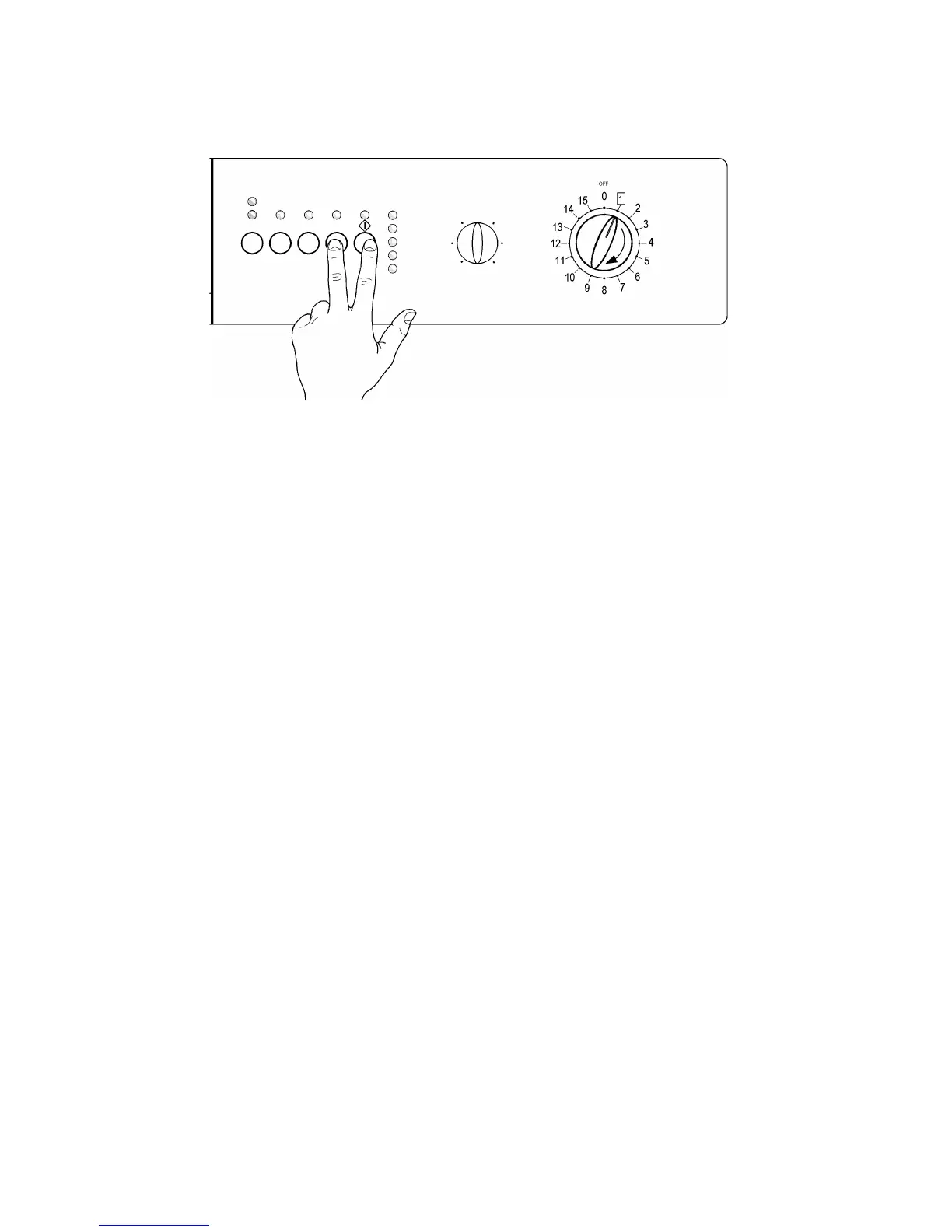
Access to diagnostics mode
1. Switch off the appliance.
2. Press and hold down START/PAUSE and any one of the option buttons simultaneously.
3. Holding down both buttons, switch the appliance on by turning the programme selector one position to
the right (clockwise).
4. Continue to hold down the START/PAUSE and option buttons until the LED begins to flash (at least 2
seconds).
Remark: The START/PAUSE button can be configured according to the styling of the model,
and is therefore not always in the position shown in the figure.
In the first selector position, the operation of the buttons and the relative LEDs is checked; turning the
selector knob clockwise activates the diagnostics cycle for the operation of the various components and
displays any alarm conditions.
7.2 Exiting diagnostics mode
→ To exit the diagnostics cycle, switch the appliance off, then on, and then off again.


 To Next Page