Leveling
(Picture 4)
(Picture 5)
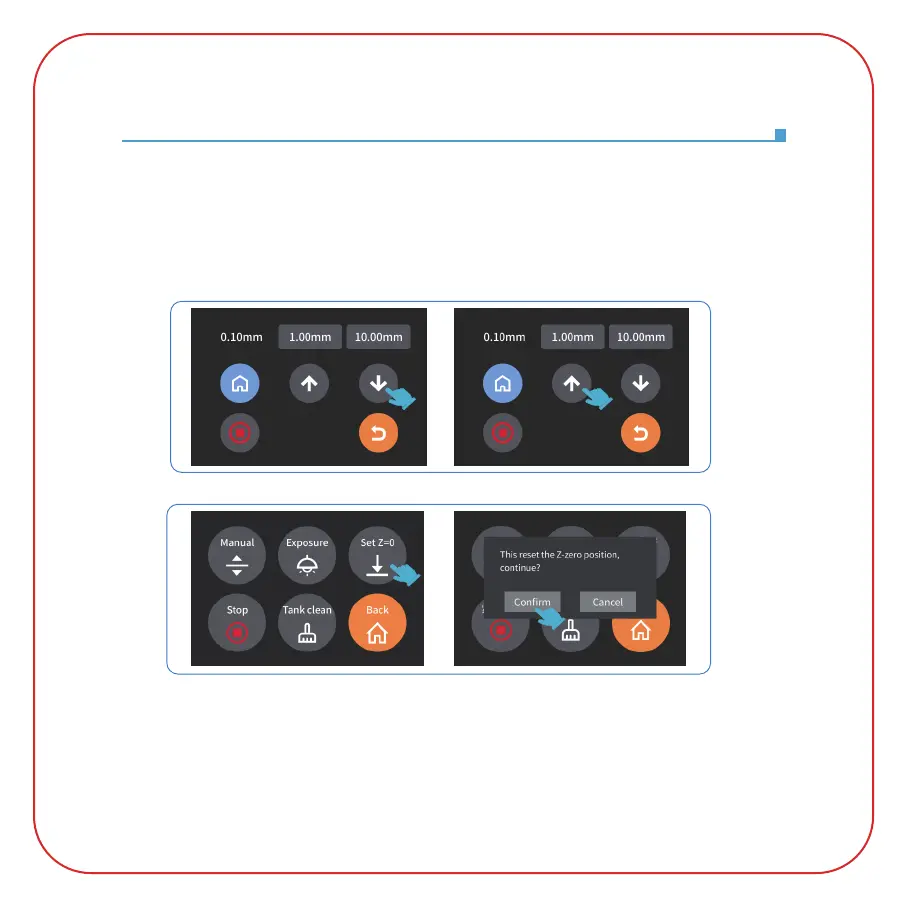
3. Pull the leveling card. If you find there is a slight resistance during this process, you can go
directly to step 5. (Note: If there is no resistance when pulling out the leveling card, please click
the Z-axis "down" button (in steps of 0.1mm) until there is a slight resistance to pull the leveling
card. If there is too much resistance or the leveling card cannot move, please click the Z-axis "up"
button (in steps of 0.1mm) until there is slight resistance to pull the leveling card.) (See Picture 4)
4. After completing the above operations, back to the previous menu, and click "Set Z=0", then a
confirmation pop-up window will appear in the interface, click "Confirm" to complete the setting.
At this time, the current Z-axis position is reset to the new initial height of the first printing layer.
(See Picture 5)











 To Next Page