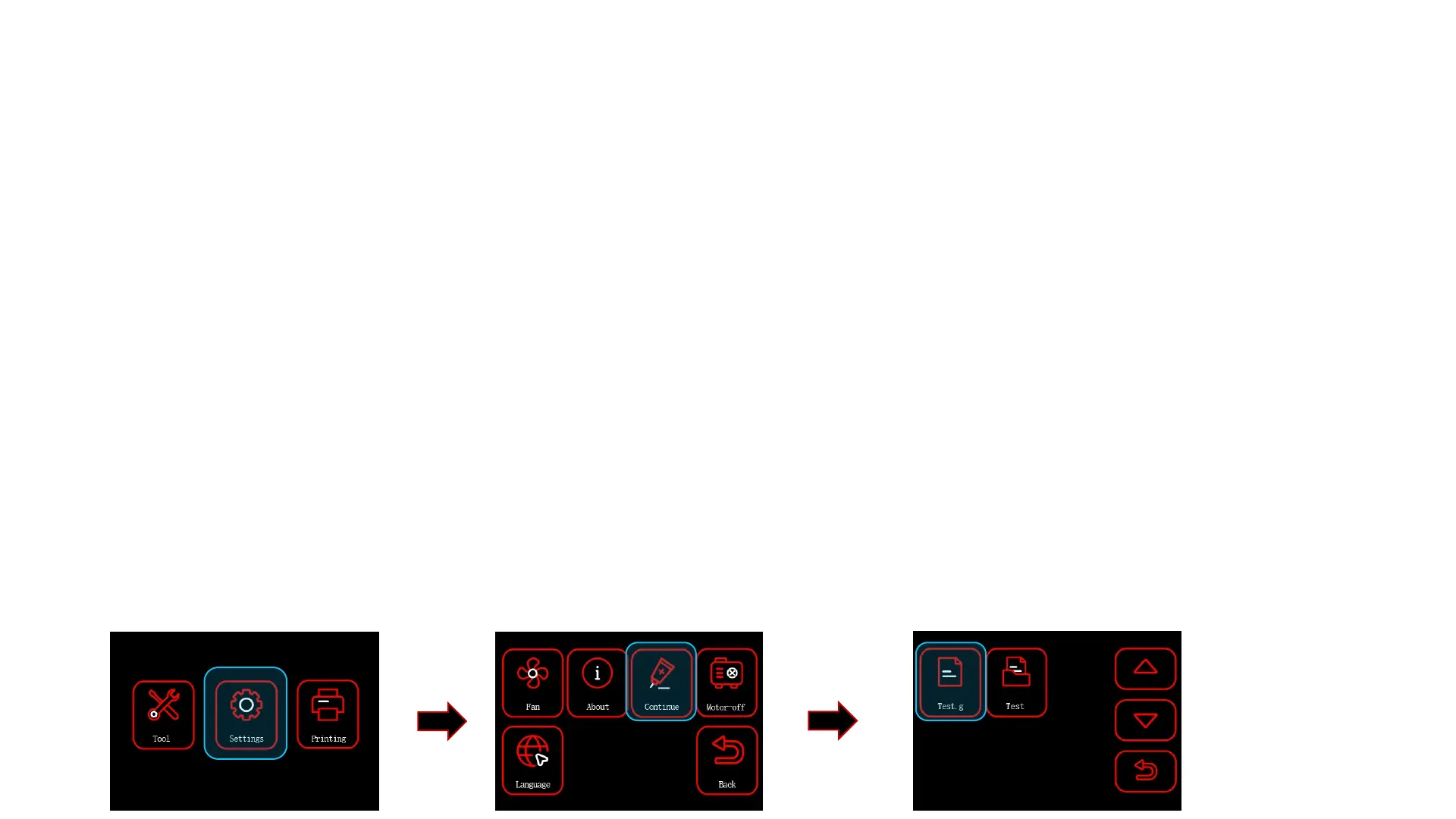
Description of Special Function:
Continue:
l This function allows you to resume printing if you want to continue printing after the model
has been interrupted by a misoperation.
l First click 【Tool】-【Home】, observe if the model will collide by setting the X/Y/Z axis to
zero in sequence. (If a collision occurs, turn off the power immediately, this function
cannot be used.)
l Then click 【Back】-【Move】, move the Z-axis to the height of model interruption, then
move the X/Y axis again, and move the nozzle to the top of the model. Observe whether
the nozzle is level with the model section or there is a gap of about 0.1mm. (The print
head should not be lower than the height of the model interruption position, or model
collision will occur during printing.).
l Finally, select 【Settings】 on the menu, click 【Continue】, and then select the model
file you want to continue printing.
l Wait for the temperature of the nozzle and heatbed to reach the preset temperature, in the
meanwhile, start to read the previous printing information up to the height of the
interrupted printing position, then the X and Y axes will back to zero one after another, and
then it will start printing.
12



 To Next Page