10. THE SEQUENCER
35
10.9.2 PER TRACK MODE
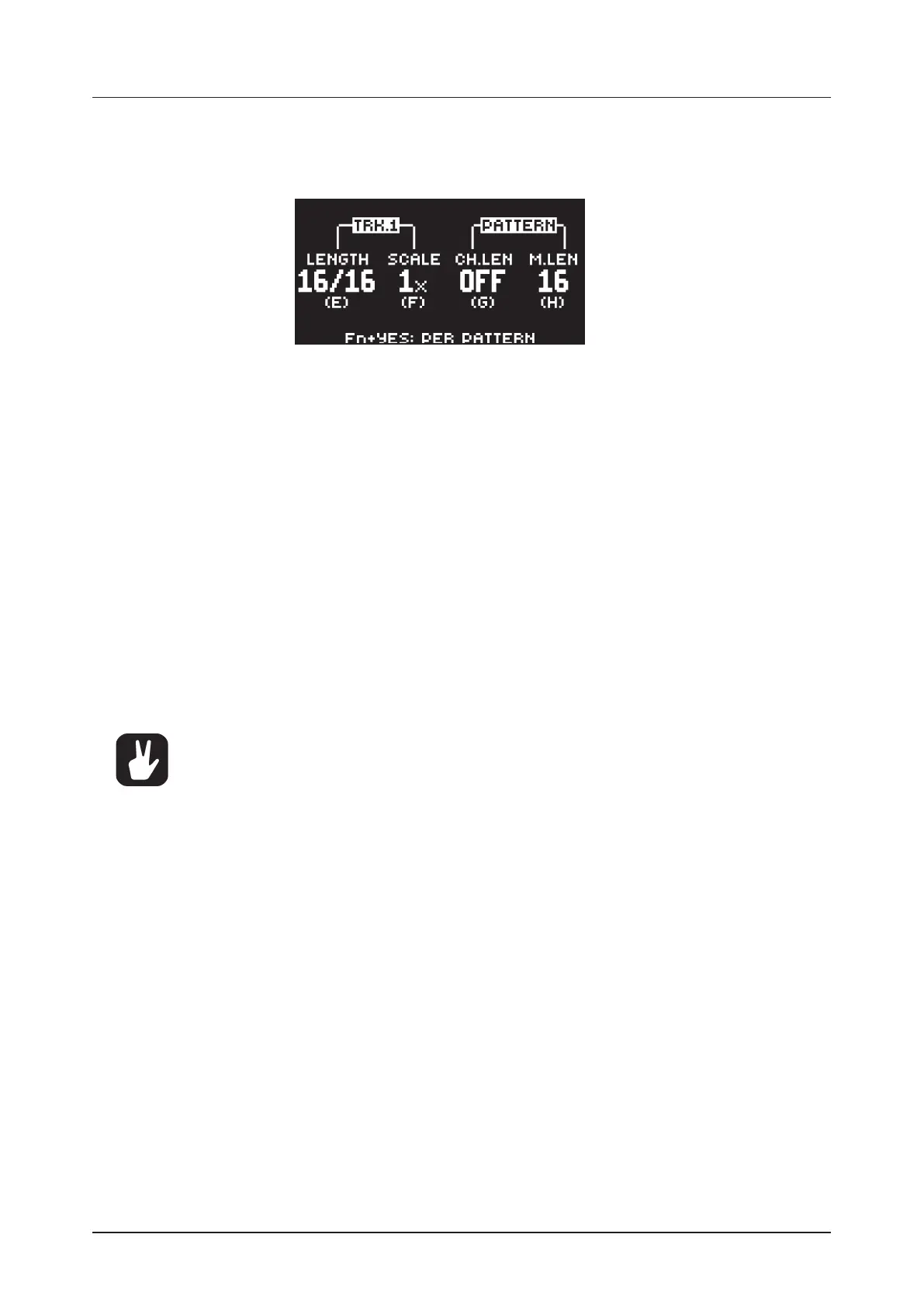
In this mode, you can assign individual length and scale to the tracks of the pattern. Press [FUNC] +
[YES] to switch between the two scale modes. In PER TRACK mode, two columns exist, TRACK and
PATTERN.
The TRACK column sets the step length and scale of the track. The settings only aects the active track.
Press the [TRK] keys to select the track whose scale settings you wish to edit.
The PATTERN column sets the master change length and the master length of the pattern.
LENGTH controls the step length of the track. The leftmost number displays the number of steps
of the track. The total length, displayed by the second number, determines the maximum number of
steps available for the track. If you use 17 steps or more in a track, the [PAGE] key is (while in GRID
RECORDING mode) used to toggle between the dierent pattern pages.
SCALE controls the speed of track playback in multiples of the current tempo. It oers seven possible
settings, 1/8X, 1/4X, 1/2X, 3/4X, 1X, 3/2X and 2X. A setting of 1/8X plays back the track at one-eighth
of the set tempo. 3/4X plays the track back at three-quarters of the tempo; 3/2X plays back the track
twice as fast as the 3/4X setting. 2X makes the track play at twice the BPM.
CH.LEN (Change Length) controls for how long the active pattern plays before a cued or chained
pattern begins to play. This setting is important when, for example, you set M.LEN to INF. If you do not
make any CH.LEN setting, the pattern plays infinitely, and the next pattern is thus not cued. By default
a cued pattern change happens at the end of the pattern (CH.LEN set to OFF).
M.LEN (Master Length) controls the number of steps the pattern plays before all tracks restart. An
INF setting makes the tracks of the pattern loop infinitely, without ever being restarted. Note that this
setting also aects for how long the active pattern plays before a chained pattern starts playing. The
CH.LEN parameter overrides this if its parameter value is less than the M.LEN value.
In the SCALE menu, you can press [FUNC] + [UP]/[DOWN] to set the TRACK LENGTH in
increments from 2/16 to 64/64.
10.10 SEQUENCER FEATURES
10.10.1 PARAMETER LOCKS
Parameter locks makes it possible to set every trig to have its own unique parameter values. The note
trigs of an audio track can, for example, have dierent pitch, amp or filter settings. It is possible to pa-
rameter lock the parameters found on the PARAMETER pages, and you can apply parameter locks to
all types of tracks. For a complete overview of all parameters on the PARAMETER pages, please see “11.
AUDIO TRACK PARAMETERS” on page 40, and “12. MIDI TRACK PARAMETERS” on page 48.
Adding parameter locks in GRID RECORDING mode.
1. Press [RECORD] to enter GRID RECORDING mode.
2. Press [TRIG] to add a Note trig or [FUNC] + [TRIG] key to add a Lock trig and to where you want
to perform a parameter lock.
3. Press and hold the [TRIG] key of a previously placed trig (note trig or a lock trig).
4. Turn the DATA ENTRY knobs that control the parameter you want to lock, and set it to the desired
value. The graphics become inverted for the locked parameter, and the locked parameter value is
displayed. The [TRIG] key of the locked trig blinks red (for note trigs) or yellow (for lock trigs) to
indicate the trig now contains a parameter lock.
Remove a single parameter lock by holding [TRIG] + pressing the DATA ENTRY knob of the locked pa-
rameter. You can erase all parameter locks from a trig if you remove the note trig and then enter it again.


 To Next Page