13. FX AND MIXER PARAMETERS
54
13.3.3 FREQ
FB Shelving Freq sets the shelving filter frequency. Together with the GAIN parameter, it can be used to
dampen the reverberated signal above a chosen frequency, making the reverberation sound more promi-
nent or more mued. (0.00–127.00)
13.3.4 GAIN
FB Shelving Gain aects the damping of the reverberated signal above the shelving frequency set by the
FREQ parameter. At max value the treble is included in the reverberations; lowering the value gradually
dampens it. (0.00–127.00)
13.3.5 HPF
HPF sets the cuto frequency of the reverb high-pass filter that aects the audio going in to the reverb.
(0.00–127.00)
13.3.6 LPF
LPF sets the cuto frequency of the reverb low-pass filter that aects the audio going in to the reverb.
(0.00–127.00)
13.3.6 REV
Rev Pre/Post Comp sets whether the signal from the reverb should enter the audio chain before or after
the compressor. (PRE, POST) For more information, please see “4.2 EFFECTS” on page 13.
13.3.7 VOL
Mix Volume sets the volume of the Reverb output signal. (0.00–127.00)
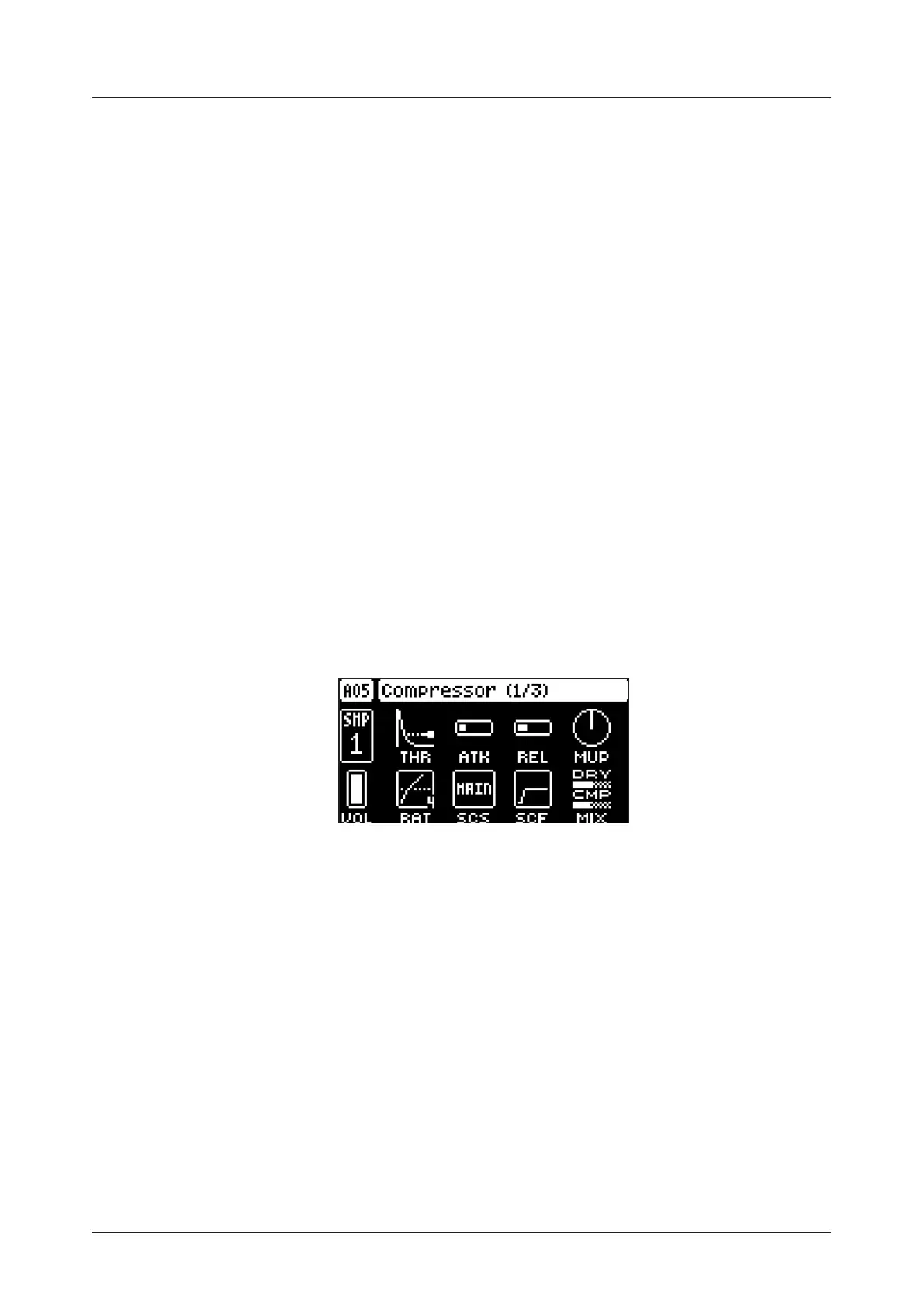
13.4 COMPRESSOR (MASTER PAGE 1)
The Compressor master eect compresses the dynamic range of the signal by reducing the volume
of loud sounds relative to the quiet sounds. There are eight parameters with which the compressor is
customized on this page. There is a bar on the rightmost edge of the screen that visually represents the
amount of compression.
Press [FUNC] + [LFO] once to access this parameter page.
13.4.1 THR
Threshold sets the threshold of the compressor. A lower threshold means a larger portion of the signal
are subject to compression. (0–127)
13.4.2 ATK
Attack sets the time of the compressor attack phase, i.e. how quickly the compressor responds to loud
peaks. (0–127)
13.4.3 REL
Release sets the time of the compressor release phase, i.e. how long it takes for the compression to
recover in quieter moments. (0–127)
13.4.4 MUP
Makeup Gain sets the makeup gain of the compressor output, to compensate for the reduced signal
levels caused by compression. The Makeup Gain parameter value is displayed in dB. (0.0–24.0)
13.4.5 VOL
Pattern volume sets the patterns overall audio level. This parameter basically has the same function as
the MASTER VOLUME knob, but is saved together with the pattern. (0–127)


 To Next Page