13. FX AND MIXER PARAMETERS
56
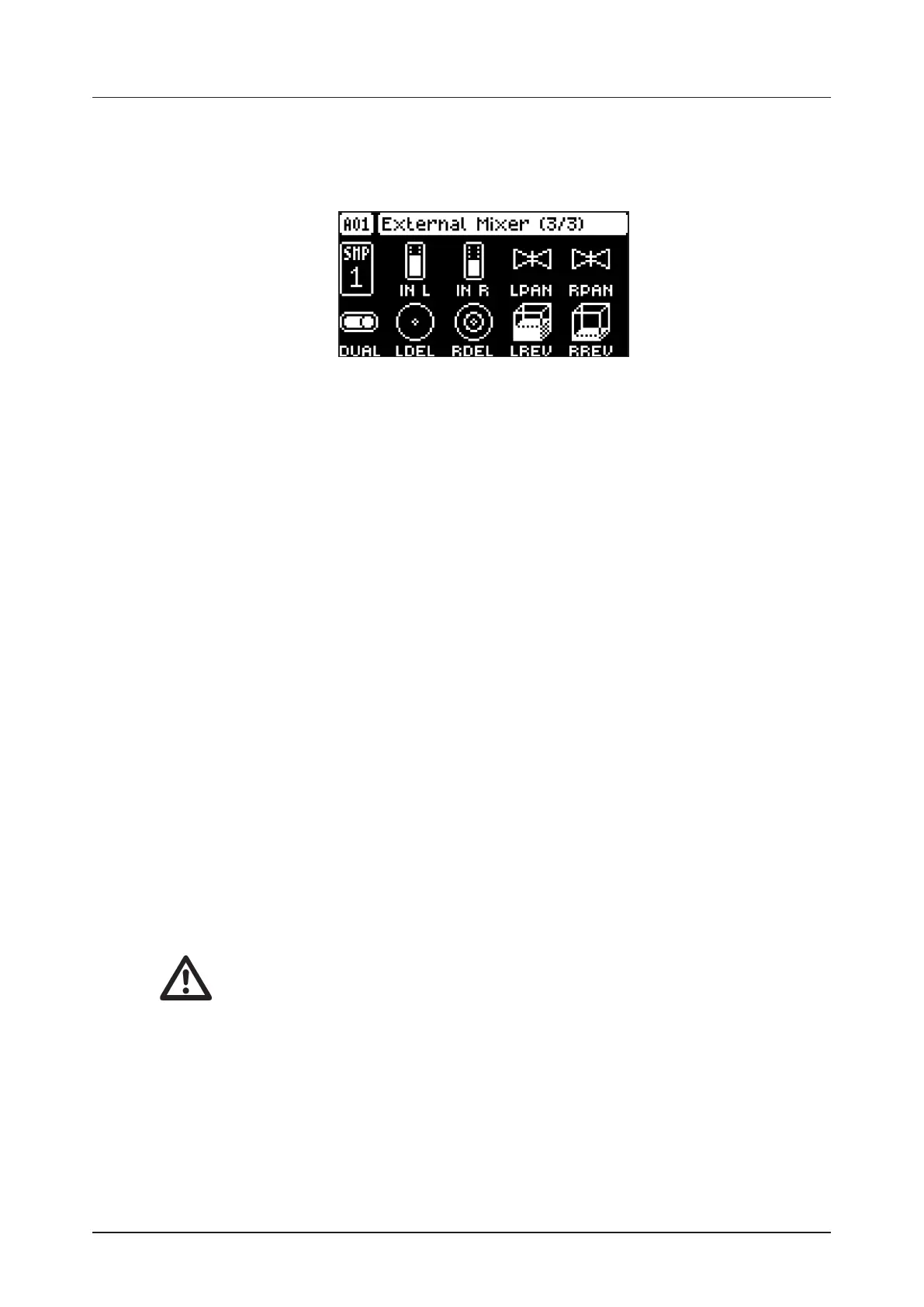
13.6 EXTERNAL MIXER (MASTER PAGE 3)
The EXTERNAL MIXER page contains a number of parameters related to when you use the INPUT L/R
inputs to process incoming audio.
Press [FUNC] + [LFO] three times to access this parameter page.
13.6.1 IN L
Volume input L sets the level of the audio from the INPUT L audio input.
13.6.2 IN R
Volume input R sets the level of the audio from the INPUT R audio input.
13.6.3 LPAN
Left pan sets the pan of the audio from the INPUT L audio input. (L64–R63)
13.6.4 RPAN
Right pan sets the pan of the audio from the INPUT R audio input. (L64–R63)
13.6.5 DUAL
Dual Mono sets if the inputs are processed as two separate mono inputs or as a single stereo input.
Setting this parameter to OFF changes the rest of the parameters from being separate controls for the
left and right channel to single controls for both audio channels. The PAN parameters changes to a BAL
(Balance) parameter. Use LEVEL/DATA to adjust this parameter (OFF, ON)
13.6.6 LDEL
Input L Delay Send sets the amount of sound from the INPUT L audio input that is sent through to the
delay eect. For more information, please see “13.3 DELAY” on page 60. (0.00–127.00)
13.6.7 RDEL
Input R Delay Send. Same as LDEL but instead aects the audio from the INPUT R audio input (0.00–
127.00)
13.6.8 LREV
Input L Reverb send sets the amount of sound from the INPUT L audio input that is sent through to the
reverb eect. For more information, please see “13.4 REVERB” on page 62. (0.00–127.00)
13.6.9 RREV
Input R Reverb Send. Same as LREV but instead aects the audio from the INPUT R audio input (0.00–
127.00)
• Setting the MON parameter on the SAMPLING menu to YES disables the External in
mixer functionality. For more information, please see “14.1 SAMPLING MENU” on page
57.
• After you load/reload a project, or after pressing [STOP] + [STOP], you must trig or play
an audio track to activate the eects for the External in mixer.


 To Next Page