EasyManua.ls Logo

ELNA 6003 - Main Function of Keys; Reverse Key; Auto-Lock Key; Up;Down Needle Key

ELNA 6003
45 pages
Print Icon
To Next Page IconTo Next Page
To Previous Page IconTo Previous Page
Loading...
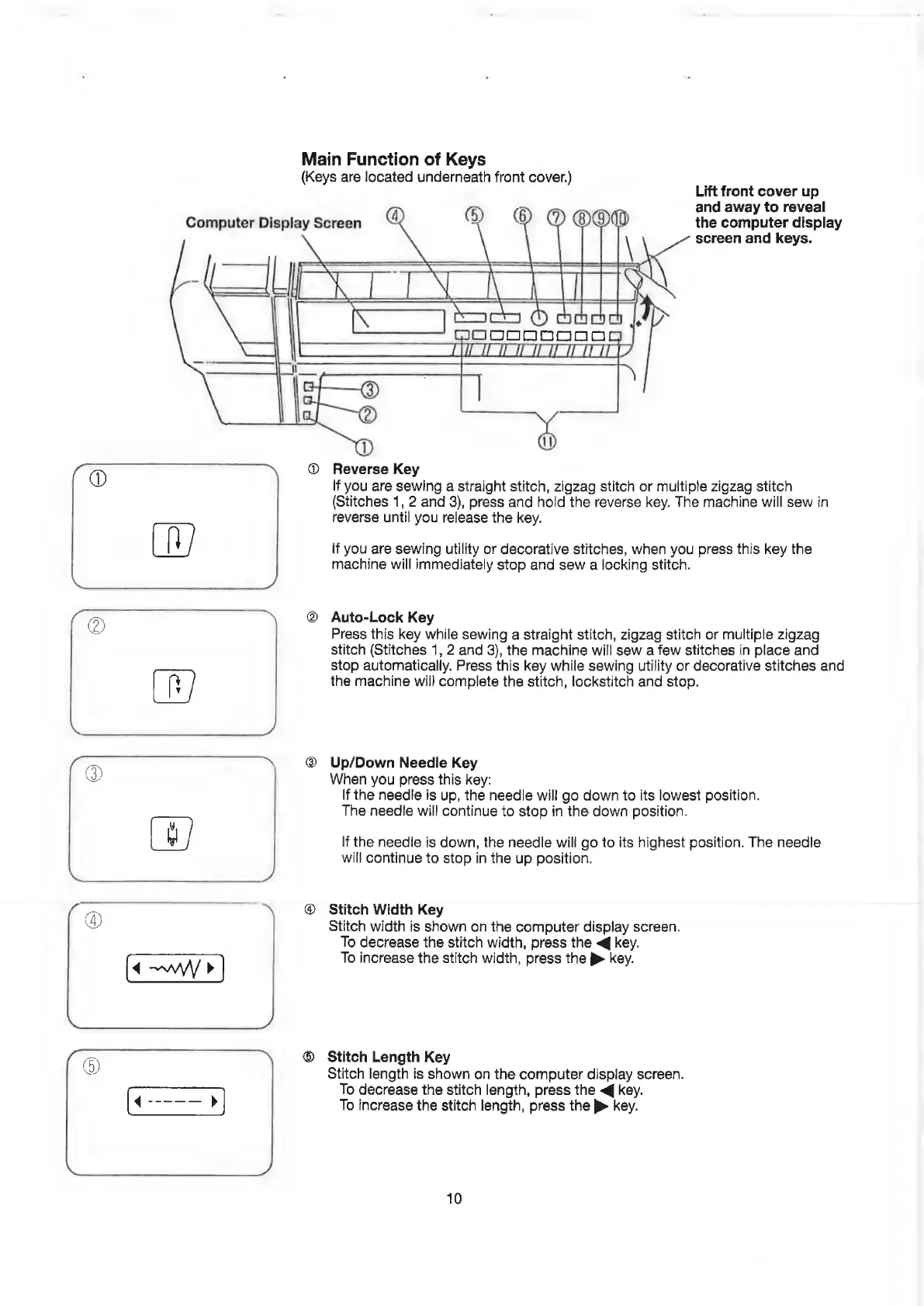
Main
Function
of
Keys
(Keys
are
located
underneath
front
cover.)
Lift
front
cover
up
and
away
to
reveal
Computer
Display
Screen
oO)
(6)
)
MO
OOM
the
computer
display
screen
and
keys.
ne
ee
ae
UFR
LY
A_LUHYS
KR)
Sc
0
dds
|
WOOO
MmOooOooog
CU
i
i
ay
I
ae
aS
BS
ee
5
@
D
(1)
@
Reverse
Key
If
you
are
sewing
a
straight
stitch,
zigzag
stitch
or
multiple
zigzag
stitch
(Stitches
1,
2
and
3),
press
and
hold
the
reverse
key.
The
machine
will
sew
in
reverse
until
you
release
the
key.
If
you
are
sewing
utility
or
decorative
stitches,
when
you
press
this
key
the
machine
will
immediately
stop
and
sew
a
locking
stitch.
Auto-Lock
Key
Press
this
key
while
sewing
a
straight
stitch,
zigzag
stitch
or
multiple
zigzag
stitch
(Stitches
1,
2
and
3),
the
machine
will
sew
a
few
stitches
in
place
and
stop
automatically.
Press
this
key
while
sewing
utility
or
decorative
stitches
and
the
machine
will
complete
the
stitch,
lockstitch
and
stop.
@
Up/Down
Needle
Key
When
you
press
this
key:
If
the
needle
is
up,
the
needle
will
go
down
to
its
lowest
position.
The
needle
will
continue
to
stop
in
the
down
position.
If
the
needie
is
down,
the
needle
will
go
to
its
highest
position.
The
needle
will
continue
to
stop
in
the
up
position.
@
Stitch
Width
Key
Stitch
width
is
shown
on
the
computer
display
screen.
To
decrease
the
stitch
width,
press
the
<@
key.
To
increase
the
stitch
width,
press
the
p>
Key.
®
Stitch
Length
Key
Stitch
length
is
shown
on
the
computer
display
screen.
To
decrease
the
stitch
length,
press
the
<@
key.
To
increase
the
stitch
length,
press
the
p>
key.
10

Related product manuals