EasyManua.ls Logo

ELNA 6003 - How to Sew on a Button

ELNA 6003
45 pages
Print Icon
To Next Page IconTo Next Page
To Previous Page IconTo Previous Page
Loading...
BH1
[CowuT
W5.0
L0.4|
‘=o
x
das
|
COMPLETED
|
SIZE
MEMORY
[Sane
sve
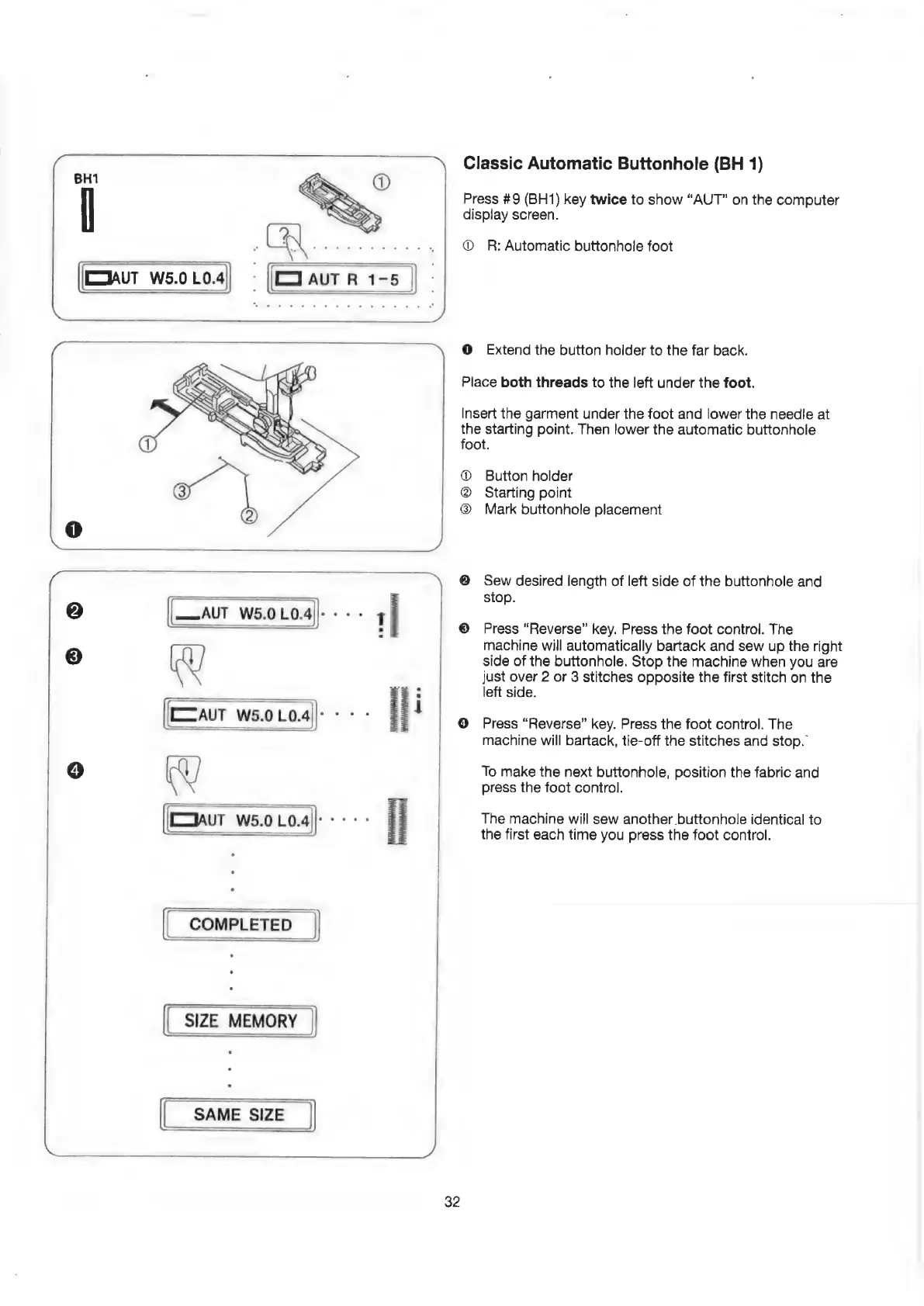
Classic
Automatic
Buttonhole
(BH
1)
Press
#9
(BH1)
key
twice
to
show
“AUT”
on
the
computer
display
screen.
@
R:
Automatic
buttonhole
foot
@
Extend
the
button
holder
to
the
far
back.
Place
both
threads
to
the
left
under
the
foot.
Insert
the
garment
under
the
foot
and
lower
the
needle
at
the
starting
point.
Then
lower
the
automatic
buttonhole
foot.
Button
holder
Starting
point
Mark
buttonhole
placement
Sew
desired
length
of
left
side
of
the
buttonhole
and
stop.
Press
“Reverse”
key.
Press
the
foot
control.
The
machine
will
automatically
bartack
and
sew
up
the
right
side
of
the
buttonhole.
Stop
the
machine
when
you
are
just
over
2
or
3
stitches
opposite
the
first
stitch
on
the
left
side.
Press
“Reverse”
key.
Press
the
foot
control.
The
machine
will
bartack,
tie-off
the
stitches
and
stop.
To
make
the
next
buttonhole,
position
the
fabric
and
press
the
foot
control.
The
machine
will
sew
another
buttonhole
identical
to
the
first
each
time
you
press
the
foot
control.
32

Related product manuals