EasyManua.ls Logo

ELNA 6003 - Foot Pressure Dial; Controlling Sewing Speed; Using the Fine Adjustment Dial

ELNA 6003
45 pages
Print Icon
To Next Page IconTo Next Page
To Previous Page IconTo Previous Page
Loading...
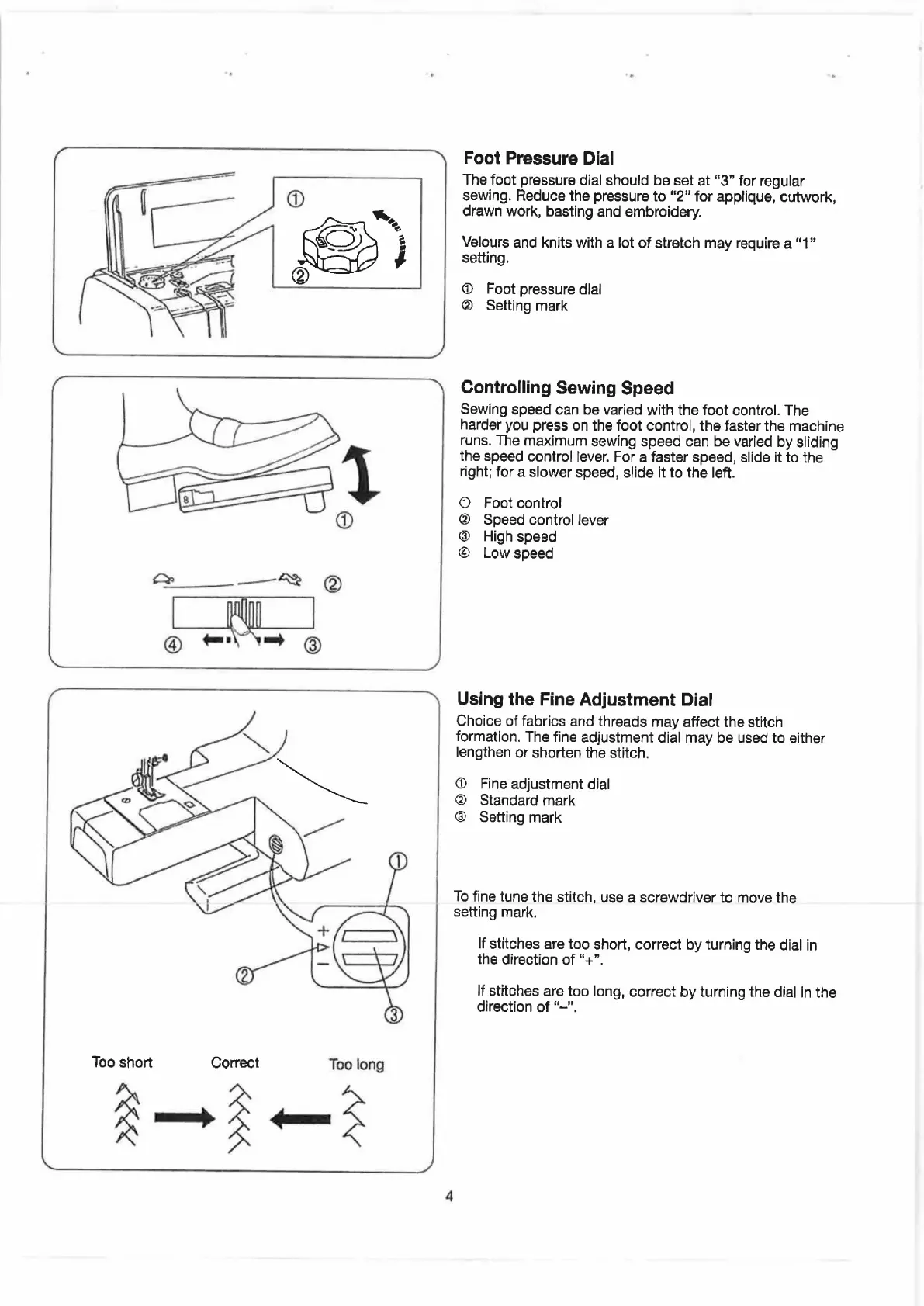
Too
short
Correct
Too
long
fm
Som
Foot
Pressure
Dial
The
foot
pressure
dial
should
be
set
at
“3”
for
regular
sewing.
Reduce
the
pressure
to
“2”
for
applique,
cutwork,
drawn
work,
basting
and
embroidery.
Velours
and
knits
with
a
lot
of
stretch
may
require
a
“1”
Seiting.
@
Foot
pressure
dial
@
Setting
mark
Controlling
Sewing
Speed
Sewing
speed
can
be
varied
with
the
foot
control.
The
harder
you
press
on
the
foot
control,
the
faster
the
machine
runs.
The
maximum
sewing
speed
can
be
varied
by
sliding
the
speed
control
lever.
For
a
faster
speed,
slide
it
to
the
right;
for
a
slower
speed,
slide
it
to
the
left.
@
Foot
control
@
Speed
control
lever
@
High
speed
@
Low
speed
Using
the
Fine
Adjustment
Dial
Choice
of
fabrics
and
threads
may
affect
the
stitch
formation.
The
fine
adjustment
dial
may
be
used
to
either
lengthen
or
shorten
the
stitch.
@
Fine
adjustment
dial
®
Standard
mark
@
Setting
mark
To
fine
tune
the
stitch,
use
a
screwdriver
to
move
the
setting
mark.
If
stitches
are
too
short,
correct
by
turning
the
dial
in
the
direction
of
“+”.
lf
stitches
are
too
long,
correct
by
turning
the
dial
in
the
direction
of
“~".

Related product manuals