EasyManua.ls Logo

ELNA 6003 - Troubleshooting

ELNA 6003
45 pages
Print Icon
To Next Page IconTo Next Page
To Previous Page IconTo Previous Page
Loading...
©®°
©
© ©
6&6
8
@
2m
(ar
wro
3}
ew
(70)
O
1)
o
6
@®©
©
8
86
37
37
26
(Il
@
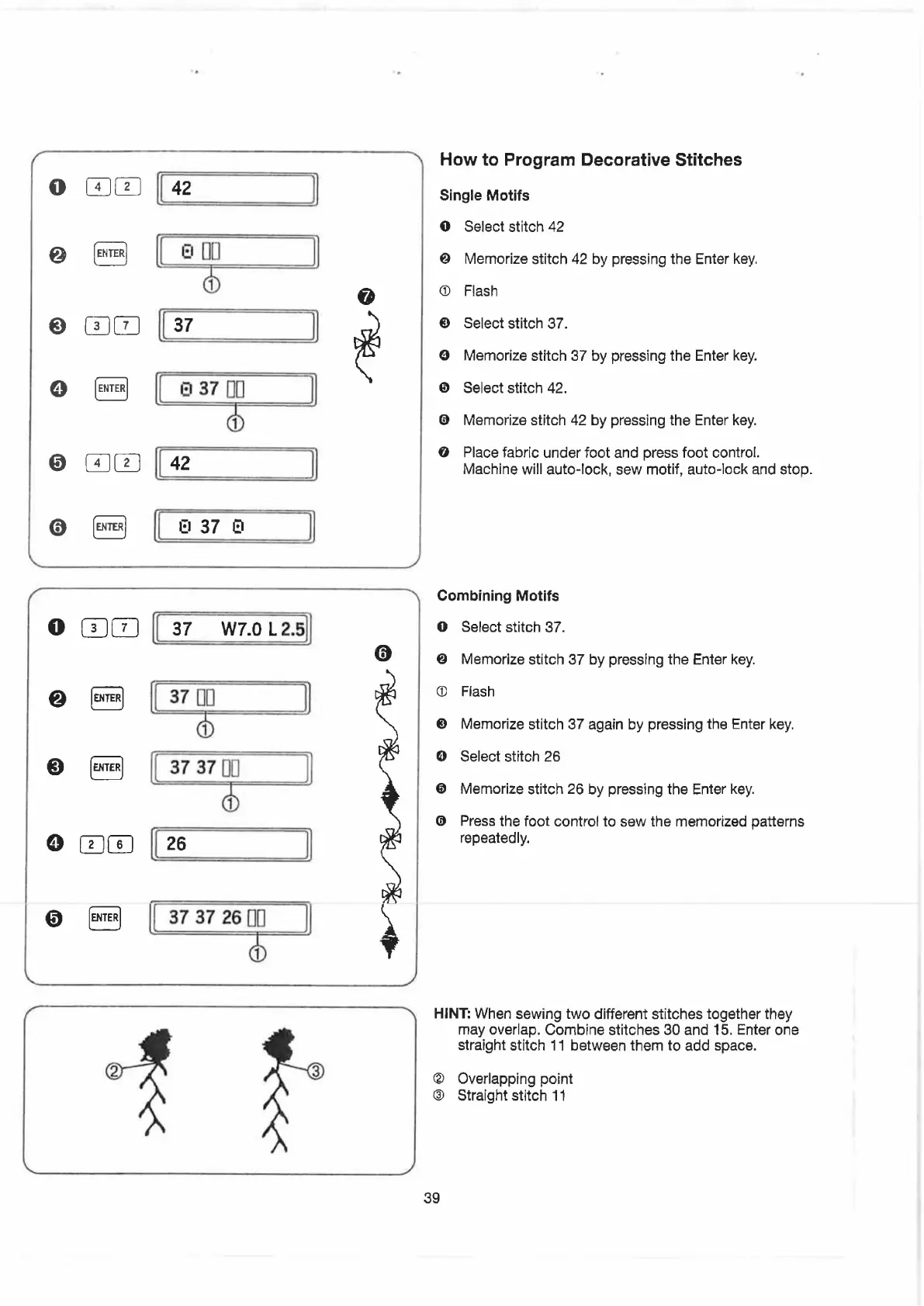
How
to
Program
Decorative
Stitches
Single
Motifs
select
stitch
42
Memorize
stitch
42
by
pressing
the
Enter
key.
Flash
Select
stitch
37.
Memorize
stitch
37
by
pressing
the
Enter
key.
Select
stitch
42.
Memorize
stitch
42
by
pressing
the
Enter
key.
Place
fabric
under
foot
and
press
foot
control.
Machine
will
auto-lock,
sew
motif,
auto-lock
and
stop.
Combining
Motifs
Select
stitch
37.
Memorize
stitch
37
by
pressing
the
Enter
key.
Fiash
Memorize
stitch
37
again
by
pressing
the
Enter
key.
Select
stitch
26
Memorize
stitch
26
by
pressing
the
Enter
key.
Press
the
foot
control
to
sew
the
memorized
patterns
repeatedly.
may
overlap.
Combine
stitches
30
and
15.
Enter
one
straight
stitch
11
between
them
to
add
space.
Overlapping
point
Straight
stitch
11
HINT:
When
sewing
two
different
stitches
together
they
@
@
39

Related product manuals