EasyManua.ls Logo

ELNA 6003 - Adjusting Stitch Length Manually; Variable Needle Positions

ELNA 6003
45 pages
Print Icon
To Next Page IconTo Next Page
To Previous Page IconTo Previous Page
Loading...
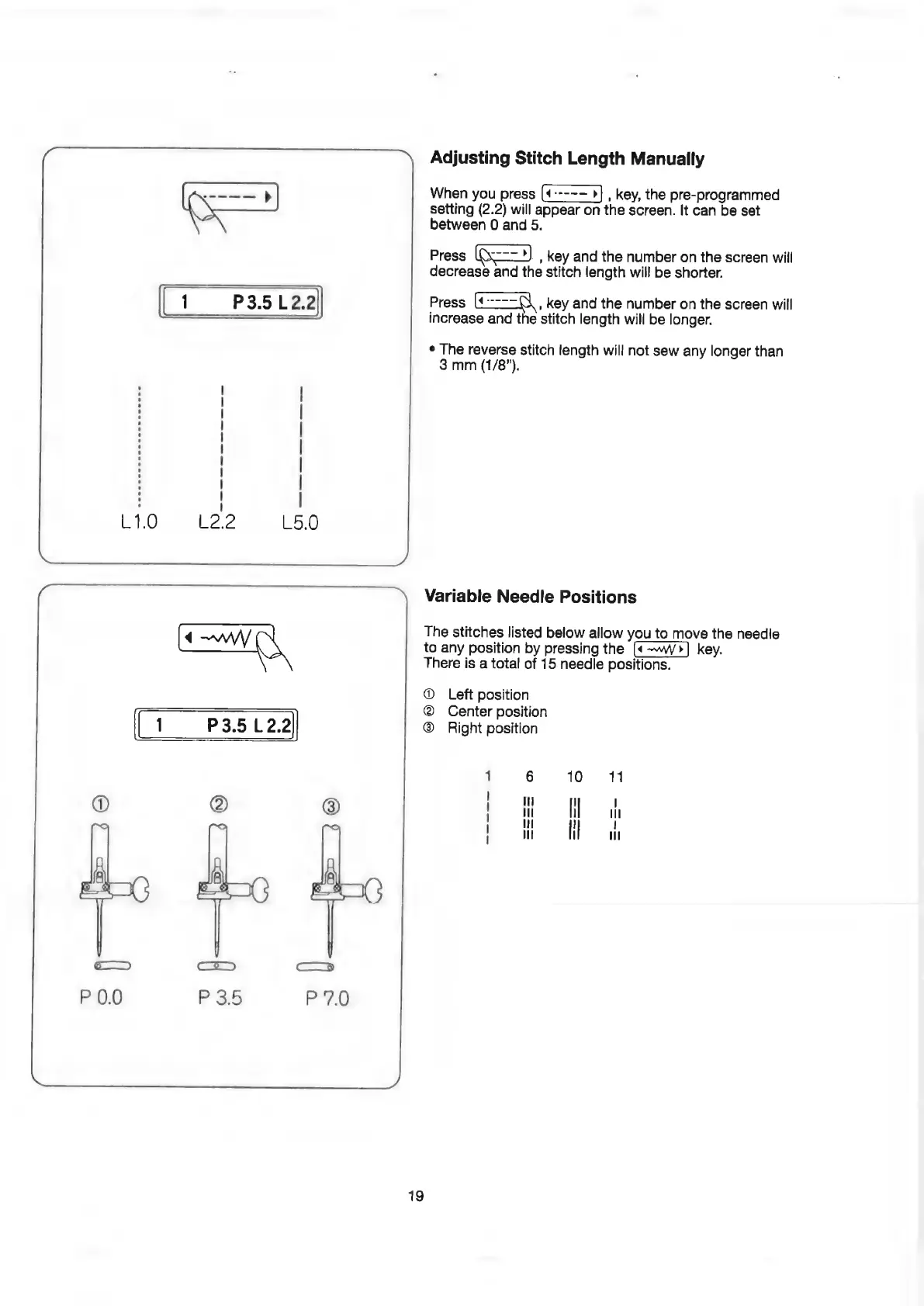
Adjusting
Stitch
Length
Manually
When
you
press
,
key,
the
pre-programmed
setting
(2.2)
will
appear
on
the
screen.
It
can
be
set
between
0
and
5.
Press
ice
=3)
,
key
and
the
number
on
the
screen
will
decrease
and
the
stitch
length
will
be
shorter.
Press
ice.
key
and
the
number
on
the
screen
will
increase
and
the
stitch
length
will
be
longer.
¢
The
reverse
stitch
length
will
not
sew
any
longer
than
3
mm
(1/8").
Variable
Needle
Positions
The
stitches
listed
below
allow
you
to
move
the
needle
to
any
position
by
pressing
the
(«-~W/>]
key.
There
is
a
total
of
15
needle
positions.
®
Left
position
@
Center
position
P3.5
12.2
®
Right
position
——_—_—
—-
=—<—_
—
a
—
—_——
19