EasyManua.ls Logo

ELNA 6003 - Combining Motifs with Mirror Image

ELNA 6003
45 pages
Print Icon
To Next Page IconTo Next Page
To Previous Page IconTo Previous Page
Loading...
ARANAAAA
"3
TOUANATITTE
IANA
UL
VY
AY
ee
©
ANAARA
IAI
IH
LAMALAAAL
LAAAMAAA
tote
HAA
AA)
AMAL
il
Prune
Hii
iNT
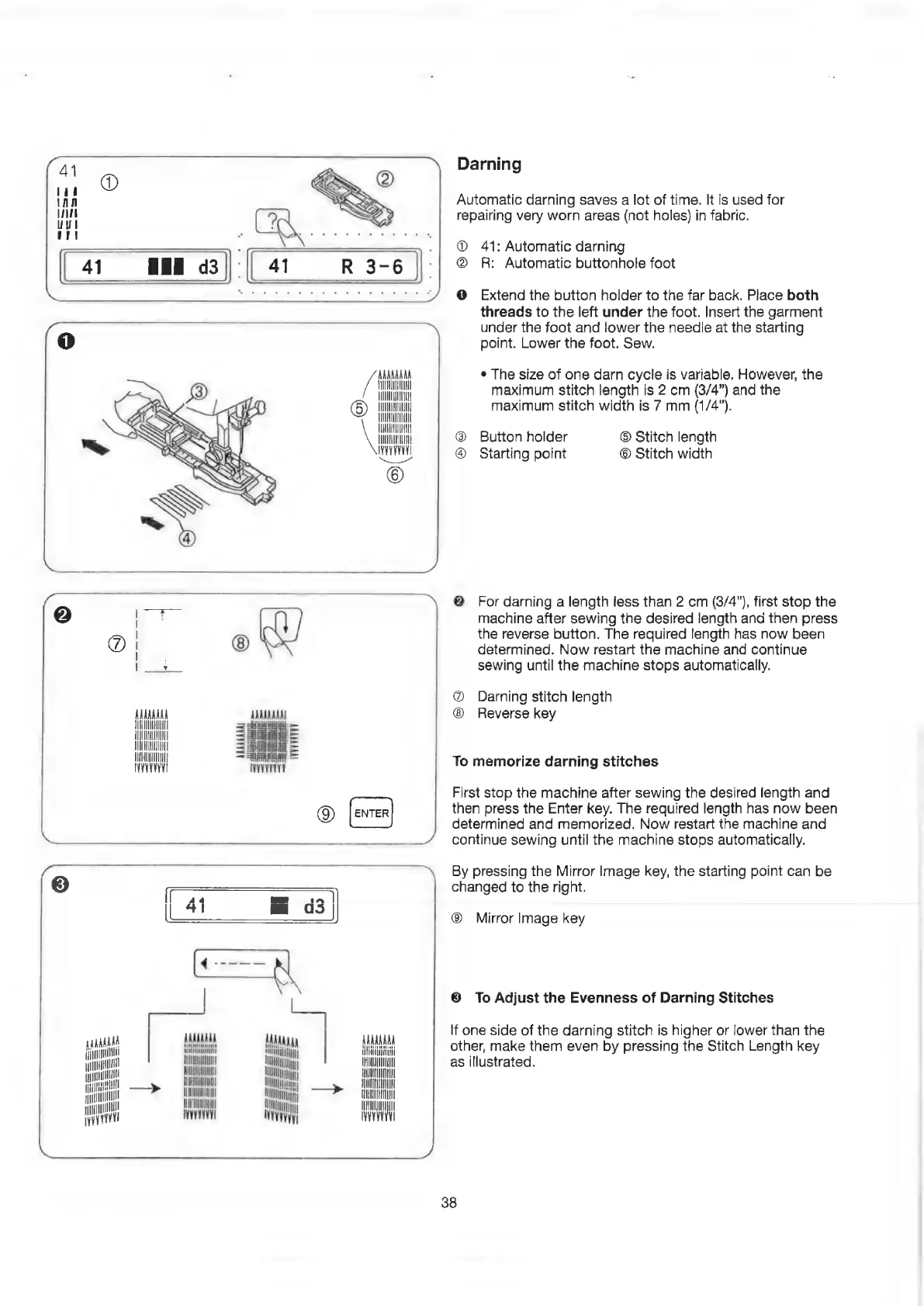
Darning
Automatic
darning
saves
a
lot
of
time.
It
is
used
for
repairing
very
worn
areas
(not
holes)
in
fabric.
®
41:
Automatic
darning
@
R:
Automatic
buttonhole
foot
@
Extend
the
button
holder
to
the
far
back.
Place
both
threads
to
the
left
under
the
foot.
Insert
the
garment
under
the
foot
and
lower
the
needle
at
the
starting
point.
Lower
the
foot.
Sew.
¢
The
size
of
one
darn
cycle
is
variable,
However,
the
maximum
stitch
length
is
2
cm
(3/4”)
and
the
maximum
stitch
width
is
7
mm
(1/4”).
Button
holder
Starting
point
©
Stitch
length
©
Stitch
width
@
For
darning
a
length
less
than
2
cm
(3/4”),
first
stop
the
machine
after
sewing
the
desired
length
ana
then
press
the
reverse
button.
The
required
length
has
now
been
determined.
Now
restart
the
machine
and
continue
sewing
until
the
machine
stops
automatically.
@
Darning
stitch
length
Reverse
key
To
memorize
darning
stitches
First
stop
the
machine
after
sewing
the
desired
length
and
then
press
the
Enter
key.
The
required
length
has
now
been
determined
and
memorized.
Now
restart
the
machine
and
continue
sewing
until
the
machine
stops
automatically.
By
pressing
the
Mirror
Image
key,
the
starting
point
can
be
changed
to
the
right.
®
Mirror
Image
key
©
To
Adjust
the
Evenness
of
Darning
Stitches
If
one
side
of
the
darning
stitch
is
higher
or
lower
than
the
other,
make
them
even
by
pressing
the
Stitch
Length
key
as
illustrated.
38

Related product manuals