23
Templates
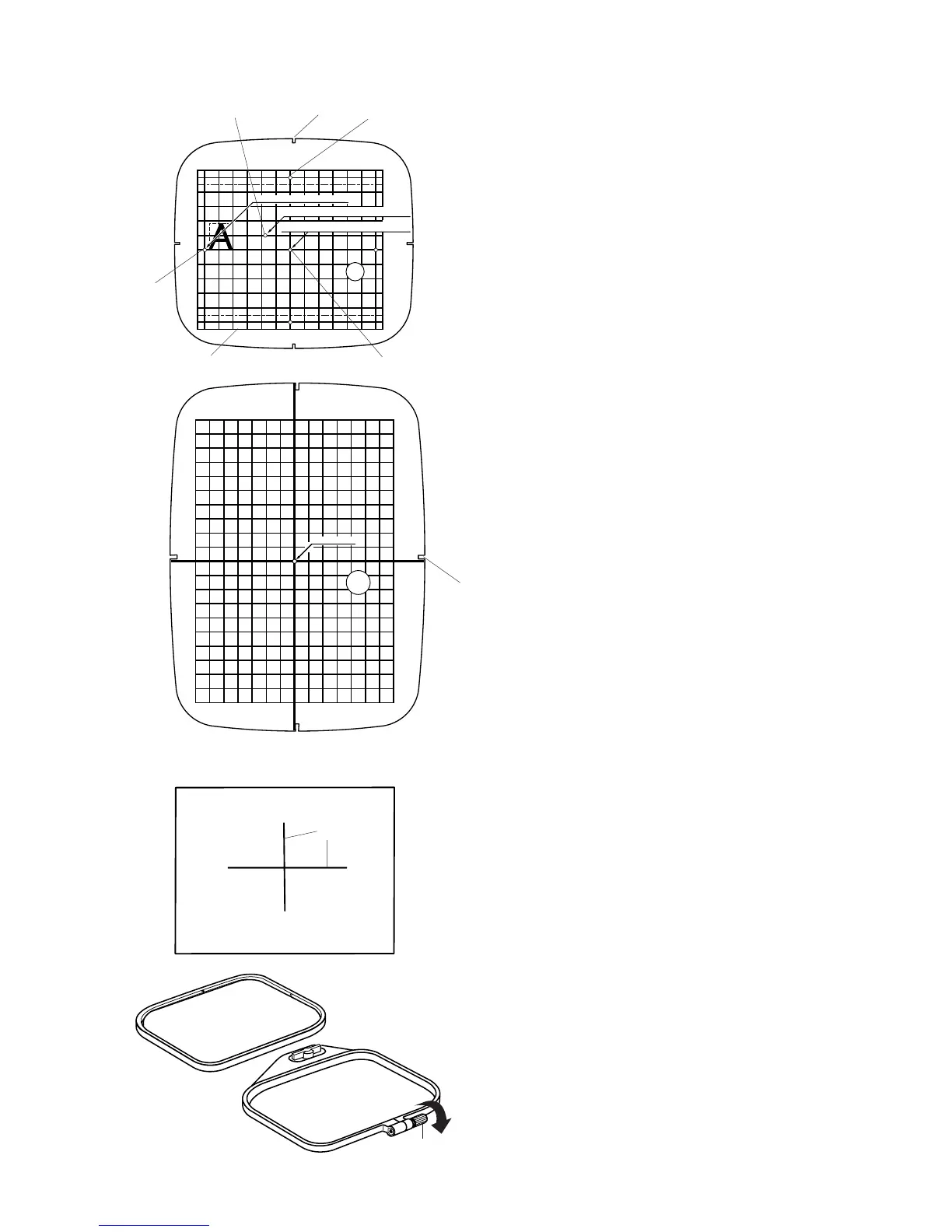
Each hoop comes with a template to help you
place your design where you want it on the fabric.
There are a variety of starting points visible on the
template. Find the one that is appropriate for your
machine/design.
q Starting point for built-in and PC
design cards.
w Starting point for alphabets with horizontal
placement.
e Starting point for 100 series EnVision card
and for Elna EnVision CE20 and 8007.
r Boundary edges for built-in and PC design
cards.
Starting point for alphabets with vertical
placement.
NOTE: The four indentations
t for fitting the
template onto the hoop do not correspond with any
of the reference lines.
Securing Fabric in Hoop
Use a washable fabric marker or tailor’s chalk to
draw centerlines q on your fabric (see stabilizers
on page 22).
Loosen the hoop tightening screw w and lift out
the inner hoop.
STARTING POINT
STARTING POINT FOR MONOGRAMMING
STARTING POINT FOR MEMORY CARDS ( FROM No.1001 )
STARTING POINT FOR MEMORY CARDS ( FROM No.102 )
q
w
q
w
e
r
t
y
y
t



 To Next Page