Chapter Four Configuration
man_905-105_2.16 Page 41
setup stage.
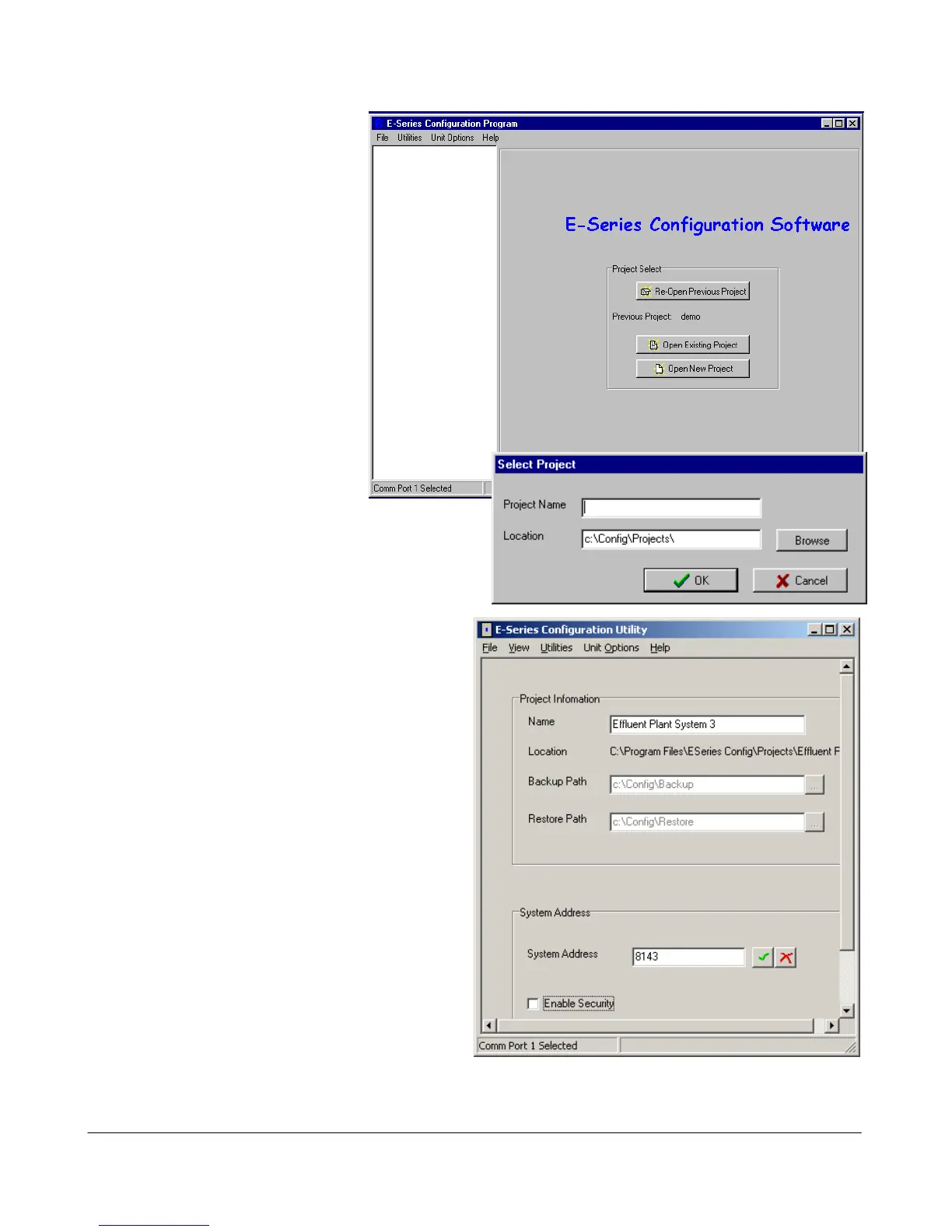
The Initial screen will appear.
The configuration is performed
for a complete system. The
necessary configuration stages
are :
select system name and system
address
select individual units and unit
addresses
configure I/O mappings for
each unit
configure user options for each
unit
load the configuration files
into each unit.
From the initial screen, you can
select an existing project, or start
a new project. The name of the project will create
a new directory which will eventually contain the
configuration files for the modules in this system.
When you have selected the project, a screen
will appear where you may enter the system
address.
If you are editting an existing project, the system
address will already have been entered. Do not
change the system address unless you are going
to re-program all of the modules in the system.
Password. You have the option of entering a
password to protect the configuration files
against unauthorized changes. When you open a
new project, you will be asked to enter a
password - if you do not enter any text - that
is, press “ESC” or “Enter”, then password
protection is disabled. If you do enter a
password, then you will need to enter this
password to make changes to the configuration or
download or upload configuration. You only
need to enter the password each time you enter
the project. Without the passowrd, you are able
to view the configuration details but you cannot
make changes.



 To Next Page