905U Wireless I/O Module User Manual
105S Serial I/O Module
Page 44 © January 2011
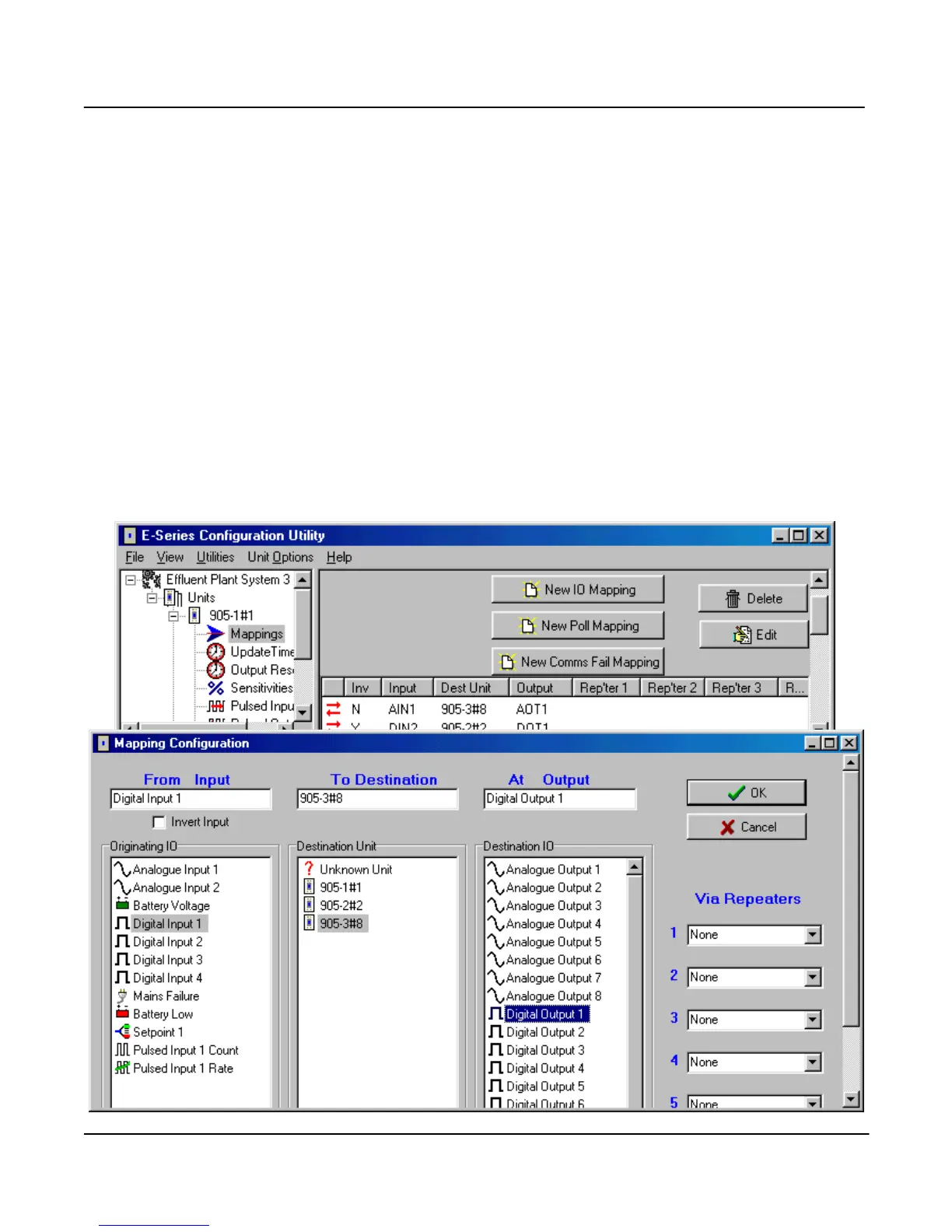
I/O Mapping To enter an I/O mapping, select “New I/O Mapping”.
1. The I/O mapping display will show all inputs at the selected module - both physical inputs and
internal inputs. Select the input to be mapped.
2. If you wish to invert the mapping, select the “Invert Input” box. If you invert an input, then the
output will be the reverse of the input. Analog I/O can also be reversed - 4mA will be 20mA etc.
Do not invert pulse inputs.
3. The invert function is not available on -2 modules - only inverted digital inputs are available (as
internal inputs on the input list).
4. To select the destination module, you can either select the module from the “Destination Unit” list,
or enter the unit address in the “To Destination” box. You can enter an address that has not yet
been allocated to another unit.
5. You can select the output by entering the output number (1 – 8) in the “output” box, or select an
output from the displayed list. There will only be a list of possible outputs displayed if at step 2
you selected a desrtination until that has already been configured in the system. The output



 To Next Page