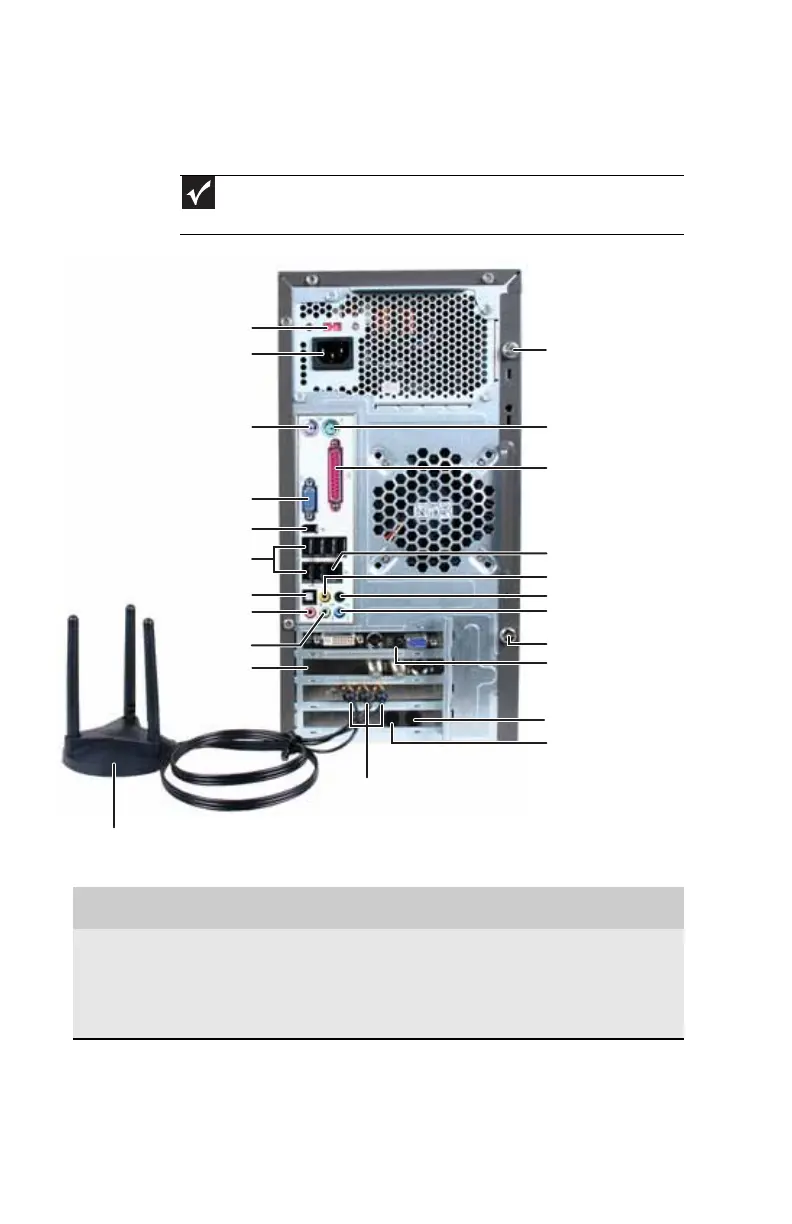
Chapter 2: Checking Out Your Computer
8
Back
Important
Your computer’s hardware options and port locations may vary from this
illustration.
Component Icon Description
Voltage switch The switch is preset at the factory. Make
sure that this is set to the correct voltage for
your area. For more information on setting
this correctly, see “Checking the voltage
selection” on page15.
Telephone jack
PS/2 mouse port
PS/2 keyboard port
Voltage switch
Power connector
Ethernet (network) jack
Audio in/side speaker jack
Case cover thumbscrew
Headphone/front
speaker jack
Microphone jack
Surround L/R speaker jack
Center/subwoofer jack
USB ports
Video card (optional)
Modem (line) jack
Wireless network antenna
connectors (optional)
IEEE 1394/FireWire™ port
TV tuner
(optional)
Case cover thumbscrew
S/PDIF jack (optional)
Parallel port
Monitor (VGA) port
Wireless network antenna (optional)
8512635.book Page 8 Friday, July 27, 2007 11:21 AM















 To Next Page