o ST (strokes) o OPEN
o CLOSED
BATCH Pulses supplied from an external contact start the pump according to the
strokes required to dose the quantity of product set during programming or for
the desired quantity.
For best result, calibrate the pump carefully (test - PROG 2 SETUP menu).
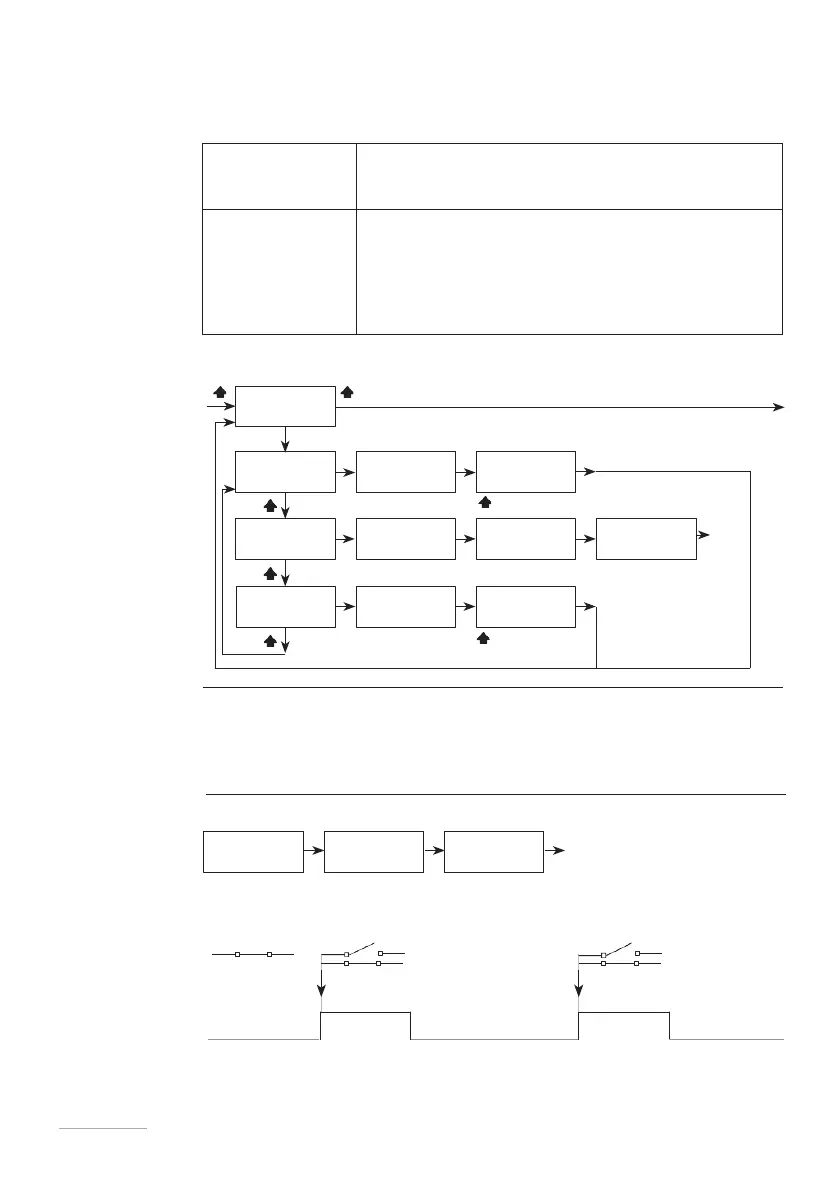
To start the pump for dosing a certain amount of
product after receiving a pulse from external
equipment
•
MODE (working mode)
•
CC (quantity of product be dosed)
•
ST (pulses to be supplied to the magnet)
•
CONTACT (contact status)
•
CC/ST (cc/pulse- working parameter in PROG
2 SETUP menu)
Fig. 17. BATCH menu
EXTERNAL: an
external signal
regulates
dosing
An external contact (N.O. or N.C.) starts dosing at the maximum frequency (“CC”)
or the set number of strokes (“ST”).
EXAMPLE 1 Set as below:
E E E
Any change in contact status starts the dosing of the set number of strokes.
Fig. 18. Batch -external mode- contact status and pump working mode



 To Next Page