7
gf1
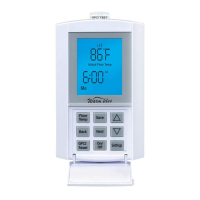
5/2 Day Wake
12
00
Auto
:
AM
Mo
Figure 18
Duringtheabovesteps,theprogramcanbesaved
atanytimebypressingtheNext/Savebuttonfor
two seconds. If no key input is received for 90
seconds,ortheOn/Offbuttonispressedtoother
position,theprogramwillexitthe7Daysetting
mode saving any of the changes.
J. Ground Fault Interrupter (GFCI)
The thermostat has an integral Ground Fault
CircuitInterrupter(GFCI)withEndofLife(EOL)
feature to isolate the heating cable load and to
detect improper operation of the GFCI circuitry.
Test the GFCI circuitry monthly using the following
procedure:
PresstheGFCITESTbuttononcetosimulateafault:
1. If red GFCI light illuminates on the GFCI TEST
button and the “GFI” symbol flashes on the
display (see Figure 18), the circuitry is working as
expectedandhasactivatedtheGFCIprotection
anddisabledthethermostat.PresstheGFCI
RESET button to restore the thermostat to normal
operation.
2. If red GFCI light illuminates and flashes on the
GFCITESTButtonandtheLCDdisplayisblank,the
GFCI circuitry is not functioning properly. If pressing
the GFCI RESET button does not reset the fault,
thenthermostathasreachedEOLandmustbe
replaced with a new thermostat.
IftheGFCItripsandcan’tbereset,turntheOn/
Off button to Off position; there is a possible fault in
theheatingcable.UnderNOcircumstancesshould
the thermostat be bypassed when a fault condition
exists.
K. Power Outage Recovery
Powerinterruptionstothethermostatwillnotaffect
the program settings. However, a power interruption
ofgreaterthanapproximately10minuteswill
require that the clock be reset (see “Setting the
TimeandDay”above).Ofcourse,forextended
power interruptions, the display will remain blank.
L. Sensor Icon
If the thermostat detects a fault with the Floor
Sensor,theSensoriconwillflashontheLCD.
M. Re-set to factory default values for 5/2 Day & 7
Day programs
PressOn/OffbuttontoOffmode,pressandhold
Back/CancelandNext/SaveandDownbuttonsfor
3 seconds. The time schedules will be set to default
values.


 To Next Page
 Loading...