Instruction Manual Section 6: Programming Measurements
LIQ-MAN-56 April 2017
Programming Measurements 45
filter, enter 0-999 seconds and press ENTER/MENU.
4. To program Reference Impedance. Select Low or High and press ENTER/MENU.
5
. To choose the wiring scheme, Select Normal or Reference to Ground and press
ENTER/MENU.
6.4 Contacting Conductivity
Measurement Programming
The section describes how to configure the 56 analyzer for conductivity measurements using
contacting conductivity sensors. The following programming and configuration functions are
covered.
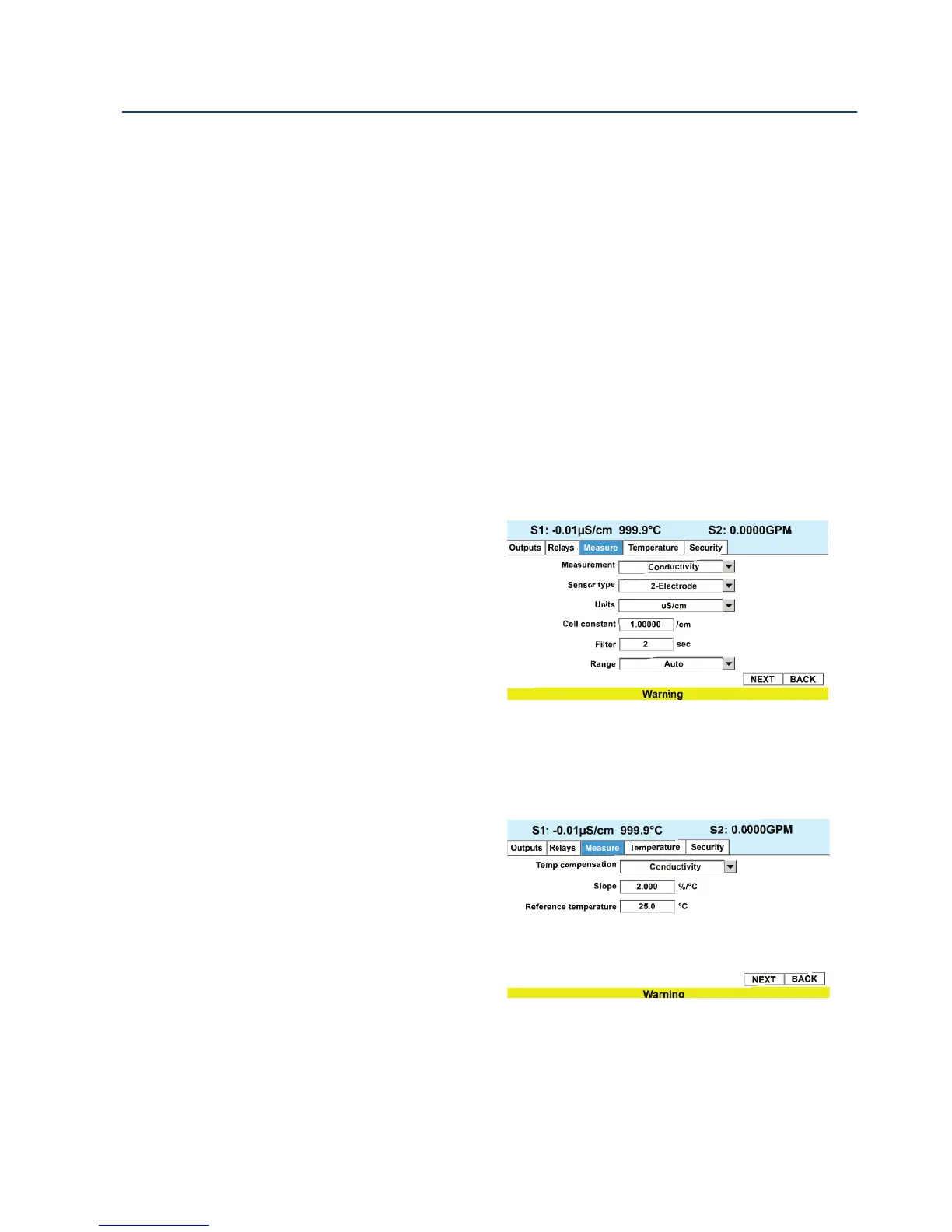
1. Measure: Conductivity, Select Conductivity, Resistivity, TDS. Salinity or % conc
2. Type: 2-Electrode Select 2-Electrode or 4-Electrode type sensors
3. Cell K: 1.00000/cm Enter the cell Constant for the sensor
4. Measurement units
5. Filter: 2 sec Override the default input filter, enter 0-999 seconds
6. Range: Auto Select measurement
Auto-range or specific range
7. Temp Comp: Slope Select Temp
Comp: Slope, Neutral Salt, Cation or
Raw
8. Slope: 2.00% / °C Enter the linear
temperature coefficient
9. Ref Temp: 25.0 °C Enter the Refer-
ence temp
10. Cal Factor: default=0.95000/cm
Enter the Cal Factor for 4-Electrode sensors from the sensor tag
To configure the contacting conductivity measurement board, access the Program screen by
pressing ENTER/MENU from the main screen and then select the Measurement tab.
1. To program a Measurement type, select Conductivity Select Conductivity, Resistivity,
TDS. Salinity or % conc. and press
ENTER/MENU.
2. To program a sensor type, select 2-
Electrode Select 2-Electrode or 4-
Electrode type sensors and press
ENTER/MENU.
3. To program the Cell constant, enter
the exact cell constant value ex-
pressed as 1.XXXXX/cm the for the
sensor and press ENTER/MENU.
4. To program Measurement units, select uS/cm or mS/cm and press ENTER/MENU.
5. To Override the default input filter, enter 0-999 seconds and press ENTER/MENU.
6. To program the measurement range, select a specific range appropriate for your process
and press ENTER/MENU.
7. To program the Temp Comp method, choose Slope, Neutral Salt, Cation or Raw
and press ENTER/MENU.













 To Next Page