Section 8: Time Proportional Control Instruction Manual
April 2017 LIQ-MAN-56
64 PID Control
8.2 TPC Setup
8.2.1 Selecting TPC
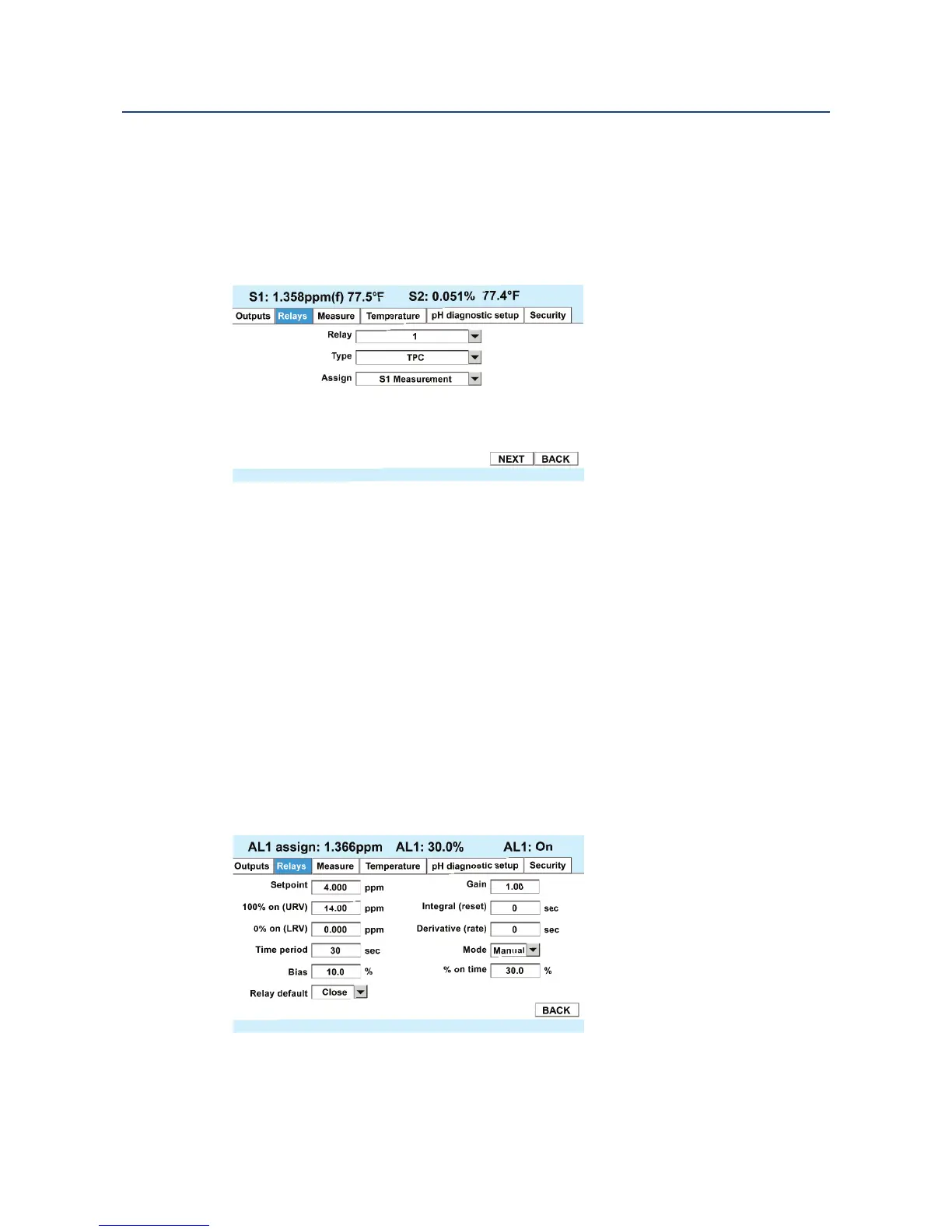
Select TPC control, the relay to be used, and the measurement to be controlled from the
main relay setup window:
Basic Definitions
• Relay – Select the relay (1 through 4) to be use for TPC control.
• Type – Choose TPC
• Assign – Select the Measurement to be controlled. Note: This measurement can also
be a 4-20 mA signal input brought in by the flow/ 4-20 mA board.
• Select Next to go to the PID Setup parameters
8.2.2 TPC Setup Parameters
The TPC setup window contains the PID control tuning parameters.
Also note that the upper portion of the screen shows the relay number and the value of the
measurement assigned to it, the % On Time for the relay, and the current state of the relay,
i.e. On or Off. This makes it possible to observe the primary variable (PV), the % On Time,
and the relay state, while tuning time proportional control.













 To Next Page