Instruction Manual Section 6: Programming Measurements
LIQ-MAN-56 April 2017
Programming Measurements 47
7. To program the Reference Temperature for Manual temperature compensation
(not from probe RTD), enter the Reference temp expressed as XX.X °C and press
E
NTER/MENU.
8
. To Override the default input filter, enter 0-999 seconds and press ENTER/MENU.
9. To program the measurement range, select a specific range appropriate for your process
and press ENTER/MENU.
6.6 Chlorine Measurement Programming
With a Chlorine measurement board installed, The 56 can measure any of four variants
of Chlorine:
• Free Chlorine
• Total Chlorine
• Monochloramine
• pH-independent Free Chlorine
The section describes how to configure the 56 analyzer for Chlorine measurements.
6.6.1 Free chlorine measurement programming
This Chlorine sub-section describes how to configure the 56 analyzer for Free Chlorine
measurement using amperometric chlorine sensors. The following programming and
configuration functions are covered:
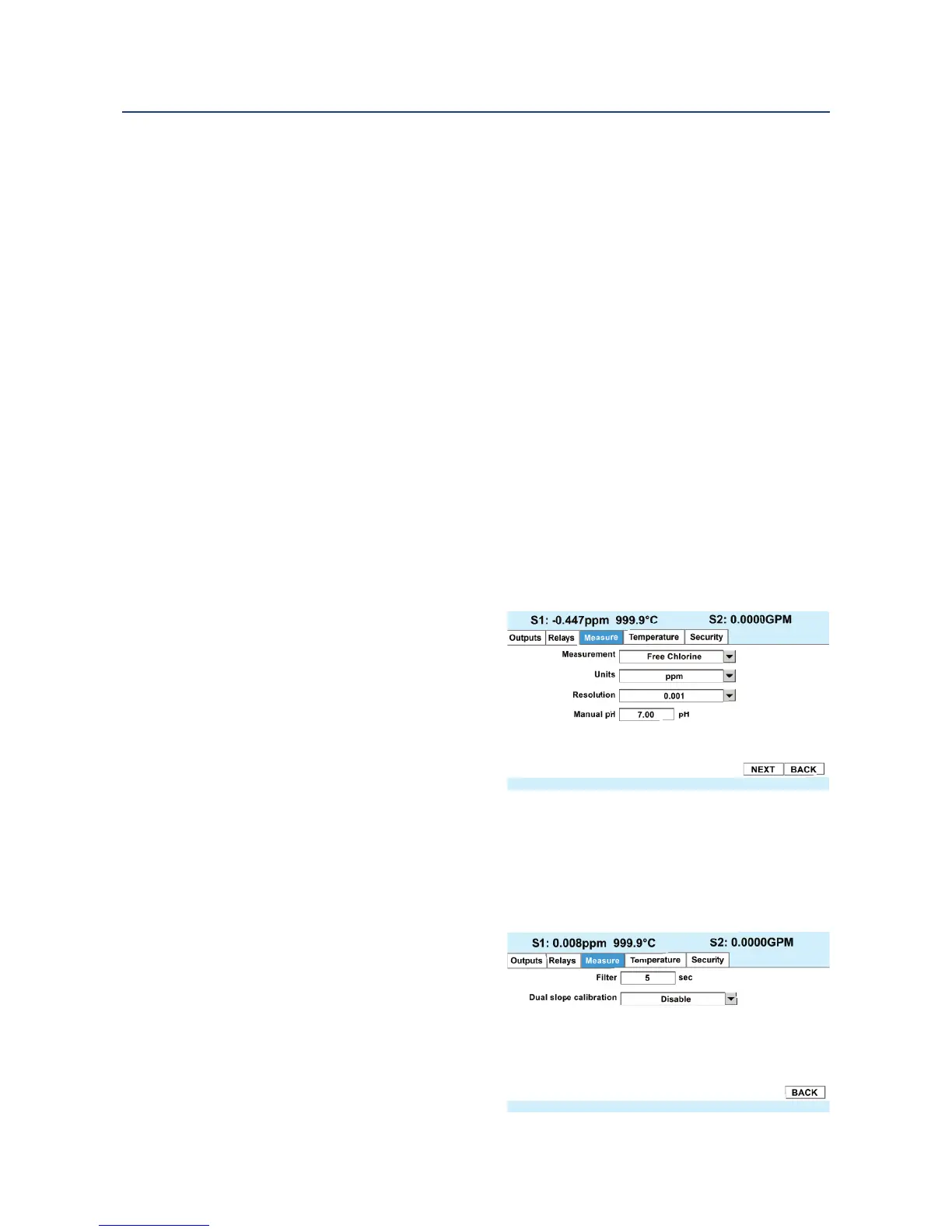
1. Measure: Free Chlorine Select Free
Chlorine, pH Ind. Free Cl. Total Cl,
Monochloramine
2. Units: ppm Select units ppm or mg/L
3. Resolution: 0.001 Select display res-
olution 0.01 or 0.001
4. Free Cl Correct: Live Select Live/
Continuous pH correction or Manual
5. Manual pH: 7.00 pH For Manual pH
correction, enter the pH value
6. Filter: 5 sec Override the default input filter, enter 0-999 seconds
7. Dual Slope Calibration: Enable or Disable
1. To program the Measurement type, select Free Chlorine,
pH Ind Free Cl., Total Cl, or Mono-
chloramine and press ENTER/MENU.
2. To program the Measurement Units:
select ppm mg/L and press
ENTER/MENU.
3. To program the Measurement Resolu-
tion: Select 0.01 or 0.001 and press
ENTER/MENU.
4. To program Free Cl Correction, se-
lect Live/Continuous pH correction
or Manual and press ENTER/MENU






 To Next Page