5.5.3 SD-Card settings
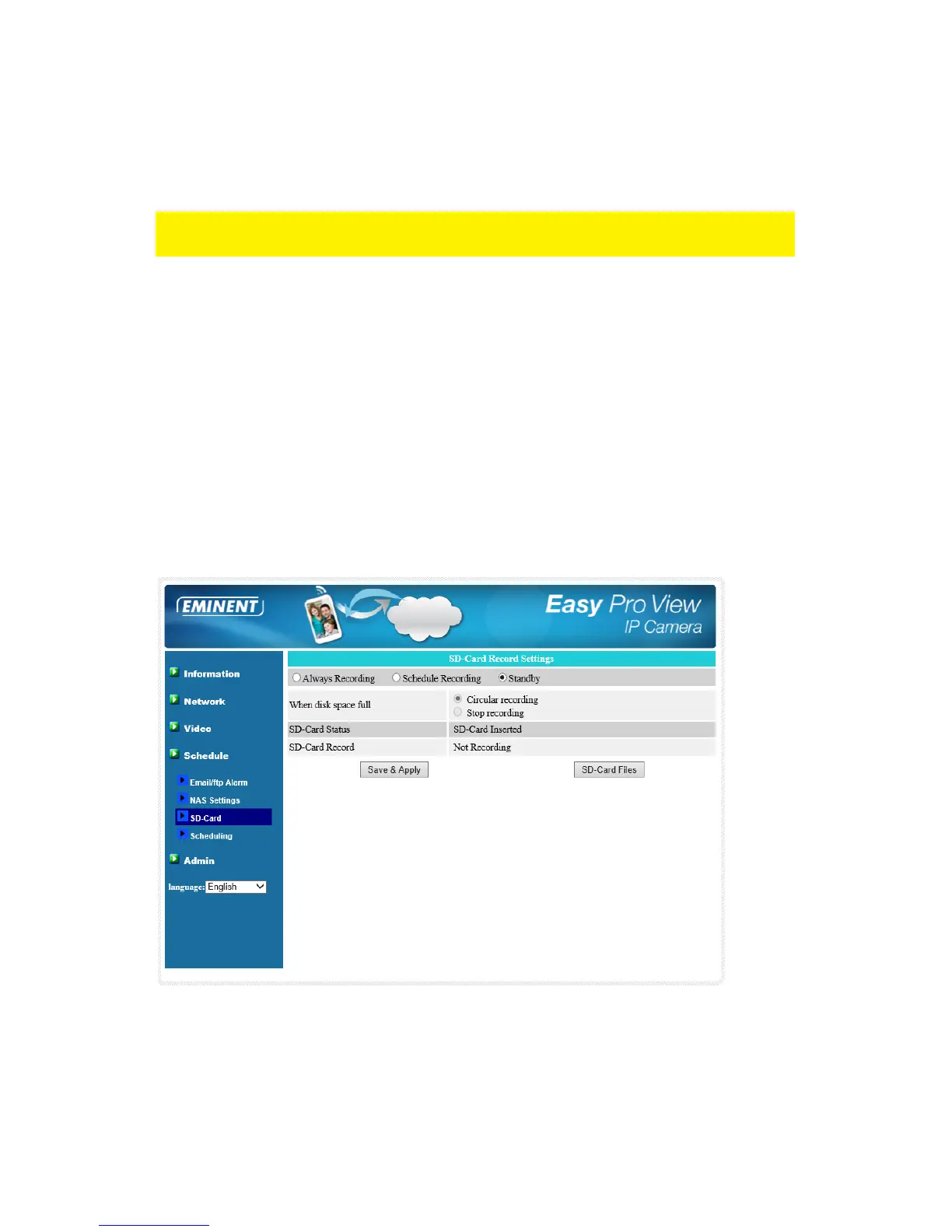
The EM6260 provides the recording of the video files into a standard Micro SD-Card.
Since this recording is directly to the SD-Card, there is no network packets loss
problem when recording to remote device through internet.
Note : when the EM6260 is doing SD-Card recording, this is counted as one video
user. Please refer to appendix B about allowed maximum video users.
1. If the “Always Recording” is selected, the system will start to record to the SD-
Card immediately and keep recording always. If the “Schedule Recording” is
selected, the system will do the SD-Card recording according to the “scheduling”
in section 5.5.4. “Disable Recording” will disable this SD-Card recording.
2. When doing the SD-Card recording, the system will check the free disk space of
the SD-Card. If the disk space is full (no free disk space), the system will do
“Circular recording”( overwrite the oldest recorded files in the SD-Card ) or “Stop
recording” as selected.
3. SD-Card status – the SD-Card inserted or removed status is displayed here.
4. SD-Card files – a list of recorded video files will be displayed that are stored on
the micro SD-Card with information including file name and recorded time under
the directory of each date. The recorded file could be separately downloaded or
deleted on this page.



 To Next Page